Everything a data engineer needs to work with PySpark DataFrames — from how Spark actually runs your code, to the everyday operations and the performance fixes that keep jobs from crashing.
PySpark is how most data engineers work with Apache Spark — writing Python to transform data that’s far too big for one machine. This page is a hub for the PySpark guides on this site, organized the way the work actually breaks down: understanding how Spark runs your code, the DataFrame operations you’ll use every day, and fixing jobs when they get slow or crash.
Each section explains the core idea in plain English and links to a focused, in-depth article when you want the full detail. Read it top to bottom, or jump straight to the piece you need.
First, how Spark actually works
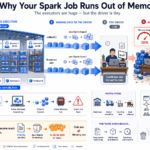
Before any operation makes sense, you need the mental model. Spark splits your data into partitions spread across many machines (executors), and a single driver coordinates the work. Your code doesn’t run line by line — Spark builds a plan and only executes when you ask for a result (this is called lazy evaluation).
Getting this right is what separates code that scales from code that mysteriously crashes. Start here:
The most common thing you do in PySpark is add, change, or reshape columns. There are three tools for it — withColumn, withColumns, and select — and picking the wrong one (especially in a loop) can quietly wreck performance.
Method
Use it for
withColumn
Adding or changing one column
withColumns
Adding several columns at once (Spark 3.3+)
select
Reshaping — keep, derive, rename, reorder, or drop columns
Once you can shape columns, you filter rows. In PySpark you’ll see two method names for this — filter() and where() — and it’s easy to lose time wondering which is “correct” or faster.
The short answer: they’re the same function. where() is just an alias for filter(), kept because it feels natural to SQL users. What actually causes bugs is using Python’s and/or instead of the bitwise &/|, forgetting parentheses, or letting nulls silently drop rows.
This is where most of the real work lives. The same transformation can run in two minutes or two hours depending on how data is partitioned and shuffled. And the most common Spark failures — a job that runs forever, or one that dies with an out-of-memory error — almost always trace back to a handful of causes.
Not exactly. Apache Spark is the underlying distributed compute engine (written in Scala/JVM). PySpark is the Python API for it — it lets you write Spark jobs in Python. The concepts (partitions, executors, lazy evaluation) are identical; PySpark is just the language you drive Spark with.
Do I need to know Scala to use PySpark?
No. PySpark exposes almost all of Spark’s functionality through Python, and it’s the most common way data engineers use Spark. Understanding how Spark runs — the architecture — matters far more than the language.
What’s the difference between filter() and where() in PySpark?
There is none — where() is an alias for filter(), so they produce identical results and query plans. See filter() vs where() for the full explanation and the mistakes that actually cause bugs.
Why is my PySpark job so slow?
The usual culprits are too many or too few partitions, data skew (one task doing most of the work), or pulling too much data to the driver. Start with repartition vs coalesce and data skew in joins.
How should I add many columns in PySpark?
Not by chaining withColumn in a loop — that builds a large query plan and can slow analysis or fail. Use withColumns (Spark 3.3+) or a single select. Full comparison in withColumn vs withColumns vs select.