MERGE vs INSERT OVERWRITE vs APPEND: How to Write a Delta Table
Reaching for MERGE by default is one of the most expensive habits in data engineering. The right write pattern depends on your source — here's the decision, one question at a time.
Your pipeline needs to write into a target Delta table. Most engineers reach for MERGE automatically — and that’s one of the most expensive habits in data engineering. MERGE has to scan the whole target to find matching rows before it writes, so if you didn’t actually need row-by-row matching, you paid a big “read-before-write” tax for nothing.
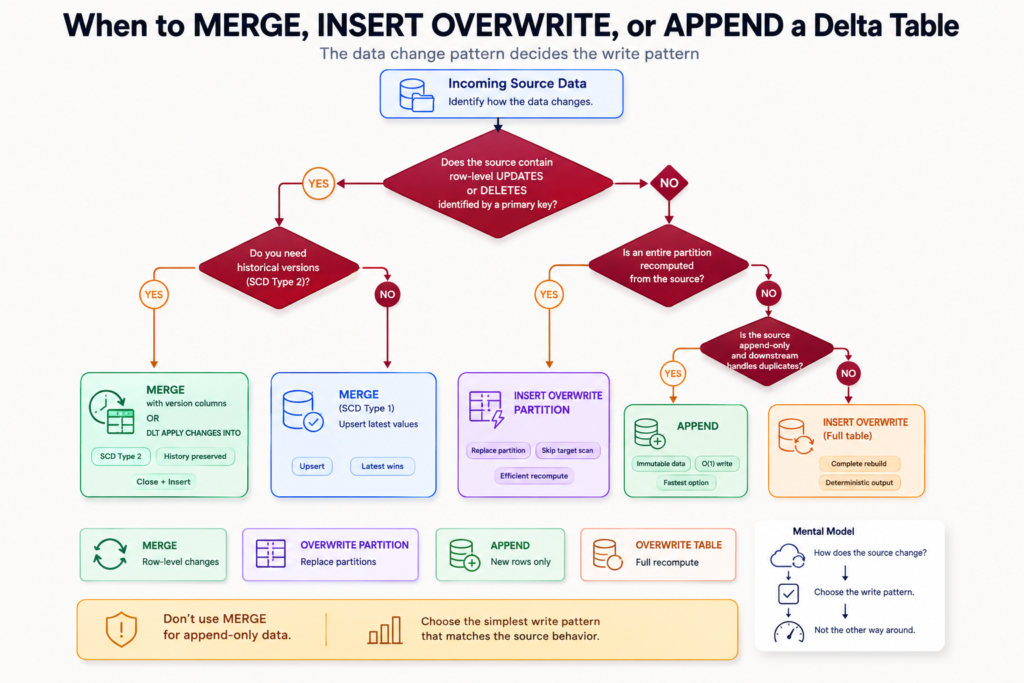
The right write pattern depends entirely on your source. Answer a short series of questions — stop at the first “yes” — and the cheapest correct pattern falls out.
Work down the tree and stop at the first match — that’s your write pattern.
The decision, one question at a time
Does the source have row-level updates or deletes, matched by a primary key? → MERGE (then check the SCD sub-question).
Is an entire partition recomputed from the source, with no row-level merge? → INSERT OVERWRITE (dynamic partition overwrite).
Is the source append-only, and does downstream handle de-duplication? → APPEND.
Now each pattern — what it is, the key facts, and the code.
MERGE — surgical, row-by-row changes
MERGE matches your source to the target on a key and then updates, inserts, or deletes individual rows. It’s the only pattern that can touch specific rows — INSERT OVERWRITE and APPEND can’t target one row.
Use it for: upserts, applying CDC changes, and slowly changing dimensions.
The cost: it scans the target to find matches — a read-before-write on every run. That’s why using it when you didn’t need row matching is wasteful.
Only update on real changes: hash the business columns and update only when the hash differs, so unchanged rows don’t get rewritten for nothing.
from delta.tables import DeltaTablefrom pyspark.sql import functions as F# Hash the columns that define a "change" so we skip no-op updatessource = source.withColumn("_row_hash", F.md5(F.concat_ws("||", *[F.col(c).cast("string") for c in business_cols])))(DeltaTable.forName(spark, "retail.silver.product").alias("t") .merge(source.alias("s"), "t.sku = s.sku") .whenMatchedUpdateAll(condition="t._row_hash != s._row_hash") # only on real change .whenNotMatchedInsertAll() .execute())
That example is SCD Type 1 — you keep only the current state and overwrite it when it changes. But sometimes you need the history too, which is the next question.
The MERGE sub-question: do you need SCD Type 2?
Ask the business one thing: “Do you ever need this record as it was at a past point in time?”
No history needed (product catalog, lookups, config) → SCD Type 1: the simple MERGE above. Fast, no bloat.
History needed (employee department, customer tier, store assignment) → SCD Type 2: instead of overwriting, you close the current row and insert a new version, so the full timeline is preserved.
SCD Type 2 adds a few tracking columns — effective_from, effective_to, is_current, _version — and runs as two steps: expire the changed current row, then insert the new version.
now = F.current_timestamp()source = (source .withColumn("_row_hash", F.md5(F.concat_ws("||",*[F.col(c).cast("string") for c in business_cols]))) .withColumn("effective_from", now))dt = DeltaTable.forName(spark, "retail.silver.employee")# Step 1 — close the current row when the data actually changed(dt.alias("t") .merge(source.alias("s"), "t.emp_id = s.emp_id AND t.is_current = true") .whenMatchedUpdate(condition="t._row_hash != s._row_hash",set={"is_current": "false", "effective_to": "s.effective_from"}) .execute())# Step 2 — append the new version for changed + brand-new records# (rows whose hash differs from the current version, or that don't exist yet)
Once the history exists, you can answer point-in-time questions — “what was their department last quarter?” — by filtering on the effective dates:
-- the record as it stood on a past dateSELECT*FROMretail.silver.employeeWHERE emp_id ='EMP-1042'AND effective_from <='2025-06-30'AND (effective_to >'2025-06-30'OR effective_to ISNULL);
If you’re on Delta Live Tables, APPLY CHANGES INTO automates this whole expire-and-insert dance for you — you declare the keys and it handles SCD Type 2 under the hood.
INSERT OVERWRITE — replace a whole partition (or table)
When you recompute an entire partition from the source and don’t need row-level matching, INSERT OVERWRITE atomically replaces that partition. Because it doesn’t hunt for matching rows, it skips the read-before-write scan entirely — much cheaper than MERGE when you’re recomputing everything anyway.
Use it for: “rebuild today’s data from scratch” jobs — reprocess a day, a region, or the whole table.
Dynamic partition overwrite: with partitionOverwriteMode = dynamic, only the partitions present in your source are replaced; the rest are untouched.
Atomic: readers see either the old partition or the new one, never a half-written mix.
# Replace ONLY the partitions present in the source(df.write.format("delta").mode("overwrite") .option("partitionOverwriteMode", "dynamic") .saveAsTable("retail.silver.daily_sales"))# Whole-table overwrite (no partitions): full recompute(df.write.format("delta").mode("overwrite") .saveAsTable("retail.silver.dim_currency"))
APPEND — just add new rows (the cheapest write)
APPEND writes only new rows and never reads the target at all. That makes it the fastest, cheapest write pattern there is — perfect for immutable event streams where records are only ever added, never changed.
Use it for: append-only sources — events, logs, sensor readings, raw Bronze ingestion.
No target scan: it doesn’t read existing data, so the write cost stays flat no matter how big the table grows.
The catch: it can create duplicates if the source re-sends data, so downstream must handle de-duplication (or use MERGE instead if you need exactly-once).
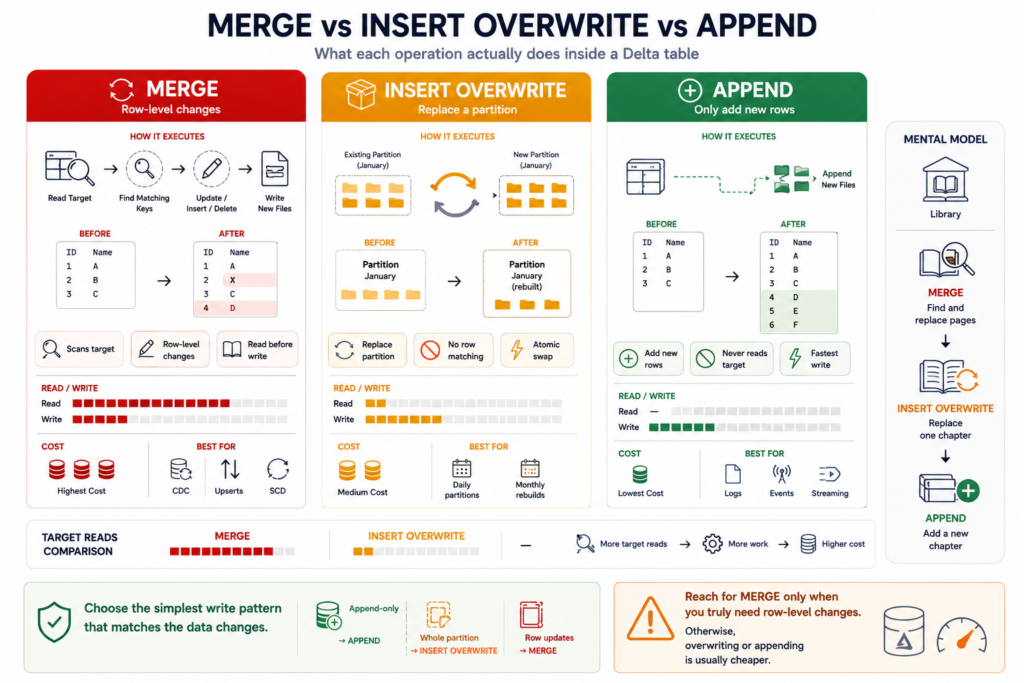
The whole point of the decision is cost. Here’s the intuition behind it:
Pattern
Reads the target?
Can change individual rows?
Relative cost
MERGE
Yes (scans for matches)
Yes
Highest
INSERT OVERWRITE
No (replaces in place)
No (whole partition/table)
Medium
APPEND
No (adds only)
No (insert only)
Lowest
MERGE reads before it writes; INSERT OVERWRITE replaces; APPEND only adds — cost rises accordingly.
So the rule of thumb: reach for MERGE only when you genuinely need row-level matching. If you’re recomputing whole partitions, INSERT OVERWRITE is cheaper; if the data is purely new, APPEND is cheapest of all.
Common mistakes
Defaulting to MERGE. The number-one cost mistake — paying for a target scan when a partition overwrite or append would do.
MERGE without a change check. Skipping the _row_hash comparison rewrites unchanged rows every run, creating churn and bloating the table’s history.
APPEND without downstream dedup. If the source ever re-sends data, you silently get duplicates.
SCD Type 2 when history isn’t needed. You pay in storage and query complexity for a timeline nobody asked for. Only track history when the business truly needs point-in-time answers.
The takeaway
Don’t default to MERGE — decide. If the source changes individual rows by key, use MERGE (and pick SCD Type 1 for current-state-only, or SCD Type 2 when you need history). If you recompute whole partitions, use INSERT OVERWRITE with dynamic partition overwrite. If the data is append-only and downstream dedups, use APPEND — the cheapest write of all. Otherwise, overwrite the whole table. The pattern that fits your source is almost always cheaper than the MERGE you’d have reached for on autopilot.
Frequently Asked Questions
When should I use MERGE vs INSERT OVERWRITE in Delta?
Use MERGE when the source has row-level updates or deletes matched by a primary key, because only MERGE can change individual rows. Use INSERT OVERWRITE when you recompute an entire partition or table from the source and don’t need row-level matching — it replaces data in place and skips the costly scan-for-matches that MERGE performs.
Why is MERGE expensive?
MERGE must read the target table to find rows that match the source key before it can update, insert, or delete them. That read-before-write scan runs on every execution, so using MERGE when you didn’t need row-level matching wastes compute. INSERT OVERWRITE and APPEND avoid the scan entirely.
What is the difference between SCD Type 1 and Type 2?
SCD Type 1 keeps only the current state and overwrites a record when it changes, so there’s no history. SCD Type 2 preserves history by closing the current row (setting an end date and is_current to false) and inserting a new version, letting you answer point-in-time questions. Choose Type 2 only when the business needs the record as it was in the past.
When should I use APPEND instead of MERGE?
Use APPEND when the source only ever adds new rows — events, logs, sensor data — and downstream can handle de-duplication. It never reads the target, making it the cheapest and fastest write. If the source can update existing rows or you need exactly-once semantics, use MERGE instead.
What is dynamic partition overwrite?
Dynamic partition overwrite (partitionOverwriteMode = dynamic) makes INSERT OVERWRITE replace only the partitions present in the source data, leaving all other partitions untouched. It’s ideal for reprocessing specific days or regions without rewriting the whole table.
How do I avoid rewriting unchanged rows in a MERGE?
Add a hash of the business columns (a _row_hash) to both source and target, and set the MERGE update condition to fire only when the hashes differ. Unchanged rows are then skipped instead of being rewritten every run, which reduces churn and keeps the table’s version history clean.