Follow one Delta table from CREATE to time travel and watch exactly what happens on disk — the Parquet files, the transaction log, and how that log quietly powers ACID and versioning.
Delta tables feel like magic. You update a row and it just works. You ask for “the table as it looked yesterday” and there it is. But there’s no magic — it’s all one clever idea, and once you see it, Delta stops being a black box.
We’re going to follow one single table — an orders table for a grocery company — through its full lifecycle: create → write → read → update → delete → time travel → checkpoint. At every step we’ll look at exactly what lands on disk and how Delta uses it.
Keep this one idea in your back pocket, because everything below flows from it:
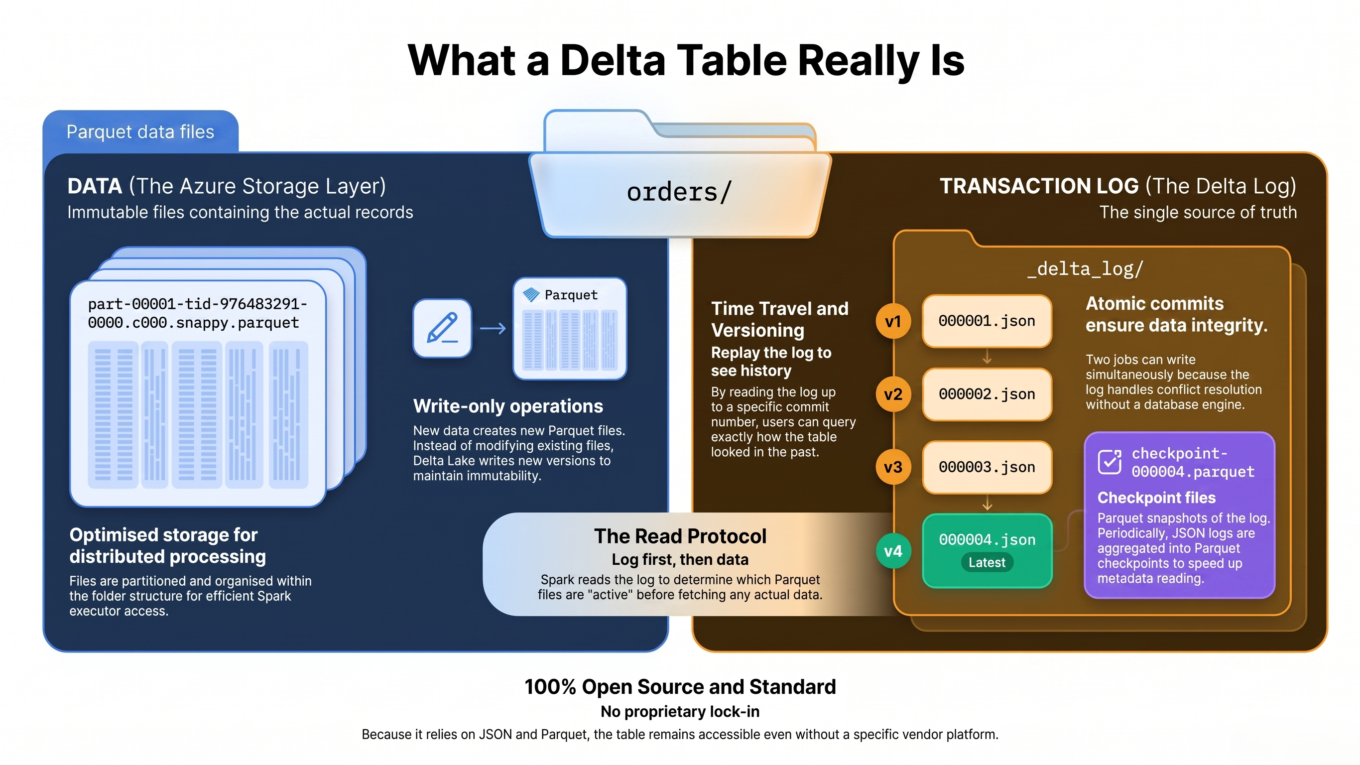
A Delta table is just Parquet data files + a transaction log. The log — not the folder of files — is the real source of truth for what the table contains.
Think of the transaction log as a bank ledger: you never erase old entries, you only append new ones, and the current state is whatever you get by reading the ledger from top to bottom.
Step 1: Create
CREATETABLEorders ( order_id INT, region STRING, amount DOUBLE) USING DELTA;
What happens on disk: the table is empty, but Delta already created a folder with a _delta_log directory inside it, holding its very first entry:
No data files yet — just commit 0, the first page of the ledger. Inside, it records the table’s schema (columns and types) and the protocol (which Delta features the table uses). The table “exists” purely because the log says so.
What happens on disk — two things, in this exact order:
Delta writes the data first as a Parquet file.
Then Delta commits a new log entry, ...0001.json, that says “this file is now part of the table.”
/orders/ part-0001.snappy.parquet<- the actual data _delta_log/00000000000000000000.json<-commit0 (schema)00000000000000000001.json<-commit1 ("add part-0001")
That commit contains an “add” action for the new file, including handy stats — the min and max of each column:
Those stats let a later query like WHERE amount > 200 see this file’s max is 90 and skip it entirely without reading it — free “data skipping,” straight from the log.
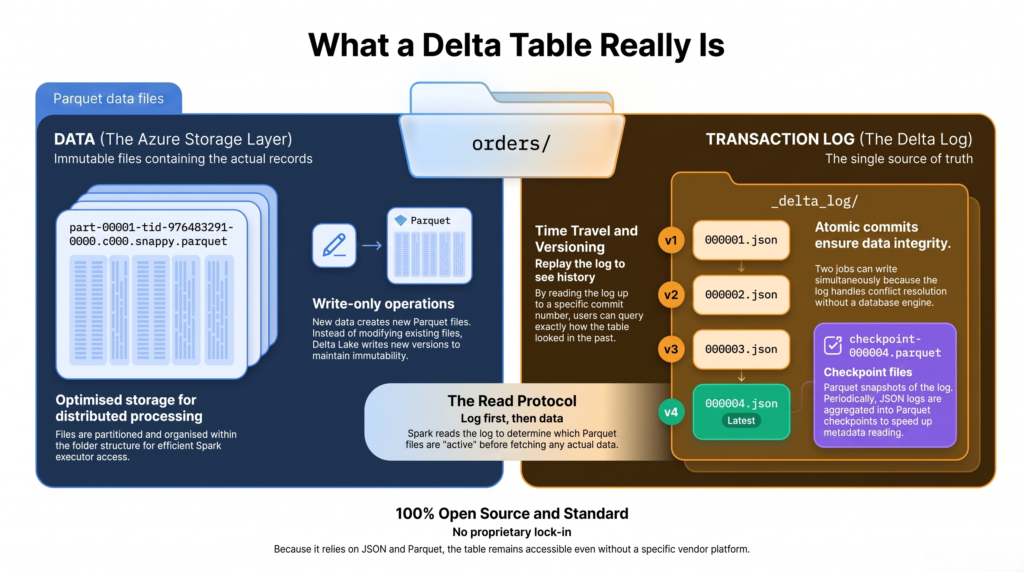
A Delta table on disk: Parquet data files plus a _delta_log folder of numbered JSON commits.
How Delta knows the “latest version”
You’ll hear people say a Delta table is “at version 5.” Where does that number come from? It’s beautifully simple: each commit file is numbered, and that number IS the version.
00000000000000000000.json → version 0
00000000000000000001.json → version 1
00000000000000000002.json → version 2 … and so on.
So how does Delta find the current version? It looks inside the _delta_log folder and finds the highest-numbered commit file. That’s it. Right now the newest file is ...0001.json, so the table is at version 1.
And every new operation just claims the next number in the sequence. The next write becomes version 2, then 3, and so on — the log never renumbers or overwrites, it only appends the next file. The newest file always tells you the latest version, and the sequence of numbers is the table’s complete history.
Step 3: Read
SELECT*FROM orders;
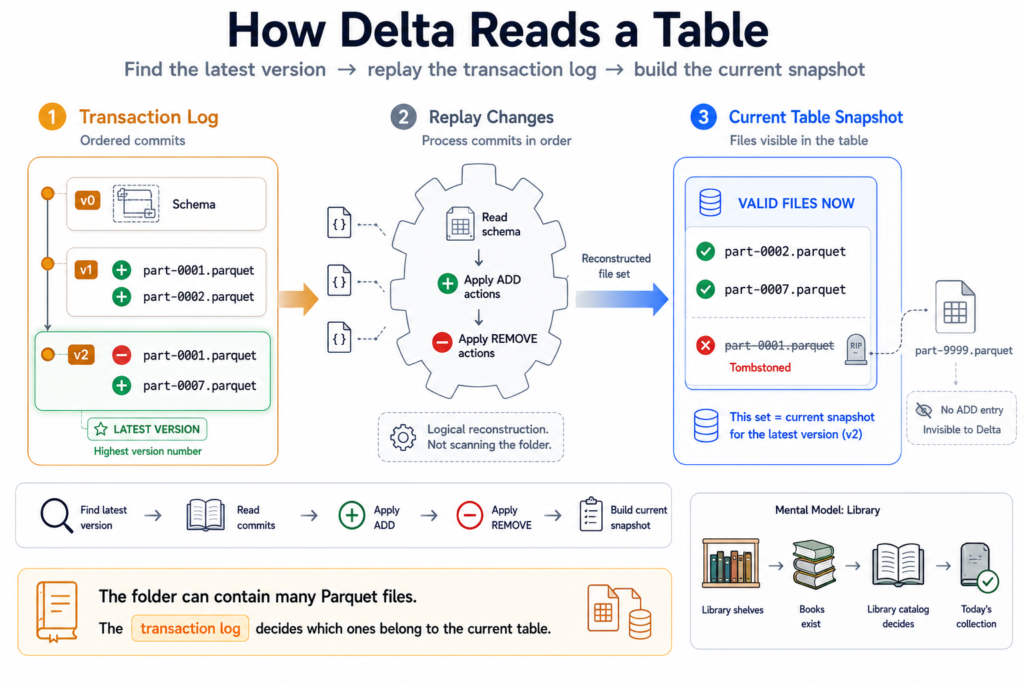
What happens: here’s the part that surprises people. Delta does not just list the folder and read whatever Parquet files it finds. It uses the log, in three moves:
Find the latest version — the highest-numbered commit file in _delta_log (here, version 1).
Replay the ledger up to that version, applying every “add” and “remove,” to work out the exact set of files valid right now.
Read only those files (using the stats to skip any it doesn’t need).
This is why a stray Parquet file left behind by a crashed job is simply ignored — if no commit added it, it isn’t part of the table. The folder can lie; the log cannot.
The log is an append-only ledger; the current table is whatever you get by replaying its add/remove actions up to the latest version.
Step 4: Update
UPDATE orders SET amount =999WHERE order_id =1;
What happens: you’d think Delta edits the row inside the Parquet file. It can’t — Parquet files are immutable. So Delta uses copy-on-write:
It reads the file that contains order 1.
It writes a brand-new Parquet file with the corrected row (plus the other rows from that file, unchanged).
It commits the next version, ...0002.json (version 2), which removes the old file and adds the new one.
{"remove": {"path":"part-0001.snappy.parquet", ...}} <- old file, tombstoned{"add": {"path":"part-0007.snappy.parquet", ...}} <- new file with the fix
The old file is not deleted from disk — it’s just marked “removed” in the log (a “tombstone”). The table is now at version 2, and the next time someone reads, Delta finds version 2 as the highest commit and replays adds/removes to get the new file set. Remember that tombstone — it’s the secret behind time travel.
Step 5: Delete
DELETEFROM orders WHERE order_id =2;
What happens: delete works just like update — copy-on-write again, creating version 3. For each file that holds a matching row, Delta writes a new file without those rows and commits a “remove old + add new.” If every row in a file is deleted, it simply removes the file with no replacement.
{"remove": {"path":"part-0002.snappy.parquet", ...}} <- had order 2{"add": {"path":"part-0009.snappy.parquet", ...}} <- same rows minus order 2
(Newer Delta versions have an optimization called deletion vectors that mark individual rows as deleted in a small side file instead of rewriting the whole Parquet — faster for big files — but the log-driven idea is identical.)
Step 6: Time travel
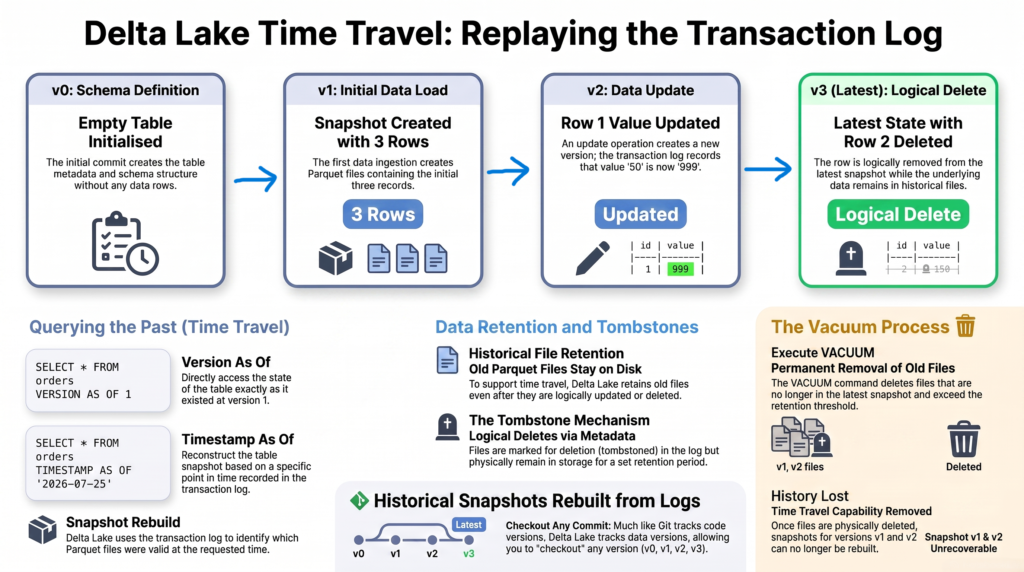
What happens: now the version numbers pay off. Because every version’s exact file set is recorded in the log — and old files are only tombstoned, never immediately deleted — Delta can hand you the table as it looked at any past version. Instead of replaying up to the latest version, it replays up to the version you ask for:
-- the table at version 1, before the update and deleteSELECT*FROM orders VERSIONAS OF 1;-- or at a point in time (Delta maps the timestamp to a version)SELECT*FROM orders TIMESTAMPAS OF '2026-07-25 09:00:00';-- the full history of every versionDESCRIBE HISTORY orders;
To answer VERSION AS OF 1, Delta replays the ledger up to commit 1 and reads the file set as it was then — including the old, tombstoned files it never deleted. DESCRIBE HISTORY just prints the ledger back to you: every version number, the operation that created it, and when.
Each commit number is a version — time travel just replays the log up to the version you ask for.
Step 7: Checkpoint
What happens: after hundreds of commits, replaying every JSON from version 0 to find the current state would get slow. So every 10 commits (by default) Delta writes a checkpoint — a single Parquet file summarizing the whole table state at that version — plus a tiny _last_checkpoint file pointing to the newest one:
_delta_log/00000000000000000010.checkpoint.parquet <- summary of the state at version 1000000000000000000011.json <- version 11 _last_checkpoint <- points to version 10
Now finding the latest state is fast: Delta reads _last_checkpoint to jump straight to version 10’s summary, then only replays the handful of commits numbered after it (11, 12, …) to reach the true latest version. No matter how old the table is, it never has to replay from version 0. Checkpoints don’t change any behavior — they’re purely a speed shortcut on the same ledger.
Cleanup: VACUUM (and the time-travel trade-off)
Those tombstoned old files pile up and cost storage. VACUUM physically deletes files that are no longer referenced and older than a retention window (7 days by default):
VACUUM orders; -- removes unreferenced files older than 7 days
The trade-off: once VACUUM deletes those old files, you can no longer time-travel to versions that depended on them. The version numbers still exist in the log, but the data files they point to are gone. Time travel and VACUUM pull in opposite directions — keep enough history for your needs, but not so much that storage balloons.
Optional: what “partition by” changes
Partitioning is entirely optional and changes none of the mechanics above. If you create the table with PARTITIONED BY (region), the only difference is that Delta lays the Parquet files out in per-value sub-folders and records the partition in each “add” action:
Then WHERE region = 'East' only reads the East files. Useful — but partition only on low-cardinality columns like region, never on IDs, or you’ll shatter the table into millions of tiny files. The log, versioning, and time-travel behavior are exactly the same with or without partitioning.
The whole picture
Step
What happens on disk
Version after
Create
Commit 0 records schema + protocol
0
Write
Write Parquet, then commit “add”
1
Read
Find highest commit, replay log for valid files, read them
(reads 1)
Update
Copy-on-write: add new file, remove old
2
Delete
Copy-on-write without the deleted rows
3
Time travel
Replay the log up to a chosen version
(reads any)
Checkpoint
Parquet summary every 10 commits
(no new version)
The takeaway
A Delta table is nothing more than Parquet files plus an append-only transaction log, and the log — not the folder — is the source of truth. Each commit is a numbered JSON file, and that number is the table’s version; the latest version is simply the highest-numbered commit. To read, Delta finds that newest commit and replays the ledger’s add/remove actions to get the valid files. Create writes a schema commit; write lands files then commits “add”; update and delete copy-on-write by adding new files and tombstoning old ones (each bumping the version by one); time travel replays the log up to any past version; and checkpoints let Delta jump to the latest state without replaying from zero. Picture the numbered ledger, and every Delta behavior becomes predictable instead of magical.
Frequently Asked Questions
What is the Delta transaction log?
The transaction log is the _delta_log folder of numbered JSON commit files that records every change to a Delta table — which Parquet files were added or removed at each version. It is the source of truth: to know the current table, Delta replays the log rather than trusting the folder listing.
How does Delta determine the latest version of a table?
Each commit is a numbered JSON file in _delta_log (000…000.json is version 0, 000…001.json is version 1, and so on), and that number is the version. Delta finds the current version by taking the highest-numbered commit file. With checkpoints, it reads the _last_checkpoint pointer to jump to the latest checkpoint and then replays only the commits numbered after it.
Does an UPDATE or DELETE change the Parquet file in place?
No. Parquet files are immutable, so Delta uses copy-on-write: it writes new Parquet files with the changed or remaining rows and commits a log entry that removes the old files and adds the new ones. The old files stay on disk as tombstones until VACUUM deletes them, which is what enables time travel.
How does Delta time travel work?
Every version records the exact set of files it contained, and updates only tombstone old files rather than deleting them. To query a past version, Delta replays the log up to that version number and reads the file set as it was, using VERSION AS OF or TIMESTAMP AS OF. It works as long as VACUUM hasn’t removed the old files.
What are Delta checkpoints and why do they exist?
A checkpoint is a Parquet file Delta writes every 10 commits by default that summarizes the entire table state at that version. Instead of replaying every commit from version 0 to find the latest state, readers jump to the newest checkpoint and replay only the commits after it, so reads stay fast even for tables with thousands of versions.
What happens to files left behind by a crashed write?
They are ignored. Because data files are written before the commit, a crash before the commit leaves Parquet files that no log entry references. Since Delta builds the table only from the files listed in the log, those orphan files are invisible to every query and never become part of the table.