PySpark withColumn vs withColumns vs select: Which to Use
Three ways to add or change columns in PySpark — and one of them, used in a loop, quietly wrecks performance. Here's what each does and when to reach for it.
Adding or changing columns is one of the most common things you do in PySpark, and there are three tools for it: withColumn, withColumns, and select. They overlap enough to be confusing — and picking the wrong one can quietly tank performance. Here’s what each does, and exactly when to use it.
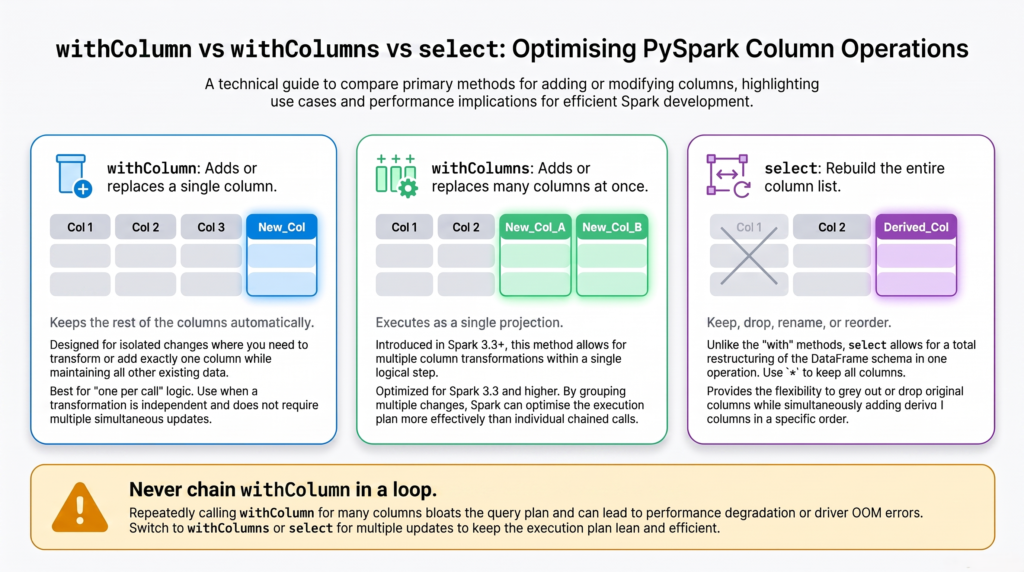
withColumn — add or replace ONE column
withColumn(name, expression) adds a new column, or replaces an existing one if the name already exists. Every other column is kept automatically. It handles exactly one column per call.
from pyspark.sql.functions import col# add a new columndf2 = df.withColumn("total", col("price") * col("qty"))# replace an existing column (same name)df2 = df.withColumn("price", col("price") *1.1)
It’s clean and readable for a single column. The trouble starts when you need many columns.
⚠️ The trap: withColumn in a loop
This is the one thing to remember from this whole article. Each withColumn call adds a projection to Spark’s query plan. Call it once, fine. Call it dozens of times in a loop, and the plan balloons — analysis gets slow, and Spark can even fail with a StackOverflowError.
# BAD — each withColumn adds a projection; the plan explodesfor i inrange(50): df = df.withColumn(f"c{i}", col("x") + i) # slow, can StackOverflow
Spark’s own docs warn about this. The fix is to add all the columns in a single operation — which is exactly what the next two tools do.
withColumns — add or replace MANY columns at once
withColumns(dict) (Spark 3.3+) does what withColumn does, but for a whole dictionary of columns in a single projection. It’s the direct fix for the loop trap — same additive behavior (all other columns kept), just done once.
# GOOD — add/replace several columns in ONE stepdf2 = df.withColumns({"total": col("price") * col("qty"),"price_with_tax": col("price") *1.1,})
If you’re on Spark 3.3 or newer and need to add multiple columns, this is usually the cleanest choice.
select — rebuild the DataFrame’s columns
select is different in spirit: instead of adding to the existing columns, it rebuilds the column list from scratch — you list exactly what you want out. That makes it the most flexible: you can add derived columns, keep a subset, rename, reorder, and drop, all in one projection.
from pyspark.sql.functions import col# add a column while keeping everything else ("*")df2 = df.select("*", (col("price") * col("qty")).alias("total"))# reshape: keep just a few columns and add a derived onedf2 = df.select("order_id", "region", (col("price") * col("qty")).alias("total"))
The key difference: with withColumn/withColumns you keep every existing column automatically; with select you only get what you list (unless you include "*"). So select also naturally drops columns — anything you leave out is gone.
Adding or changing one column? → withColumn. Simple and readable.
Adding several columns at once (Spark 3.3+)? → withColumns. One projection, no loop trap.
Reshaping — selecting a subset, adding many derived columns, renaming, reordering, or dropping? → select.
Never chain withColumn in a loop for many columns — use withColumns or select instead.
The takeaway
All three add or change columns and all return a new DataFrame (DataFrames are immutable). Use withColumn for a single column, withColumns to add several at once on Spark 3.3+, and select when you’re reshaping the DataFrame — choosing which columns to keep, derive, rename, or drop. The one rule that actually matters for performance: don’t add many columns by chaining withColumn in a loop, because it builds a huge query plan. Reach for withColumns or select and do it in a single step.
Frequently Asked Questions
What is the difference between withColumn and select in PySpark?
withColumn adds or replaces a single column while automatically keeping all the others. select rebuilds the column list from scratch, so you only get the columns you list (unless you include "*"), which also lets it drop, rename, and reorder. Use withColumn to tweak one column and select to reshape the DataFrame.
Is chaining withColumn slow in PySpark?
Yes, when you do it many times. Each withColumn adds a projection to the query plan, so adding dozens of columns in a loop builds a very large plan that slows analysis and can even cause a StackOverflowError. To add many columns, use withColumns (Spark 3.3+) or a single select instead.
What is withColumns in PySpark and when was it added?
withColumns adds or replaces multiple columns at once from a dictionary, in a single projection. It was introduced in Spark 3.3 and is the recommended replacement for chaining many withColumn calls, since it avoids the large-plan performance problem.
Can withColumn add more than one column?
No. withColumn adds or replaces exactly one column per call. To add several columns in one operation, use withColumns with a dictionary (Spark 3.3+) or a select that lists all the new expressions.
Does withColumn modify the original DataFrame?
No. PySpark DataFrames are immutable, so withColumn, withColumns, and select all return a new DataFrame and leave the original unchanged. You need to assign the result to a variable to use it.