Fix Over-Partitioned Delta Tables (Slow Queries) in Databricks
Partitioning by the wrong column shatters your table into millions of tiny files and grinds queries to a halt. Here's how to right-size it — and why liquid clustering is usually the better answer.
A Delta table that should be fast is suddenly crawling. Even a simple query takes forever, the query plan spends ages just “listing files,” and the cluster driver looks overworked before any real computation starts. Nine times out of ten, the culprit is over-partitioning — the table has been shattered into far too many tiny partitions.
⚡ Quick fix
Stop partitioning by high-cardinality columns (like user_id or a full timestamp). Those create a folder per value — millions of them.
On Databricks, switch to liquid clustering instead of partitioning: CLUSTER BY (col). It self-tunes and handles high cardinality without the folder explosion.
Compact the existing small files with OPTIMIZE.
The details — and how to pick partition keys that don’t blow up — are below.
What “over-partitioned” actually means
Partitioning splits a table into folders, one per partition value. That’s great when it produces a handful of big, evenly-sized chunks the engine can skip through. It’s a disaster when it produces millions of tiny ones, each holding a few kilobytes.
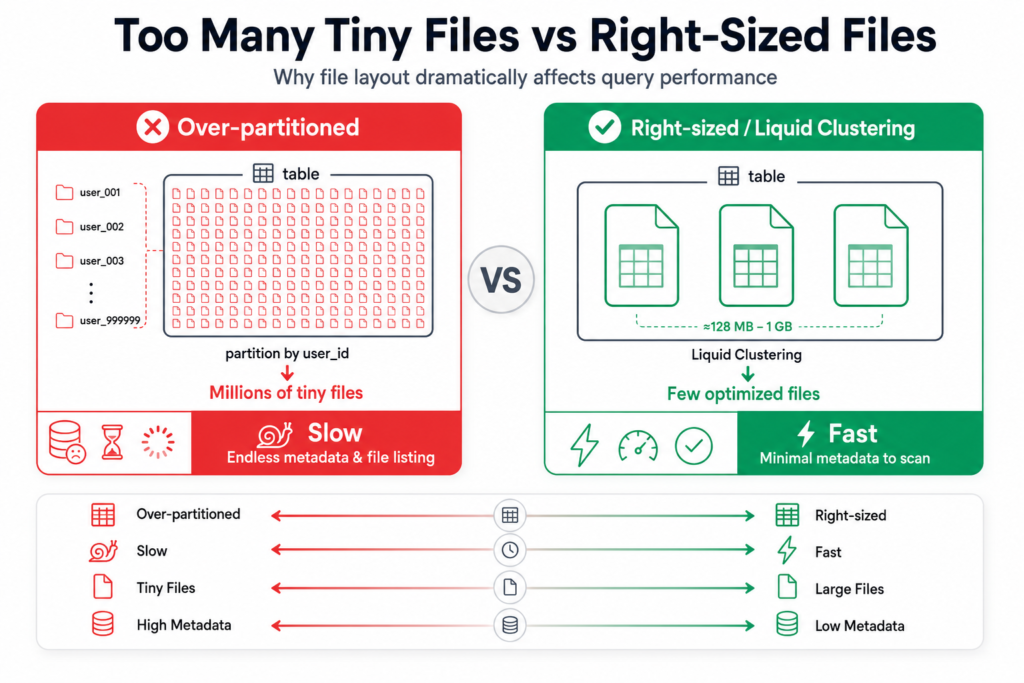
Why tiny partitions are so slow: before it can run your query, Spark has to list and open every file. Ten large files? Instant. Ten million tiny files? The engine spends all its time on metadata and file-listing overhead, and barely any on the actual data. This is the classic small files problem, and over-partitioning is the most common way to cause it.
Over-partitioning shatters a table into millions of tiny files; right-sizing keeps a few large, fast-to-scan files.
Why it happens
Partitioning by a high-cardinality column.user_id, order_id, or a to-the-second timestamp each have millions of distinct values — so you get millions of partitions.
Too many partition columns at once.partitionBy("country", "city", "day", "hour") multiplies out into an explosion of tiny slices.
Partitioning a table that’s just too small. A 5 GB table split into thousands of partitions has almost nothing in each one.
The fix
1. Right-size (or drop) partitioning
Rules of thumb that keep you out of trouble:
Partition only large tables — as a guideline, don’t partition anything under roughly a terabyte. Small tables should have no partitioning.
Each partition should hold a meaningful amount of data — aim for ≥ ~1 GB per partition, not kilobytes.
Partition on low-cardinality columns you actually filter on — date, country, event_type — never on IDs.
2. Prefer liquid clustering (the modern answer)
On Databricks, liquid clustering is designed to replace both partitioning and Z-ordering. You tell it which columns to cluster by, and it organizes the data for fast skipping without creating rigid folders — so it handles high-cardinality columns and skew gracefully, and self-tunes as data grows:
-- New table: cluster instead of partitionCREATETABLEsales(order_id BIGINT, customer_id BIGINT, order_date DATE, amount DECIMAL)CLUSTER BY (order_date, customer_id);-- Existing table: switch it to clusteringALTERTABLE sales CLUSTER BY (order_date, customer_id);OPTIMIZE sales; -- applies the clustering
You can’t combine CLUSTER BY with PARTITIONED BY — clustering is meant to be used instead of partitioning, which is exactly the point.
3. Compact the small files you already have
If the damage is done, OPTIMIZE rewrites the tiny files into larger ones. On older setups you’d pair it with ZORDER for data skipping (liquid clustering makes that unnecessary):
-- Compact tiny files into larger onesOPTIMIZE sales;-- Legacy data-skipping (pre-liquid-clustering)OPTIMIZE sales ZORDER BY (customer_id);
4. Stop new small files at the source
Turn on optimized writes and auto-compaction so future writes don’t recreate the problem:
ALTERTABLE sales SET TBLPROPERTIES ('delta.autoOptimize.optimizeWrite'='true','delta.autoOptimize.autoCompact'='true');
How to verify it’s fixed
Query planning is fast again — no long pause “listing files” before execution.
DESCRIBE DETAIL sales shows a far smaller numFiles and larger average file size.
The same query that crawled now returns in a fraction of the time.
How to prevent it
Default to liquid clustering, not partitioning, for new Delta tables on Databricks.
Never partition on IDs or high-cardinality columns. If you catch yourself doing it, that’s the warning sign.
Only partition large tables, and keep partitions chunky (≥ ~1 GB).
Leave optimized writes and auto-compaction on so file sizes stay healthy automatically.
When it’s actually something else
Small files without partitioning: streaming or many tiny appends can create small files even on an unpartitioned table — the fix is still OPTIMIZE + auto-compaction.
Data skew: if one partition is enormous while others are tiny, that’s skew, a different tuning problem.
Under-powered cluster: confirm the slowness isn’t simply an undersized cluster for genuinely large data.
Frequently Asked Questions
What is an over-partitioned Delta table?
It’s a table split into far too many partitions, usually by partitioning on a high-cardinality column. Each partition holds only a tiny amount of data in tiny files, so Spark spends most of its time listing and opening files instead of processing data, making queries very slow.
How do I fix too many small files in Delta?
Run OPTIMIZE to compact small files into larger ones, and enable optimized writes and auto-compaction so new writes stay healthy. Longer term, avoid partitioning by high-cardinality columns, and prefer liquid clustering, which prevents the small-files explosion.
What is liquid clustering in Databricks?
Liquid clustering is a Delta feature that organizes data for fast querying without rigid partition folders. You specify clustering columns with CLUSTER BY, and Databricks arranges the data and self-tunes as it grows. It replaces both traditional partitioning and Z-ordering, and handles high-cardinality columns well.
When should I partition a Delta table?
Only partition large tables — as a guideline, above roughly a terabyte — and only on low-cardinality columns you frequently filter on, keeping each partition around a gigabyte or more. For most tables, especially on Databricks, liquid clustering is a better default than partitioning.
Can I use liquid clustering and partitioning together?
No. Liquid clustering is designed to be used instead of partitioning, not alongside it. A table uses either CLUSTER BY or PARTITIONED BY. For new tables, clustering is generally the recommended choice.