Fix “Unable to Infer Schema for Parquet” in Databricks & Spark
The error almost always means one thing: Spark found no data files at the path. Here's the 30-second fix, the real root causes, and how to stop it happening again.
(You’ll see the identical error with ORC — Unable to infer schema for ORC. It must be specified manually. — and the cause is the same.)
It looks like a schema problem. It almost never is. In nearly every case, this error means one blunt thing: Spark looked at the path you gave it and found no data files to read. No files, nothing to infer a schema from, so it gives up.
⚡ Quick fix
Before anything else, list the path and see what’s actually there:
# Databricksdbutils.fs.ls("abfss://container@account.dfs.core.windows.net/path/to/data")# Plain Spark / open sourcespark.read.format("binaryFile").load("/path/to/data").select("path").show(truncate=False)
No part-*.parquet files listed? That’s your answer — the path is empty or wrong. Fix the path, or fix the upstream job that was supposed to write data there.
Files are there but it still fails? Read with an explicit schema (see below) — you’re likely hitting the empty-directory or wrong-format edge cases.
That check solves it 90% of the time. The rest of this article is why, so it stops recurring.
What the error actually means
When you read Parquet or ORC without giving Spark a schema, it does something reasonable: it opens one of the data files and reads the schema baked into that file’s footer. Parquet and ORC are self-describing, so this usually just works.
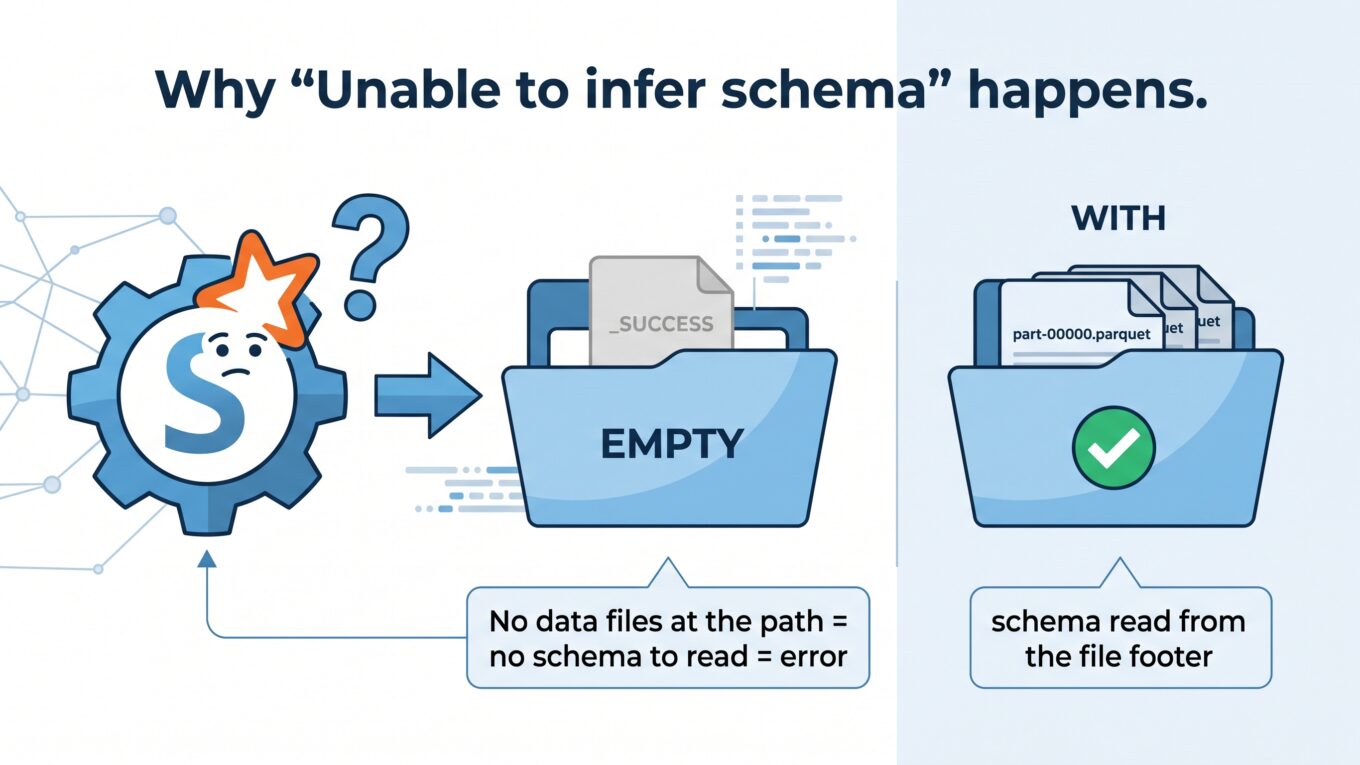
But if there are no data files at the path, there’s no footer to read, and no way to guess what the columns should be. Spark can’t invent a schema out of thin air — so it stops and tells you to specify one manually. The message is technically about schema, but the real problem is missing files.
No data files means no schema to read — that’s the error in one picture.
Why it happens — the real root causes
Ranked from most to least common in production:
1. The path is empty (an upstream job wrote nothing)
The classic. A job that normally lands data ran, filtered everything out, and wrote an empty result — leaving a directory with only a _SUCCESS file and no part- files. The next job reads that path and blows up. The write “succeeded”; it just produced nothing.
2. The path is wrong
A typo, a wrong environment (dev path in a prod job), a missing date partition, or a trailing-slash mismatch. Spark happily points at a directory that doesn’t contain what you think — and finds no files.
3. You wrote an empty DataFrame, then read it back
Writing a DataFrame with zero rows as Parquet can leave no data files behind. When a later step reads that path, there’s nothing to infer from — same error.
4. Partition filtering left nothing
You read a partitioned path filtered to, say, date=2026-07-25, but no data exists for that partition yet. The filter prunes down to zero files, and Spark can’t infer a schema from an empty set.
5. Wrong format (reading Parquet as ORC, or vice versa)
If the files are really CSV or ORC but you call .parquet(), Spark sees no valid Parquet files at the path and reports the same thing.
How to fix it — a decision path
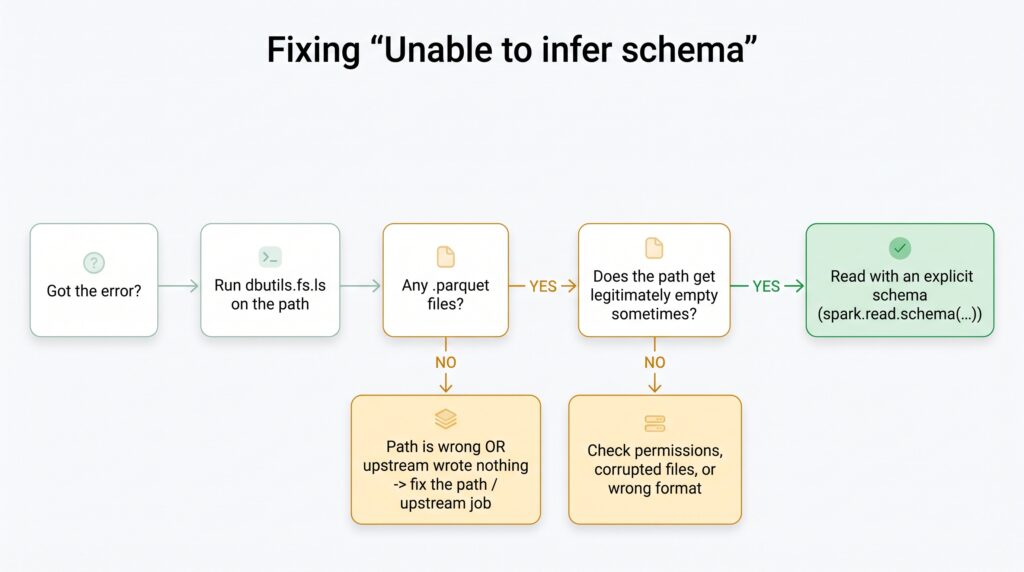
A quick decision path for the “unable to infer schema” error.
Step 1: Confirm whether files exist
files = dbutils.fs.ls("abfss://container@account.dfs.core.windows.net/path/to/data")data_files = [f for f in files if f.name.endswith(".parquet")]print(f"Found {len(data_files)} parquet files")
If the count is zero, the problem is upstream — the data was never written, or you’re pointing at the wrong path. Fix that, not the read.
Step 2: If files should exist but the read is fragile, supply the schema
When a path can legitimately be empty sometimes (a partition with no data yet), stop relying on inference and pass an explicit schema. The read then succeeds and simply returns an empty DataFrame instead of crashing:
from pyspark.sql.types import StructType, StructField, StringType, IntegerType, DoubleTypeschema = StructType([ StructField("order_id", IntegerType(), True), StructField("product", StringType(), True), StructField("amount", DoubleType(), True),])df = spark.read.schema(schema).parquet("/path/to/data") # no more crash on empty
Step 3: Guard the read for pipelines that must not fail
In a scheduled pipeline, check before you read so an empty upstream doesn’t take the whole job down:
defsafe_read_parquet(path, schema):try: files = dbutils.fs.ls(path) has_data =any(f.name.endswith(".parquet") for f in files)exceptException: has_data =False# path doesn't even existif has_data:return spark.read.parquet(path)# Return an empty, correctly-typed DataFrame instead of crashingreturn spark.createDataFrame([], schema)
This is the pattern that keeps a 3 AM pipeline alive when one source happens to be empty for the day.
How to verify it’s fixed
dbutils.fs.ls(path) shows one or more part-*.parquet files.
The read returns without the exception (even if the DataFrame is empty).
df.printSchema() shows the columns you expect.
How to prevent it for good
Use Delta tables instead of raw Parquet paths. A Delta table keeps its schema in the transaction log, so reading an empty table returns an empty, correctly-typed DataFrame — this error simply can’t happen. This alone eliminates the problem for most teams.
Always pass a schema for raw-file reads in production pipelines. Never rely on inference for scheduled jobs.
Validate upstream output — check that a write actually produced data files before a downstream job depends on it.
Read tables, not paths.spark.table("catalog.schema.table") is far more robust than pointing at a folder of files.
When it’s actually something else
If dbutils.fs.ls clearly shows Parquet files and you still get the error, it’s a rarer cause:
Permissions: you can list the directory but the cluster’s identity can’t read the files. Check your ADLS / storage credential and access connector.
Corrupted or zero-byte files: the footer is unreadable. This is a different problem — reading corrupted Parquet with a mismatched schema — worth its own investigation.
Format mismatch: the files aren’t really Parquet. Confirm the actual format before choosing the reader.
For the official reference on schema handling, see the Databricks knowledge base; the fixes above come from resolving this in real production pipelines.
Frequently Asked Questions
What does “Unable to infer schema for Parquet” mean?
It means Spark found no data files at the path you tried to read, so there was no file footer to read a schema from. Despite mentioning schema, the real cause is almost always missing or empty data files, a wrong path, or a partition filter that matched nothing.
How do I fix the unable to infer schema error in PySpark?
First list the path (for example with dbutils.fs.ls) to confirm data files exist. If they don’t, fix the path or the upstream job. If the path can be legitimately empty, pass an explicit schema with spark.read.schema(...) so the read returns an empty DataFrame instead of crashing.
Why does this happen with an empty DataFrame?
Writing a DataFrame with zero rows as Parquet can leave no data files behind, only metadata. When a later job reads that path, there is no footer to infer a schema from, so Spark raises the error. Using Delta tables or supplying an explicit schema avoids this.
Does using Delta tables prevent this error?
Yes. A Delta table stores its schema in the transaction log, so even an empty table returns an empty, correctly-typed DataFrame. Because the schema no longer depends on reading a data file, the “unable to infer schema” error effectively cannot occur.
I get the same error for ORC — is it the same fix?
Yes. “Unable to infer schema for ORC. It must be specified manually” has the same root cause — no readable data files at the path — and the same fixes: confirm files exist, correct the path, or supply an explicit schema.