Liquid Clustering vs Z-ORDER vs Partitioning: Which to Choose
Three ways to lay out a Delta table so queries read less data — and the senior skill isn't picking the newest one, it's knowing when NOT to switch. Explained with a bookstore.
Your Delta table’s queries are getting slow, and someone says “just switch to Liquid Clustering, it’s the new thing.” They’re not wrong that it’s good — but blindly reaching for the newest feature is exactly the mistake a senior engineer doesn’t make. Sometimes the right answer is “leave it alone.”
There are three ways to lay out a Delta table so queries read less data: partitioning, Z-ORDER, and Liquid Clustering. Let’s make each one obvious, then build a simple decision for choosing between them — including when migrating would cost more than it saves.
They all do one job: help queries read less
Every one of these three exists for the same reason: so a query like WHERE region = 'East' doesn’t have to read the entire table. That’s called data skipping — the less data you touch, the faster (and cheaper) the query.
Picture a giant bookstore. Our running example is the grocery company’s orders table, and finding rows is like finding books. Each strategy is a different way of organizing the store so staff grab what they need without walking every aisle.
1. Partitioning — separate rooms by category
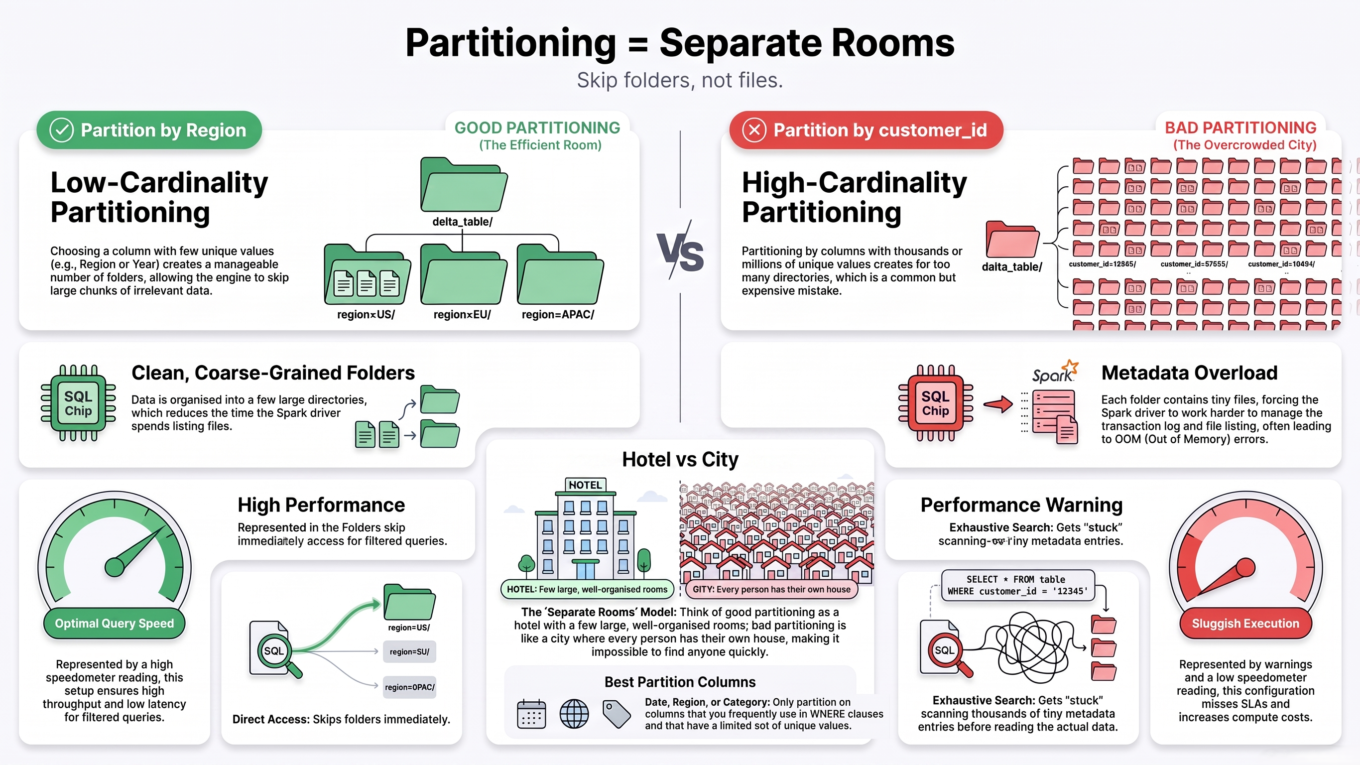
Partitioning physically splits the table into folders, one per value of a column. Partition orders by region and you get a region=East/ folder, a region=West/ folder, and so on.
In bookstore terms, that’s separate rooms by genre. A query for East orders walks straight into the East room and ignores the rest of the store entirely. This “skip a whole room without opening a single book” is called directory pruning — the coarsest and fastest kind of skipping.
CREATETABLEorders (...) PARTITIONED BY (region);
Partitioning = separate rooms per value. Great for a few big rooms; a disaster if you make millions of tiny ones.
The trap: partitioning only works on low-cardinality columns — ones with few distinct values, like region, date, or country (rule of thumb: under ~1,000 values). Partition by a high-cardinality column like customer_id and you create a folder per customer — millions of rooms, each holding a single tiny file. That’s the dreaded small-file problem, and it makes queries slower, not faster.
Use for: a column you almost always filter on, with few distinct values, on a large table.
Never use for: high-cardinality columns (IDs, timestamps).
Note: concurrency is partition-level — two writes to the same partition can conflict.
2. Z-ORDER — arrange the books within a room
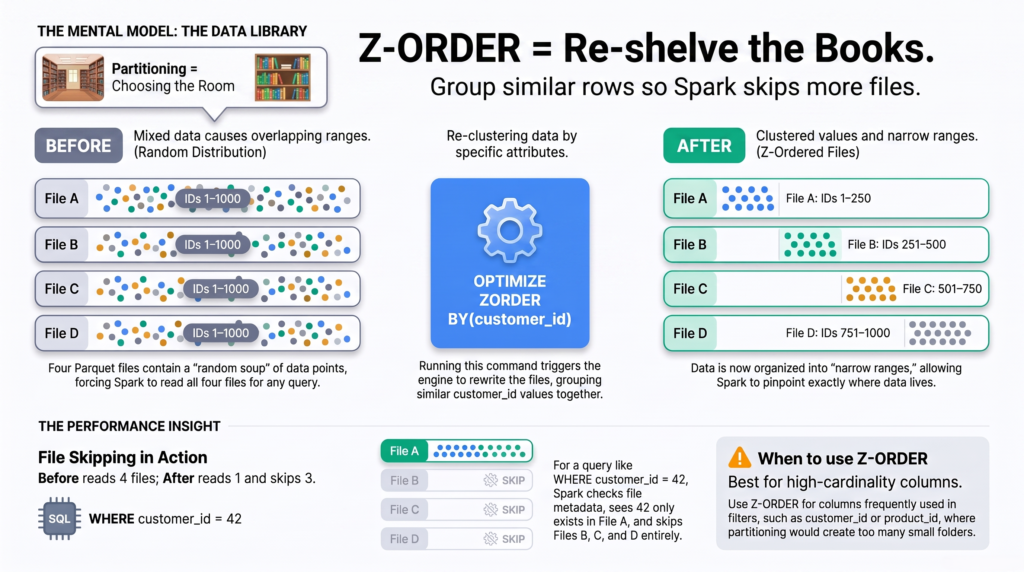
Z-ORDER works inside the files. It runs as part of OPTIMIZE, rewriting files so that rows with similar values sit together, and recording each file’s min/max so the engine can skip files whose range can’t match your filter.
Bookstore version: within a room, you re-shelve the books so related ones are next to each other — now staff scan two shelves instead of twenty. It’s a manual, periodic re-shelving: you run it, and it rewrites the files.
OPTIMIZE orders ZORDER BY (customer_id);
Z-ORDER co-locates similar rows within files so the engine skips the ones that can’t match.
Use for: high-cardinality columns you filter or join on (like customer_id) — exactly where partitioning fails.
Cost: manual; each OPTIMIZE ZORDER re-orders all files in the touched partitions.
Bonus: it combines with partitioning (partition by region, Z-ORDER by customer_id inside).
3. Liquid Clustering — a smart, self-tidying shelf
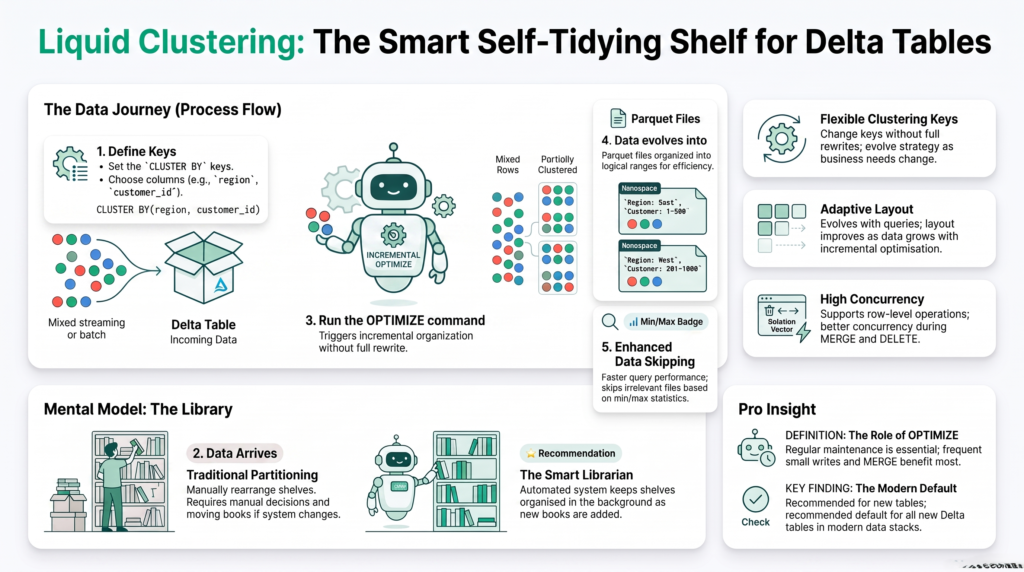
Liquid Clustering is the modern approach, designed to replace both partitioning and Z-ORDER for new tables. You declare clustering keys with CLUSTER BY, and Delta keeps the data organized for you — clustering new data as it’s written and tidying incrementally when you run OPTIMIZE.
Bookstore version: a smart shelving system that files each new book in the right place as it arrives, re-tidies a bit at a time, and — crucially — lets you change the shelving rule without emptying the store. If customers start searching by author instead of genre, you just change the key.
-- new tableCREATETABLEorders (...) CLUSTER BY (region, customer_id);-- change the keys later — no full rewrite neededALTERTABLE orders CLUSTER BY (customer_id);OPTIMIZE orders; -- tidies incrementally
Liquid Clustering keeps data tidy as it arrives, adapts to new query patterns, and lets you change keys without a rewrite.
Use for: new tables (on Databricks), high-cardinality keys, and query patterns that change over time.
Smarter OPTIMIZE: it only re-clusters files that aren’t already clustered, so there’s less churn than Z-ORDER — but you still run OPTIMIZE regularly (small writes and MERGEs don’t auto-cluster).
Row-level concurrency: with deletion vectors and row tracking, concurrent writes resolve per-row, so you no longer design your layout around write conflicts.
Note: it’s mutually exclusive with partitioning, and it’s primarily a Databricks feature (open-source Delta is catching up).
Side by side
Partitioning
Z-ORDER
Liquid Clustering
How it skips data
Skip whole folders
Skip files (min/max)
Skip files (min/max), adaptively
Best column type
Low-cardinality
High-cardinality
Either
Effort
Set at create
Manual OPTIMIZE ZORDER
Auto on write + incremental OPTIMIZE
Change keys later?
No (full rewrite)
Yes (re-run OPTIMIZE)
Yes (no rewrite)
Combines with partitioning?
—
Yes
No
Small-file risk
High (if high-cardinality)
Low
Low
Concurrency
Partition-level
Partition-level
Row-level
So which should you choose?
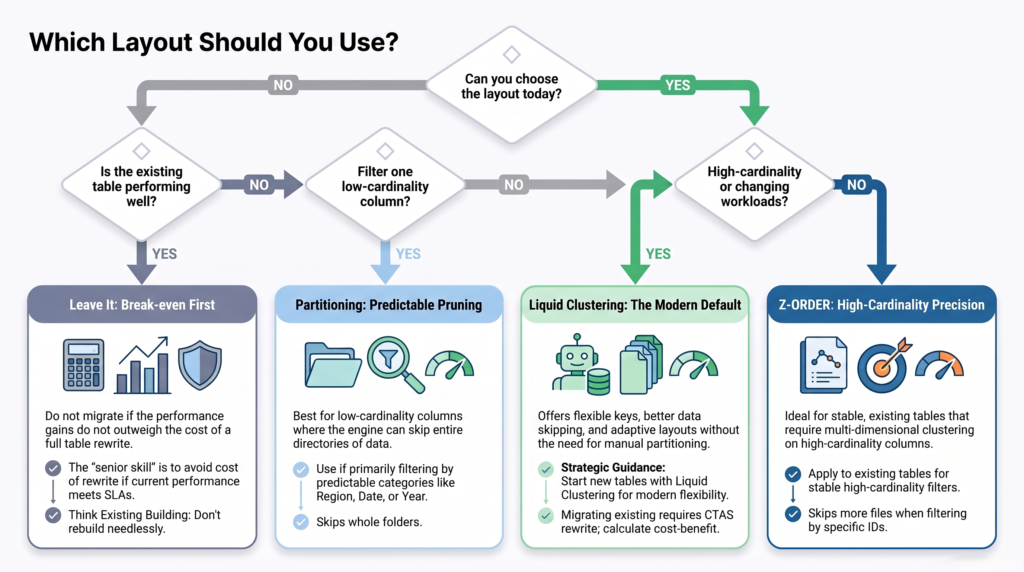
Here’s the simple decision — and the part that separates senior from junior is the migration question at the end.
New table on Databricks? → Liquid Clustering. It’s the recommended default and avoids the small-file trap. Little reason to pick anything else.
Query always filters one low-cardinality column on a huge table? → Partitioning is still perfectly fine (or Liquid Clustering).
Filtering high-cardinality columns and not on Liquid Clustering? → Z-ORDER.
Existing Z-ORDER table that already performs well? → Leave it. This is the senior call.
A quick decision path — including the senior move: don’t migrate a table that’s already performing well.
Know when NOT to migrate
Switching an existing partitioned or Z-ORDER table to Liquid Clustering requires a full table rewrite (CTAS) — hours of compute on a 10 TB table, plus pipeline downtime.
So do the break-even math before recommending it:
(queries per day that benefit × time saved per query) vs the one-time cost of the full rewrite
If a 10 TB table has been Z-ORDERed for years and already matches its query patterns, migrating might buy you a single-digit-percent read improvement for hours of compute and downtime. That math usually says don’t. Migrate when the query patterns have genuinely changed, or when you’re actively fighting the small-file problem — not because the feature is new.
Common mistakes
Partitioning by a high-cardinality column. The fastest way to create millions of tiny files and wreck performance.
Migrating to Liquid Clustering “because it’s newer.” Do the break-even math first.
Assuming Liquid Clustering means no OPTIMIZE. It clusters on some writes, but you still run OPTIMIZE regularly.
Trying to combine Liquid Clustering with partitioning. They’re mutually exclusive — pick one.
The takeaway
All three layouts exist to help queries read less data. Partitioning skips whole folders — great for one low-cardinality filter, deadly with high-cardinality keys. Z-ORDER co-locates similar rows inside files via manual OPTIMIZE — good for high-cardinality columns and it pairs with partitioning. Liquid Clustering does the same adaptively, tidies incrementally, lets you change keys without a rewrite, and adds row-level concurrency — the right default for new tables. But the senior skill isn’t defaulting to the newest option; it’s running the break-even math and leaving a well-performing table alone. Pick the layout that matches how your data is queried and written, not the one with the latest release notes.
Frequently Asked Questions
What is the difference between Liquid Clustering, Z-ORDER, and partitioning?
Partitioning splits data into folders by a low-cardinality column so queries skip whole directories. Z-ORDER rewrites files (via OPTIMIZE) to co-locate similar values so the engine skips files by their min/max range. Liquid Clustering does adaptive file-level clustering automatically, works for any cardinality, lets you change keys without a rewrite, and adds row-level concurrency.
Should I always use Liquid Clustering?
For new tables on Databricks, yes — it’s the recommended default and avoids the small-file trap. For existing tables, not necessarily: migrating requires a full rewrite, so only switch if query patterns have changed or you’re hitting the small-file problem. A well-performing Z-ORDER table is often best left alone.
When should I partition a Delta table?
Only when queries almost always filter on a single low-cardinality column (like date or region) with well under ~1,000 distinct values, on a large table. Never partition by high-cardinality columns like customer_id or timestamp, which create millions of tiny files and slow queries down.
Can I use Liquid Clustering and partitioning together?
No. Liquid Clustering and partitioning are mutually exclusive on a table — you choose one. Z-ORDER, by contrast, can be combined with partitioning. For new tables, Liquid Clustering is designed to replace both partitioning and Z-ORDER.
Does Liquid Clustering remove the need for OPTIMIZE?
No. Liquid Clustering clusters data on certain writes (like large INSERTs), but smaller writes and MERGEs don’t trigger it, so you still run OPTIMIZE regularly to keep the table tidy. Its OPTIMIZE is incremental — it only re-clusters files that aren’t already clustered — so it’s cheaper than repeatedly Z-ORDERing.
Is it worth migrating a 10 TB partitioned table to Liquid Clustering?
Only if the query patterns have changed or you’re hitting the small-file problem. Migration is a full rewrite that costs hours of compute on a 10 TB table, and an existing layout that already matches queries may only improve reads slightly. Calculate the break-even — daily queries that benefit times time saved, versus the one-time rewrite cost — before deciding.