CSV vs JSON vs Parquet vs Avro: Data File Formats Explained
The file format under your data quietly decides how fast and cheap your queries are. Here's what each one is for — and why Parquet often wins for analytics.
Once you know the types of data, the next question is where that data physically lives on disk — the file format. It feels like a boring detail, but it’s one of the quietest, highest-impact decisions a data engineer makes. The wrong format can make a query take minutes instead of seconds and cost ten times more to store.
Four formats cover almost everything you’ll meet early on: CSV, JSON, Parquet, and Avro. Let’s see what each is good at — and the one idea (row vs columnar) that explains why Parquet keeps winning for analytics.
Two questions that define every format
Before the formats themselves, two simple distinctions explain all the differences:
Human-readable or binary? Can you open it in Notepad and read it (CSV, JSON), or is it packed into computer-only bytes for speed and size (Parquet, Avro)?
Row-based or columnar? Does it store all of row 1, then all of row 2 (CSV, JSON, Avro)? Or does it store all of one column together, then the next (Parquet)? This one matters enormously — we’ll come back to it.
To make this concrete, we’ll use the same tiny table of orders throughout — three rows, three columns:
name
city
amount
Ann
London
50
Ben
Paris
30
Cara
London
90
1. CSV — the universal plain-text format
CSV (Comma-Separated Values) is the simplest: plain text, one row per line, values separated by commas. Every tool on earth can open it. Our table as CSV looks exactly like you’d expect:
Readable: yes — open it in any text editor or Excel
Layout: row-based
Great for: small datasets, quick exports, sharing with non-technical people
Weak at: big data — no compression, no built-in types, slow to query at scale; can’t store nested data
CSV is the friendly generalist. Perfect for a 500-row export; painful for 500 million rows.
2. JSON — readable and flexible
JSON is the readable, flexible format used by nearly every app and API. Each value carries a label, and unlike CSV it can hold nested, semi-structured data — notice how the third order below has a list of items inside it, something CSV simply can’t do:
Great for: moving data between apps and APIs, flexible/changing shapes
Weak at: analytics at scale — verbose, larger files, slower to scan than binary formats
JSON is the language of data in transit. You’ll see it constantly at the ingestion step, then usually convert it into something more efficient for storage.
3. Parquet — the analytics champion
Parquet is a binary, columnar format built for analytics on big data. It’s the default choice in modern lakes and lakehouses, and once you understand columnar storage (next section), you’ll see why.
Readable: no — it’s binary
Layout: columnar
Great for: fast analytical queries, huge datasets, low storage cost (excellent compression)
Weak at: being human-readable; not ideal for constant row-by-row writes
Parquet files are often a fraction of the size of the same data as CSV, and queries that touch only a few columns run dramatically faster. For analytics, it’s usually the right answer.
4. Avro — the format for data on the move
Avro is a binary, row-based format designed for efficiently moving data between systems — especially in streaming pipelines. It stores the data’s schema alongside the data, so the receiving system always knows the exact shape.
Readable: no — binary
Layout: row-based
Great for: streaming, data transport, writing lots of full records quickly
A useful rule of thumb: Avro for writing and moving whole records; Parquet for reading and analyzing columns. They’re often used together in the same platform.
The big idea: row vs columnar
This is the concept that separates the formats — and the one that makes Parquet click. Take our three-row orders table. The difference isn’t the data, it’s the order the bytes are written to disk.
A row-based format (CSV, JSON, Avro) keeps everything about one record together, then moves to the next:
A columnar format (Parquet) flips it — it keeps each column together, then moves to the next column:
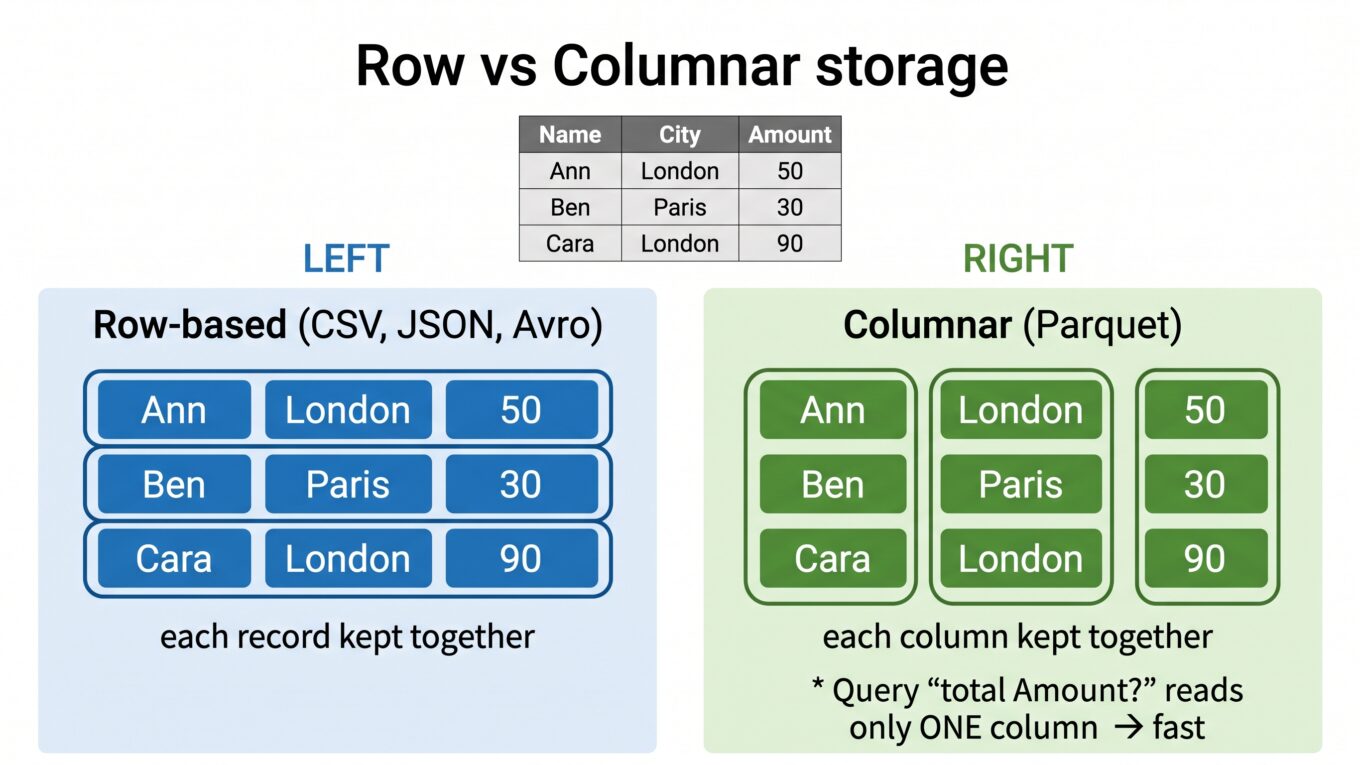
Same values, different grouping. Here’s the same idea as a picture — watch how the colored cells regroup from records into columns:
Row-based CSV · JSON · Avro
Each record stored together
AnnLondon50
BenParis30
CaraLondon90
To total amount, it must read every cell of every row.
Columnar Parquet
Each column stored together
AnnBenCara
LondonParisLondon
503090
To total amount, it reads only the amount column (dashed) — and skips the rest.
Now the payoff. Ask a typical analytics question: “What’s the total amount?” The columnar format grabs just the amount column and ignores the rest — reading a fraction of the data. The row-based format has to read every field of every row to pull the amounts out. On three rows it’s nothing; on a billion rows it’s the difference between seconds and minutes. This is the same reason OLAP systems love columnar storage.
All four, side by side
CSV
JSON
Parquet
Avro
Readable?
Yes
Yes
No (binary)
No (binary)
Layout
Row
Row (nested)
Columnar
Row
Compression
Poor
Poor
Excellent
Good
Best for
Small exports, sharing
APIs, app data
Analytics at scale
Streaming, transport
File size
Large
Largest
Smallest
Small
Query speed (analytics)
Slow
Slow
Fast
Moderate
The same data, two formats
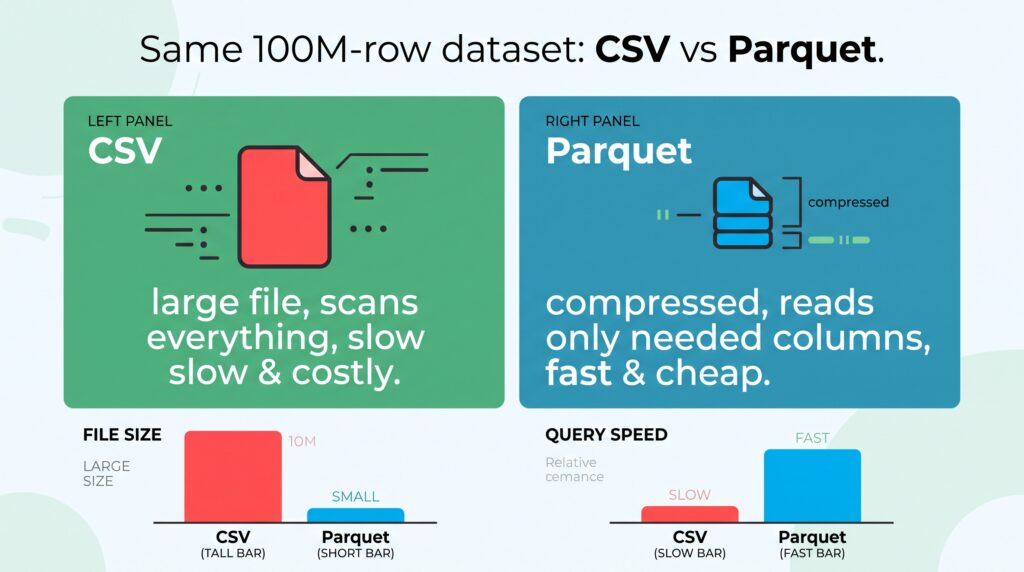
Here’s why this isn’t academic. Take the grocery company’s orders table — say 100 million rows — and store it two ways.
The same dataset as CSV vs Parquet — Parquet is far smaller on disk and much faster for column queries.
As CSV: a big file, every query scans everything, slow and expensive to store.
As Parquet: a much smaller file thanks to compression, and a query for “total revenue” reads only the revenue column — fast and cheap.
Same data, same question — but the Parquet version can be many times smaller and dramatically faster. That’s why “convert it to Parquet” is one of the most common performance wins in data engineering.
So which should you use?
Sharing a small file with someone? CSV. Simple and universal.
Moving data between apps or APIs? JSON.
Storing big data for analytics? Parquet. Almost always.
Streaming records between systems? Avro.
In a real pipeline you’ll often see all four: data arrives as JSON from an API, streams through the system as Avro, and lands as Parquet in the lakehouse for analysis — with the occasional CSV export for a colleague. Each format doing the job it’s best at.
The takeaway
File format is a quiet decision with loud consequences. CSV is the readable universal generalist; JSON is the flexible language of apps and APIs; Parquet is the columnar champion for analytics, usually far smaller and faster; Avro is the row-based format for streaming and moving records. The key insight underneath it all is row vs columnar storage — reading only the columns you need is what makes analytical queries fly. Pick the format that matches the job, and reach for Parquet whenever you’re storing data to analyze.
We’ve now covered how data is shaped and stored. Next, we move up a level to how it’s organized for analysis — starting with the foundation of data modeling: the star schema vs the snowflake schema.
Frequently Asked Questions
What is the difference between CSV and Parquet?
CSV is a plain-text, row-based format that is human-readable but large and slow for analytics. Parquet is a binary, columnar format that compresses well and lets queries read only the columns they need, making it much smaller and faster for analytics at scale. CSV suits small exports; Parquet suits big analytical datasets.
Why is Parquet faster than CSV?
Parquet stores data by column instead of by row, so an analytical query that needs one or two columns can read just those and skip the rest. It also compresses very well. CSV must scan every field of every row, which is far slower on large datasets.
What is the difference between Avro and Parquet?
Both are binary formats, but Avro is row-based and optimized for writing and moving whole records, making it ideal for streaming and data transport. Parquet is columnar and optimized for reading specific columns quickly, making it ideal for analytics. They are often used together in the same platform.
When should I use JSON?
Use JSON for moving data between applications and APIs, and when the data has a flexible or nested shape. It is readable and widely supported, but it is verbose and slow for large-scale analytics, so data is usually converted to a format like Parquet for storage and analysis.
What is columnar storage?
Columnar storage keeps all the values of one column together, rather than keeping each row’s fields together. This lets analytical queries read only the columns they need and compress data more effectively, which is why columnar formats like Parquet are much faster for analytics than row-based formats.