repartition vs coalesce in Spark: Which to Use and When
Both change the number of partitions — but one does a full shuffle and one doesn't, and that single difference decides your performance. Plus the coalesce(1) trap everyone falls into.
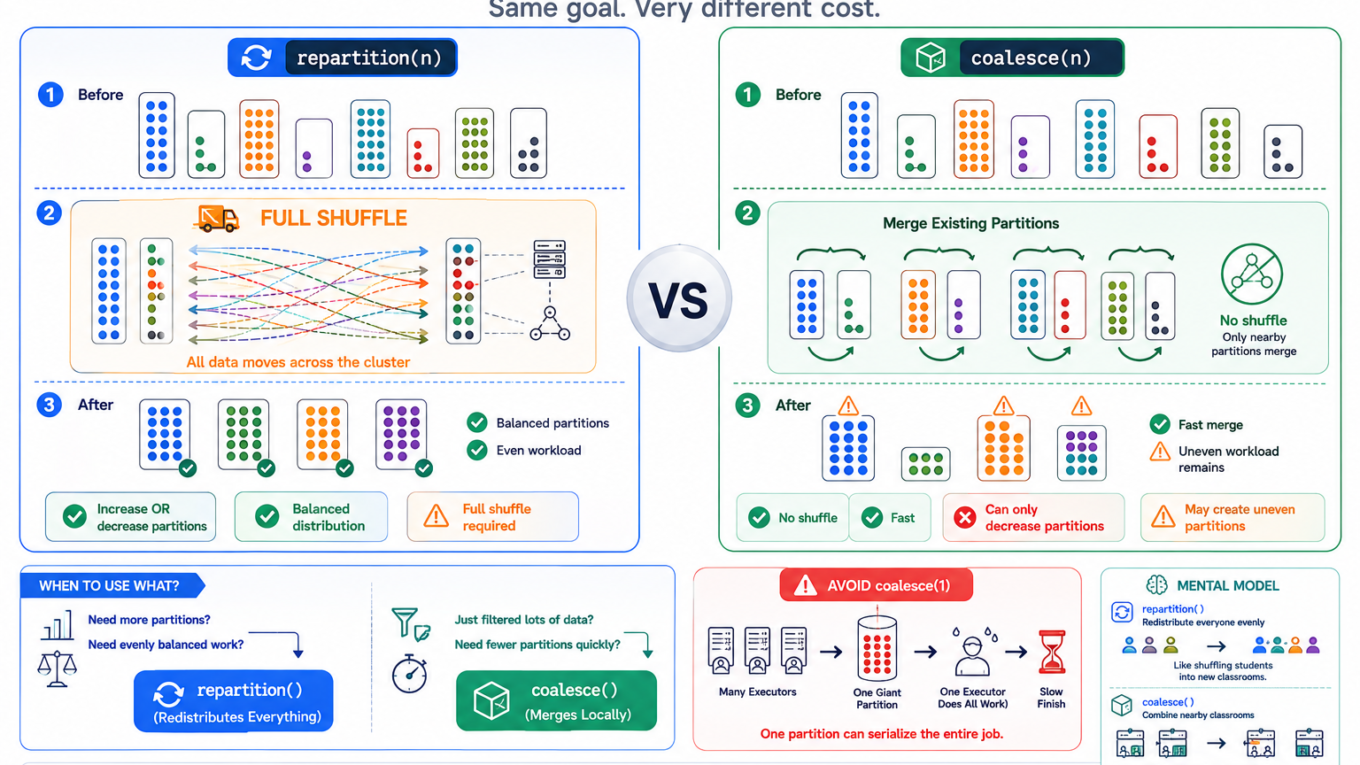
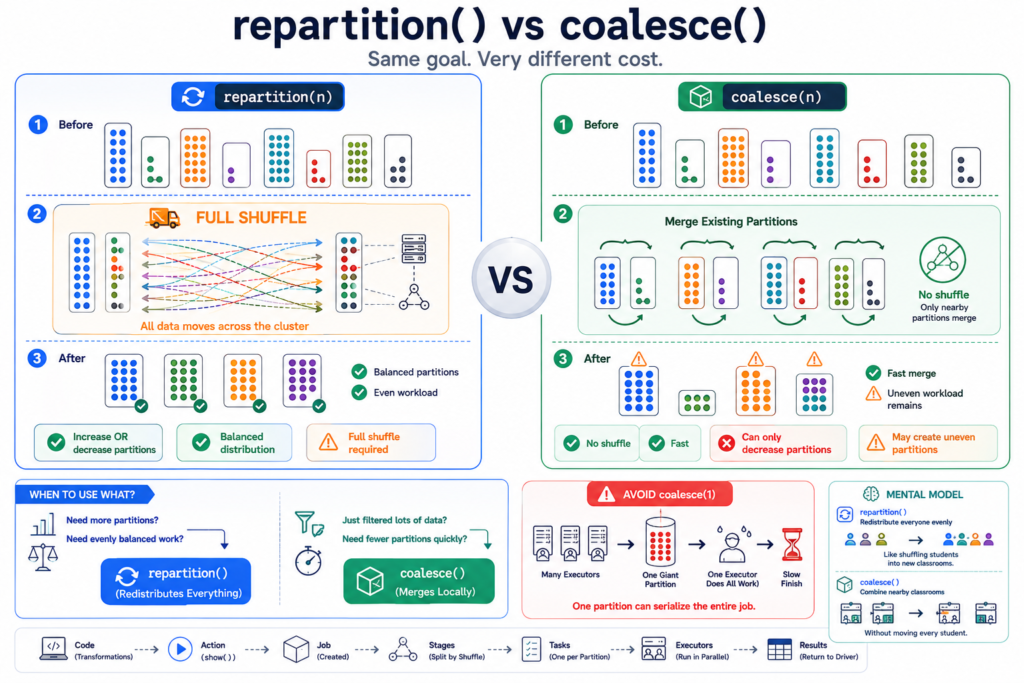
Both repartition and coalesce change how many partitions your data is split into. They look interchangeable, people reach for whichever they remember, and then one job is mysteriously slow. The difference is simple and it matters a lot: repartition does a full shuffle; coalesce avoids one. Everything else follows from that.
⚡ The short answer
repartition(n)
coalesce(n)
Can increase partitions?
Yes
No — decrease only
Full shuffle?
Yes (moves all data)
No (merges existing)
Resulting sizes
Even
Can be uneven
Cost
Higher
Lower
Use it to
Increase parallelism, fix skew, distribute evenly
Cheaply reduce partitions after a filter
Rule of thumb: going up (or need even partitions) → repartition. Going down cheaply → coalesce.
repartition — the full shuffle
repartition(n) reshuffles all the data across the cluster to produce exactly n evenly-sized partitions. It can go up or down. Because it’s a real shuffle, it’s expensive — but you get balanced partitions, which is exactly what you want when you need more parallelism or you’re fixing skew.
df.rdd.getNumPartitions() # e.g. 8more = df.repartition(200) # full shuffle -> 200 even partitionsmore.rdd.getNumPartitions() # 200# You can also repartition BY a column (hash shuffle on that key)by_region = df.repartition("region") # all rows of a region togetherby_region = df.repartition(50, "region") # 50 partitions, keyed by region
Repartitioning by a column is handy right before a join or a partitioned write, because it co-locates rows with the same key.
coalesce — merge without the shuffle
coalesce(n) only reduces the partition count, and it does so cheaply by merging existing partitions that already live on the same executor — no full network shuffle. The trade-off: the result can be uneven, because it just stitches partitions together rather than rebalancing them.
filtered = df.filter(df.amount >100) # say this leaves lots of near-empty partitionsfewer = filtered.coalesce(10) # merge down to 10 -> cheap, no full shufflefewer.rdd.getNumPartitions() # 10
This is the classic use: after a heavy filter you’re left with, say, 200 mostly-empty partitions (and 200 tiny output files). coalesce collapses them without paying for a shuffle.
repartition reshuffles everything into even partitions; coalesce merges existing ones with no shuffle.
The coalesce(1) trap
Everyone eventually writes coalesce(1) to get a single output file — and then wonders why the job crawls or runs out of memory. Here’s why it’s dangerous.
Because coalesce doesn’t add a shuffle, it pushes its low partition count backwards up the plan. coalesce(1) doesn’t just make the final write single-threaded — it can force the entire upstream computation to run on one task, throwing away all your parallelism and often OOM-ing that single executor.
Only use coalesce(1) for genuinely tiny outputs (a small summary table).
Need one file from a large dataset? Prefer repartition(1) — the shuffle costs more but keeps the upstream work parallel, so it usually finishes faster and won’t OOM.
Better still, don’t force one file. A few reasonably-sized files are almost always better than one giant file.
Which should you use?
Need MORE partitions (more parallelism)? → repartition. Coalesce literally can’t increase them.
Fixing skew or want even sizes? → repartition. Only a full shuffle rebalances the data.
Reducing partitions cheaply after a filter? → coalesce. No shuffle, low cost.
Reducing output files but the data is big? → repartition(n) to a small-but-not-1 number, to keep parallelism.
How to verify
df.rdd.getNumPartitions() # confirm the partition count before/after# After writing, check the number of output filesdbutils.fs.ls("/mnt/out/report") # one file per final partition
In the Spark UI, a repartition shows up as an extra shuffle stage (an “Exchange”); a coalesce does not add one.
Best practices
Don’t over-repartition. A full shuffle isn’t free — only repartition when you actually need even distribution or more parallelism.
Use coalesce for the cheap downsize after filters, when perfectly even partitions don’t matter.
Avoid coalesce(1) on large data. It’s the most common way to accidentally serialize a whole job.
On Databricks, let AQE help. Adaptive Query Execution can coalesce shuffle partitions automatically, so you often don’t need to tune this by hand at all.
Frequently Asked Questions
What is the difference between repartition and coalesce in Spark?
repartition does a full shuffle to create a specific number of evenly-sized partitions and can increase or decrease the count. coalesce only decreases the partition count and avoids a full shuffle by merging existing partitions, which is cheaper but can produce uneven partitions.
When should I use coalesce instead of repartition?
Use coalesce when you want to reduce the number of partitions cheaply — for example after a heavy filter that left many near-empty partitions — and even partition sizes are not important. Use repartition when you need to increase partitions, rebalance skewed data, or guarantee even sizes.
Why is coalesce(1) slow?
Because coalesce doesn’t add a shuffle, coalesce(1) can force the entire upstream computation onto a single task, removing all parallelism and often running that one executor out of memory. For a single file from large data, repartition(1) is usually safer because it keeps the upstream work parallel.
Does coalesce cause a shuffle?
No, coalesce avoids a full shuffle by combining partitions that already sit on the same executor. That is why it is cheaper than repartition, but also why it can leave partitions unevenly sized and can reduce the parallelism of upstream steps.
How do I reduce the number of output files in Spark?
Reduce the number of partitions before writing, since Spark writes one file per partition. Use coalesce for a cheap reduction when sizes can be uneven, or repartition to a small number for even, parallel writes. Avoid coalesce(1) on large datasets because it serializes the whole job.