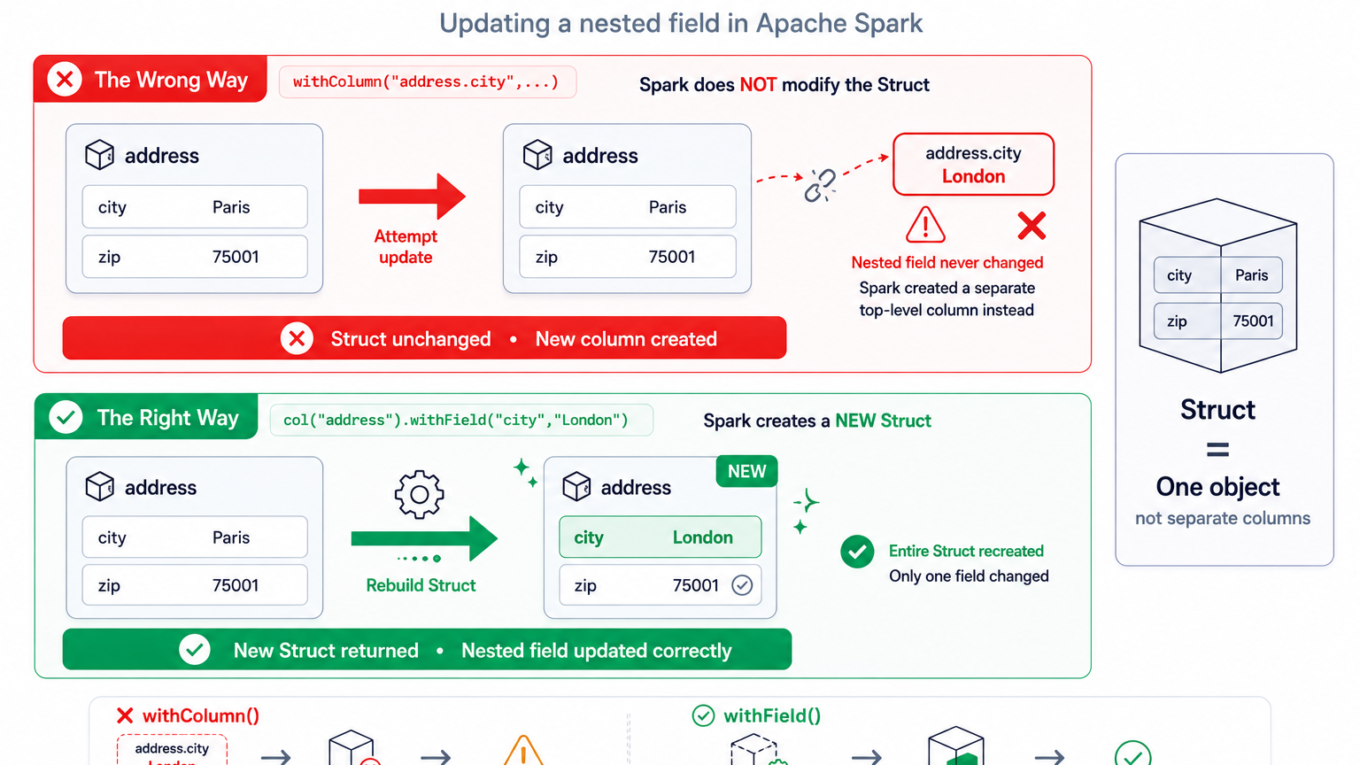
You have a struct column and you want to change one field inside it. The obvious thing doesn’t work:
# You expect this to update the nested city field...
df.withColumn("address.city", lit("London"))

# ...but it does NOT. It creates a brand-new TOP-LEVEL column
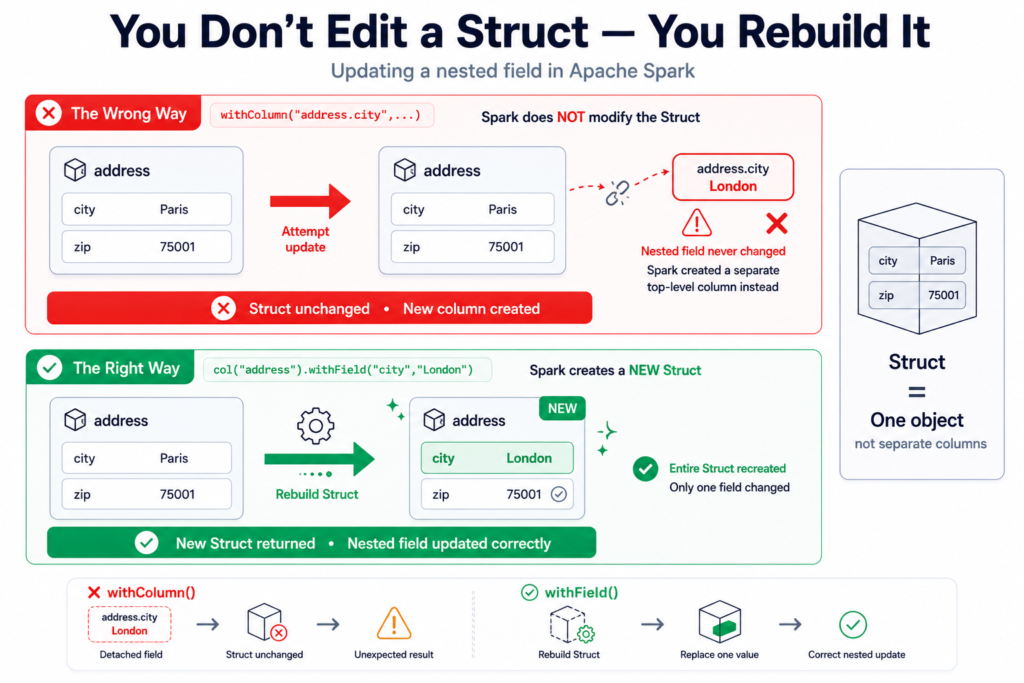
# literally named "address.city" and leaves the real nested field untouched.No error, just the wrong result — which is why this one wastes so much time. The reason is simple once you see it: structs are immutable, and withColumn with a dotted name doesn’t reach inside them. To change a nested field you have to produce a new struct.
⚡ Quick fix
On Spark 3.1+ (all current Databricks runtimes), use withField on the struct column:
from pyspark.sql.functions import col, lit

# Update a nested field
df = df.withColumn("address", col("address").withField("city", lit("London")))

# Add a new nested field
df = df.withColumn("address", col("address").withField("country", lit("UK")))

# Drop a nested field
df = df.withColumn("address", col("address").dropFields("zip"))Notice you assign back to the whole address column, not to address.city. You’re replacing the struct with an updated copy — that’s the mental model.
What’s actually happening
Say your schema looks like this:
root
 |-- id: integer
 |-- address: struct
 |    |-- city: string
| |-- zip: stringA struct is a single, self-contained value — like a small object. You can’t poke a new value into one field in place, any more than you can edit one field of an immutable record without creating a new record. Spark’s withColumn operates on top-level columns, so when you pass "address.city" it doesn’t interpret the dot as “reach inside address” — it just makes a new column whose name happens to contain a dot. The nested field never changes.
The fix, by situation
1. withField / dropFields (Spark 3.1+ — the modern way)
Shown above. It’s concise and handles update, add, and drop. This is the right default on any recent Databricks runtime.
2. Rebuild the struct explicitly (works on any version)
If you’re on an older Spark, or you want full control, construct a fresh struct listing every field — the changed one, and the ones you keep:
from pyspark.sql.functions import struct, col, lit

df = df.withColumn(
    "address",
    struct(
        lit("London").alias("city"),      # changed field
        col("address.zip").alias("zip")   # keep the rest
    )
)The catch: you must list every field you want to keep. Miss one and it silently disappears from the struct — so withField is safer when it’s available.
3. Delta tables: use SQL UPDATE with a dotted path
If the data lives in a Delta table, you don’t need DataFrame gymnastics — SQL UPDATE understands nested paths directly:
UPDATE customers
SET address.city = 'London'
WHERE id = 55;4. Arrays of structs: use transform
When the field is inside an array of structs, map over the array with the transform higher-order function and update each element’s field:
from pyspark.sql.functions import transform, col, lit

# items: array<struct<name:string, price:double>>  — bump every price by 10%
df = df.withColumn(
    "items",
    transform("items", lambda x: x.withField("price", x["price"] * lit(1.1)))
)How to verify it worked
df.printSchema()               # structure unchanged, same nested fields
df.select("address.city").show() # the nested value is actually updatedIf you accidentally used the wrong approach, the tell-tale sign is a stray top-level column named address.city showing up in printSchema alongside the untouched address struct.
Best practices for nested data
- Prefer
withField/dropFieldsover manual struct rebuilds — they won’t silently drop fields you forgot to list. - Assign back to the whole struct column, never to a dotted name.
- For Delta, reach for SQL
UPDATEwith nested paths — it’s the cleanest option. - Don’t over-nest. Deeply nested structs are awkward to maintain; flatten to columns when a field is queried or updated often.
When it’s actually something else
- A top-level column with a dot in its name: if you truly have a column literally named
a.b, wrap it in backticks (`a.b`) to reference it — that’s different from nested access. - Map columns, not structs: updating a value in a
MapTypecolumn uses map functions, notwithField. - Old Spark version: if
withFieldisn’t recognized, you’re pre-3.1 — use the explicit struct rebuild instead.
Frequently Asked Questions
Why doesn’t withColumn update a nested field?
Because withColumn operates on top-level columns and treats a dotted name like "address.city" as a literal new column name, not a path into the struct. Structs are immutable, so updating a nested field requires producing a new struct with withField or a rebuild, then assigning it back to the whole column.
How do I update a struct field in PySpark?
On Spark 3.1 or newer, use col("address").withField("city", lit("London")) and assign it back to the address column. On older versions, rebuild the struct with struct(...), listing every field you want to keep along with the changed one.
How do I add or drop a field inside a struct?
Use withField("new_field", value) to add a field and dropFields("field_name") to remove one, both applied to the struct column and assigned back. These are the safest options because they preserve all other fields automatically.
How do I update a field inside an array of structs?
Use the transform higher-order function to map over the array, and inside the lambda apply withField to each struct element. This updates the chosen field for every element of the array without exploding and re-collecting it.
Can I update nested columns in a Delta table with SQL?
Yes. Delta’s SQL UPDATE supports dotted paths, so UPDATE customers SET address.city = 'London' WHERE id = 55 updates the nested field directly. This is often the cleanest way to change nested data when it already lives in a Delta table.