Databricks Clusters Explained: Why My Pipeline Doubled the Bill
A walkthrough of what each Databricks compute type actually is — job cluster, all-purpose, SQL Warehouse, serverless — told through one pipeline that quietly cost twice what it should have.
“Nice work on the sales pipeline. Quick question though — do you know why our Databricks bill went up so much last month?”
That question is how a lot of people first learn how Databricks compute actually works. Here’s the story, and everything it teaches — starting from what a cluster even is.
How it started
You join the team. An admin sends you a link: “Here’s your cluster, attach your notebook to it.” You click it, it turns green, your notebook runs. Nobody explains what it is — it just works.
Over two weeks you build a daily sales pipeline in that notebook. Read yesterday’s orders, clean them, join to products and stores, write a summary table. You run cells, check output, tweak, run again — dozens of times a day. The cluster is always there, instantly ready. Perfect.
The pipeline works. So you schedule it: create a Workflow, point it at your notebook, set it for 2 AM daily. And when it asks which compute to run on, you pick the one you know — the same cluster the admin gave you. It’s been reliable all along. Job done.
A month later, that question about the bill.
Step back: what is a “cluster” in Databricks?
Before the mistake makes sense, the basics.
Databricks doesn’t run your code. It’s an interface. When you press run, the work happens on actual cloud machines — virtual servers rented from Azure, AWS, or Google. A cluster is just a group of those machines working together, with Spark installed and configured.
Two things follow from that, and they’re the whole story:
A cluster is real hardware. While it’s on, it costs money — whether or not anyone is using it.
You pay for two things: the cloud machines themselves, plus a Databricks software charge measured in DBUs (Databricks Units — a unit of processing power per hour). Both are billed by time.
Here’s the part nobody mentions on day one: the DBU rate is not the same for every type of compute. The identical machines cost different amounts depending on which kind of cluster you asked for. That single fact is the answer to the bill question.
The four kinds of compute — and the problem each solves
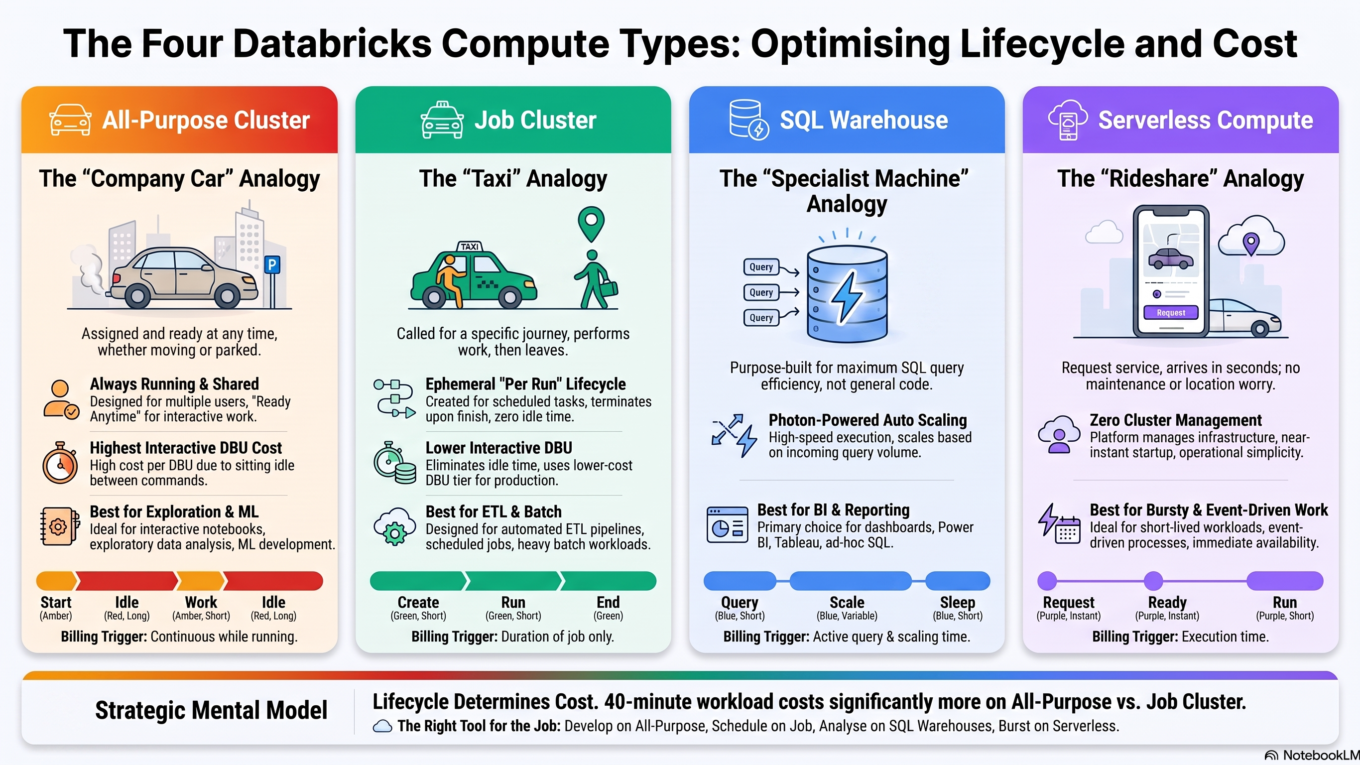
1. All-purpose cluster — the one you were given
The problem it solves:“I wait five minutes every time I run a cell.” When you’re exploring data — run a cell, read the output, tweak, run again — a cluster that shut down between commands would make the work unbearable.
What it is: a long-running cluster that you (or an admin) start manually, and which stays on until someone stops it. Several people can attach notebooks to the same one at once.
Think of it as a company car left running in the car park. Whenever you need it, you hop in and drive off immediately — no waiting. That convenience is the point. But the engine is running the whole time, burning fuel even when nobody’s in it.
Use for: notebook exploration, development, ML experimentation.
The cost: the highest DBU rate of the four, and it bills while completely idle.
2. Job cluster — created for one run, then gone
The problem it solves:“Our nightly pipeline costs a fortune.” A scheduled job runs for 40 minutes at 2 AM and nobody touches it — so why pay for a cluster sitting warm the other 23 hours?
What it is: a cluster created automatically when a scheduled job starts, and destroyed the moment it finishes. It’s temporary by design — you can’t attach a notebook to it or share it, because it only exists for the length of that one run.
This is a taxi instead of the idling company car. It shows up, takes you where you’re going, and leaves. You pay for the journey, never for parking.
Use for: scheduled, automated work — the pipelines nobody watches run.
The cost: a much lower DBU rate than all-purpose — commonly around half for the same machines — and zero idle time.
Trade-off: a few minutes of startup on every run.
3. SQL Warehouse — compute built only for SQL
The problem it solves:“The dashboard is slow and Power BI keeps timing out.” Dashboard traffic is short, frequent, and spiky — quiet at 9 AM, hammered at 10 — which a fixed general-purpose cluster handles badly and expensively.
What it is: compute that runs SQL and nothing else. You can’t attach a Python notebook to it. In exchange for that narrowness it’s tuned specifically for queries: it runs the Photon engine (a faster, vectorized query engine), scales up and down automatically as queries arrive, and BI tools like Power BI and Tableau connect straight to it over JDBC/ODBC.
If a cluster is a general workshop, a SQL Warehouse is a specialist machine that does one job extremely well.
Use for: analysts running SQL, dashboards, and BI tool connections.
4. Serverless — no cluster at all
The problem it solves:“A 30-second task waits four minutes for a cluster to boot.” Small, event-driven work — a file lands, a webhook fires — where the startup costs more than the job itself, and the load is wildly unpredictable.
What it is: compute where you don’t create or size a cluster at all — Databricks keeps capacity ready and hands you some the instant you need it. Startup drops from minutes to seconds, and you’re billed for what the work actually consumes.
It’s the difference between owning a car and calling a rideshare: no maintenance, no parking, it just turns up.
Use for: short, event-driven, or unpredictable workloads — and teams who’d rather not configure clusters at all.
Trade-off: less control. No GPUs, no custom startup scripts, and not every Spark API is available.
Four compute types, four different problems — the cost difference comes from picking the wrong one.
So what actually went wrong?
Now the bill makes sense.
The cluster the admin gave you was an all-purpose cluster — correctly, because you were developing. That part was right.
The mistake was scheduling the job on it too. Your 2 AM pipeline was automated work running on compute priced for interactive work. Two separate costs, both avoidable:
Roughly double the DBU rate. The same 40 minutes of processing, on the same machines, billed at the all-purpose rate instead of the job rate.
All the idle hours. The cluster stayed on around the clock so it’d be ready — meaning you also paid for the 23 hours a day it did nothing.
The pipeline itself was fine. The code was fine. It just ran on a car left idling in the car park for a journey a taxi should have made.
The fix — two changes
Switch the Workflow to a job cluster. In the job’s settings, choose new job compute instead of the existing all-purpose cluster. Same notebook, same code — nothing to rewrite. It now spins up at 2 AM, runs, and disappears.
Set auto-termination on the all-purpose cluster. 30 minutes of inactivity is a common choice. Keep using it for development, but it no longer runs all night and all weekend.
The pipeline’s compute cost drops sharply — the lower rate, for 40 minutes instead of 24 hours — and the development cluster stops billing while everyone’s asleep.
The new problem: now every run waits to start
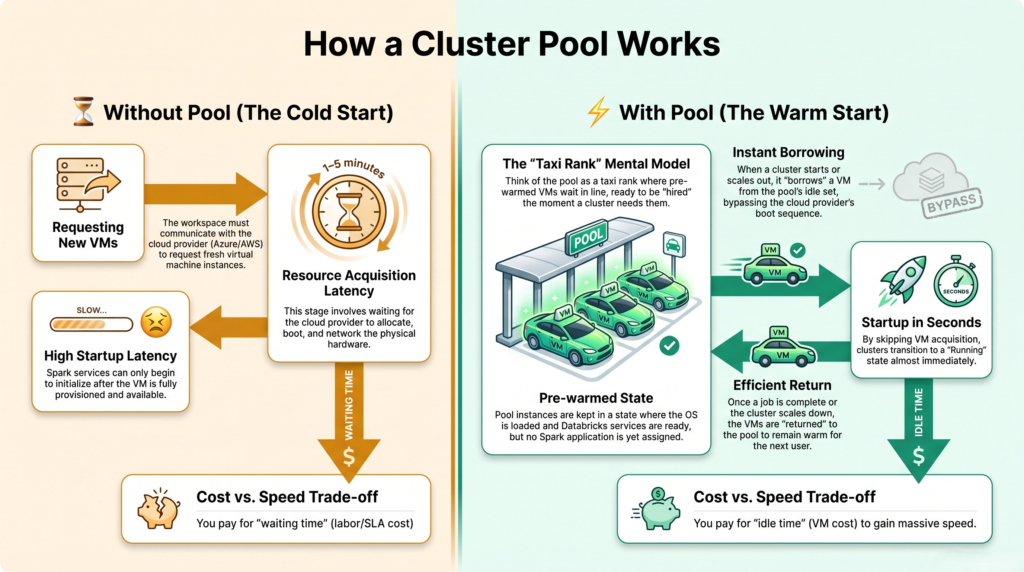
A week later you notice something. The pipeline used to begin instantly, because the cluster was already awake. Now every run spends four or five minutes just starting up before any work happens — Databricks has to ask the cloud provider for machines, wait for them to boot, and install Spark.
For one nightly job, that’s tolerable. But you now have a dozen small jobs through the day, and each is paying that startup tax. Worse, you’re billed for those boot-up minutes too.
The fix: a cluster pool.
What a cluster pool is
A pool (or instance pool) is a set of cloud machines kept switched on and pre-warmed, waiting to be used. When a cluster needs to start, instead of requesting fresh machines from the cloud and waiting for them to boot, it borrows ready ones from the pool — cutting startup from minutes to seconds. When the job finishes, the machines go back to the pool for the next job.
It’s a taxi rank. The taxis (your job clusters) still come and go per journey — but now there are always a few idling at the rank, so you never wait for one to drive over.
The billing detail that makes pools worth understanding:
While machines sit idle in a pool, you pay the cloud provider for those VMs — but Databricks does not charge DBUs for them. DBUs only start when a cluster actually picks them up and does work.
So a pool is a trade: a modest, predictable VM cost for keeping some machines warm, in exchange for near-instant cluster starts and no wasted DBU-billed boot time.
Worth it when: you run many jobs, or frequent short jobs, where startup time is a meaningful share of the total runtime.
Not worth it when: you have one nightly job — a few idle machines all day to save four minutes once is a bad deal.
Tuning: set the minimum idle instances to match how many jobs typically overlap, and set an idle-instance auto-termination so the pool shrinks when it’s quiet.
Note: a pool isn’t a fifth compute type — it’s a speed-up you attach to job or all-purpose clusters.
A pool keeps machines warm so clusters start in seconds instead of minutes.
When none of them fit: GPUs and custom libraries
One last case. You try to move a workload to serverless or a SQL Warehouse and it simply fails — the framework isn’t supported, your init script doesn’t run, or you need a GPU.
That’s expected, not a failure. Managed compute trades flexibility for convenience, so some work needs a cluster you control: GPU training, custom init scripts, or lower-level Spark APIs that managed compute doesn’t expose. Go back to a job cluster if it’s scheduled, an all-purpose cluster if it’s interactive.
The rule that would have avoided all of it
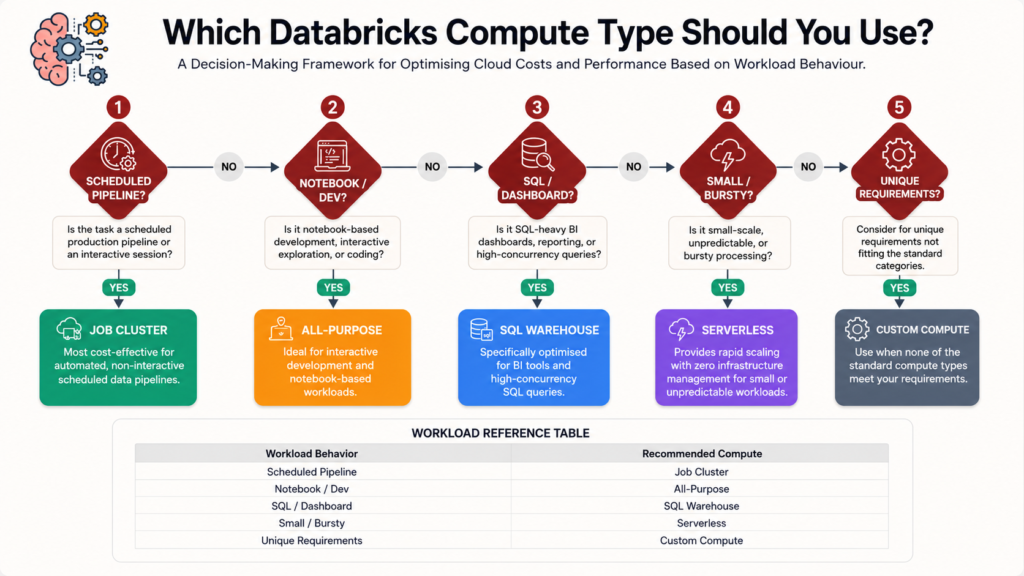
If a human is watching it run, use an all-purpose cluster. If nobody is, use a job cluster.
Notebooks, exploring, ML training? → All-purpose cluster
SQL, dashboards, Power BI or Tableau? → SQL Warehouse
Small, bursty, event-driven tasks? → Serverless
Needs a GPU, custom libraries, or unusual Spark APIs? → back to a job or all-purpose cluster
Startup time hurting across many jobs? → add a cluster pool
Work down the questions and stop at the first match.
Side by side
All-purpose
Job cluster
SQL Warehouse
Serverless
What it is
Long-running, shared
Created per run
SQL-only compute
Fully managed
Solves
Waiting between commands
Paying for idle time
Slow dashboards
Startup on tiny tasks
Lifetime
Until stopped
Ends with the job
Auto-scales
On demand
DBU rate
Highest
Much lower
Moderate
Per-use
Startup
Already warm
Minutes (seconds with a pool)
Fast
Seconds
GPU / custom libs
Yes
Yes
No
No
The mistakes that cost the most
Scheduling jobs on an all-purpose cluster. The one in this story — roughly double the rate, plus idle hours. Usually the fastest cost win available on any Databricks account.
No auto-termination. One development cluster forgotten over a weekend can cost more than the pipeline it was built for.
Running dashboards on a general cluster. Slower and pricier than a SQL Warehouse designed for exactly that.
A pool that’s too big. Pools cost real VM money while idle. Sizing one for peak and leaving it there turns a speed fix into a new bill.
Oversizing “to be safe.” A bigger cluster burns DBUs faster every hour, used or not.
This is the same discipline as choosing a data ingestion pattern: pick the cheapest option that genuinely meets the requirement, not the one that’s most convenient to reach for.
The takeaway
A Databricks cluster is real cloud machines, billed by time — and the DBU rate depends on which kind of compute you asked for. An all-purpose cluster stays alive so interactive work feels instant, at the highest rate. A job cluster exists only for one scheduled run, at roughly half the rate and no idle time. A SQL Warehouse is Photon-powered compute for SQL and BI tools. Serverless removes cluster management entirely for small, bursty work. And a cluster pool keeps machines warm so job clusters start in seconds rather than minutes. Nearly every expensive surprise comes from one habit: using the interactive cluster you were handed on day one for jobs that nobody is watching.
Frequently Asked Questions
What is a cluster in Databricks?
A cluster is a group of cloud virtual machines with Spark installed that actually runs your code. Databricks is the interface; the cluster is the hardware. Because it’s real machines, it costs money for as long as it’s switched on — you pay for the cloud VMs plus a Databricks software charge measured in DBUs.
What is the difference between a job cluster and an all-purpose cluster?
An all-purpose cluster runs continuously until stopped and can be shared for interactive notebook work, at the highest DBU rate. A job cluster is created automatically for a single scheduled run and terminates when it finishes, at a much lower DBU rate with no idle time. Use all-purpose for development and job clusters for scheduled pipelines.
What is a Databricks cluster pool?
A cluster pool is a set of pre-warmed cloud machines kept ready so clusters can start in seconds instead of minutes. Instead of requesting and booting new VMs, a cluster borrows idle instances from the pool and returns them when it finishes. It isn’t a separate compute type — it’s a speed-up you attach to job or all-purpose clusters.
Do you pay for idle instances in a cluster pool?
You pay the cloud provider for the virtual machines while they sit idle in the pool, but Databricks does not charge DBUs for idle pool instances — DBU billing starts only when a cluster uses them. That’s the trade-off: a predictable VM cost in exchange for near-instant cluster startup.
Why did my Databricks bill increase after scheduling a job?
Most likely the job was scheduled on an existing all-purpose cluster. That charges a significantly higher DBU rate than job compute for identical machines, and the cluster keeps billing during the hours between runs. Switching the job to job compute and enabling auto-termination usually fixes it.
What is a DBU in Databricks?
A DBU (Databricks Unit) is a unit of processing power consumed per hour, and it’s how Databricks charges for its software — separately from the cloud VM cost. Different compute types consume DBUs at different rates, which is why the same workload can cost very different amounts depending on the cluster type you choose.
When should I use a SQL Warehouse instead of a cluster?
Use a SQL Warehouse when the workload is SQL analytics, dashboards, or a BI tool connecting over JDBC/ODBC. It runs the Photon engine, which is much faster for SQL, and scales with query demand instead of holding a fixed cluster open. You can’t run Python notebooks on it.