Fix Parquet “Incompatible Schema” Errors in Databricks & Spark
"Failed to merge incompatible data types" and "Parquet column cannot be converted" both mean your files disagree on a column's type. Here's how to fix compatible and incompatible cases.
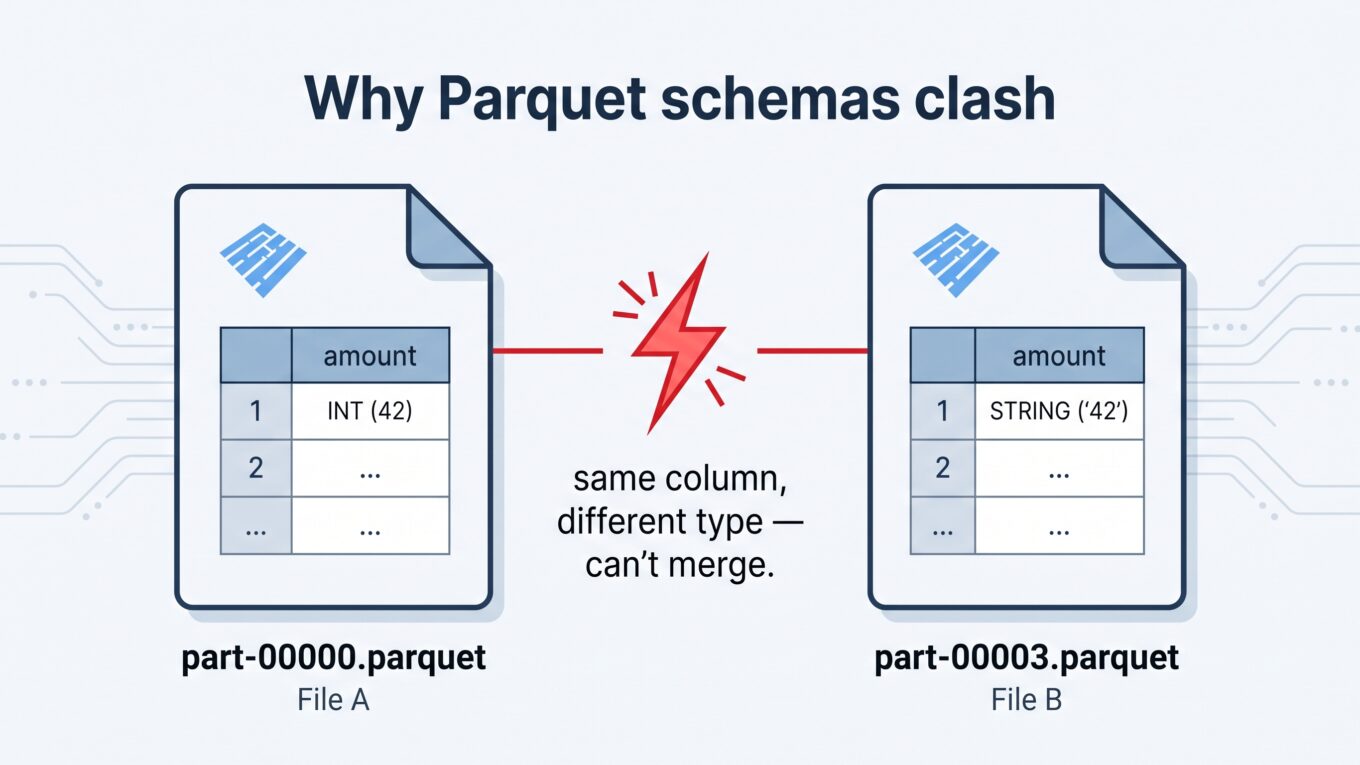
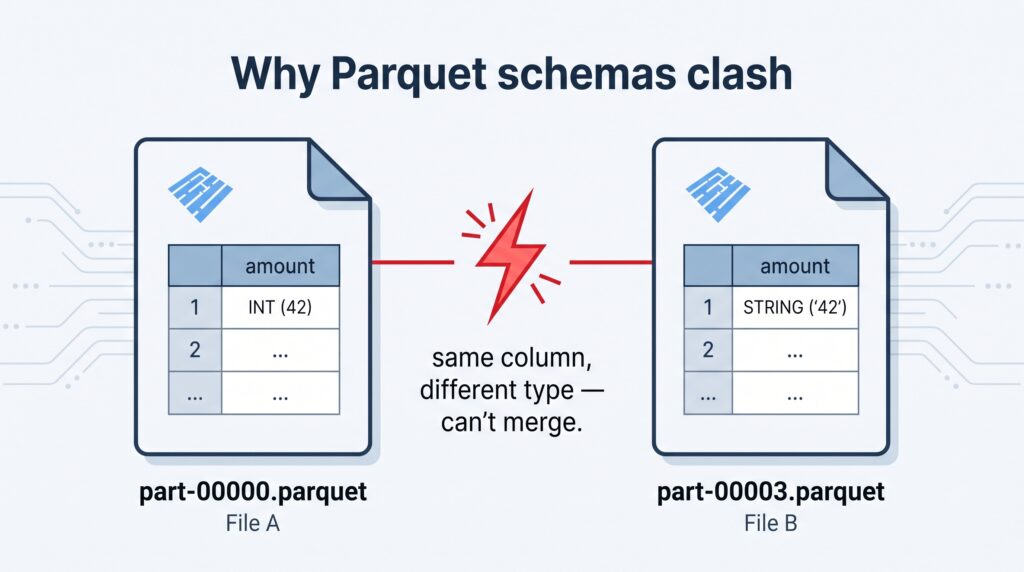
Both errors say the same thing in different words: the files at this path don’t agree on a column’s type. One file says amount is an integer, another says it’s a string. Spark can’t stitch them into one table, so it stops.
The fix depends entirely on how they disagree — and that’s the part most answers skip.
⚡ Quick fix
If the difference is compatible (extra/missing columns, or a safe widening like int → long): turn on schema merging. spark.read.option("mergeSchema", "true").parquet(path)
If the difference is incompatible (like int vs string): merging won’t save you. You have to reconcile the types yourself — read the mismatched files separately, cast them to one target type, and union. Full pattern below.
The trap: people try mergeSchema for everything, and it fails on incompatible types because merging can’t turn an integer into a string. Knowing which case you’re in is the whole game.
What the error actually means
Parquet files carry their own schema in each file’s footer. When you read a folder, Spark expects every file to describe the same columns with the same types. If file A stored amount as INT32 and file B stored it as a string, Spark hits a fork it can’t resolve automatically — hence “cannot be converted” or “failed to merge.”
The same column stored as different types across files is what breaks the read.
Why it happens
Schema drift over time. An early pipeline wrote amount as an integer; months later someone changed the source and it started arriving as a string. Old and new files now coexist in the same folder.
Mixed sources in one path. Two jobs, or two upstream systems, wrote to the same location with slightly different schemas.
A column was added or removed. Newer files have a column older ones don’t — this one is usually compatible and mergeSchema handles it.
An accidental type change. A cast slipped into the write job, or a null-heavy column got inferred differently on one run.
Step 1: Find out how the schemas differ
Before choosing a fix, see the actual disagreement. Read a couple of files individually and print their schemas:
spark.read.parquet("/path/part-00000.parquet").printSchema()spark.read.parquet("/path/part-00003.parquet").printSchema() # the one from the error
Now you can tell which case you’re in: a missing column and a safe widening are compatible; int versus string is not.
Step 2A: Compatible differences → mergeSchema
If files just have different columns, or a compatible type promotion, let Spark merge them:
This unions the columns across files and fills missing ones with nulls. Two things to know: it’s slower, because Spark must read every file’s footer to build the merged schema, and it only works for compatible types — it will still throw “failed to merge incompatible data types” for an int/string clash.
Step 2B: Incompatible types → reconcile them yourself
When two files store a column as genuinely different types, no option fixes it automatically. You decide a target type (usually the “wider” or safer one — often string), read each group, cast, and union:
from pyspark.sql.functions import col# Files where amount is an integerdf_int = (spark.read.parquet("/path/to/data/batch_old") .withColumn("amount", col("amount").cast("string")))# Files where amount is already a stringdf_str = spark.read.parquet("/path/to/data/batch_new")# Same schema now -> safe to uniondf = df_int.unionByName(df_str, allowMissingColumns=True)
Use unionByName (not union) so columns line up by name rather than position — far safer when schemas have drifted. allowMissingColumns=True handles the case where one group is missing a column entirely.
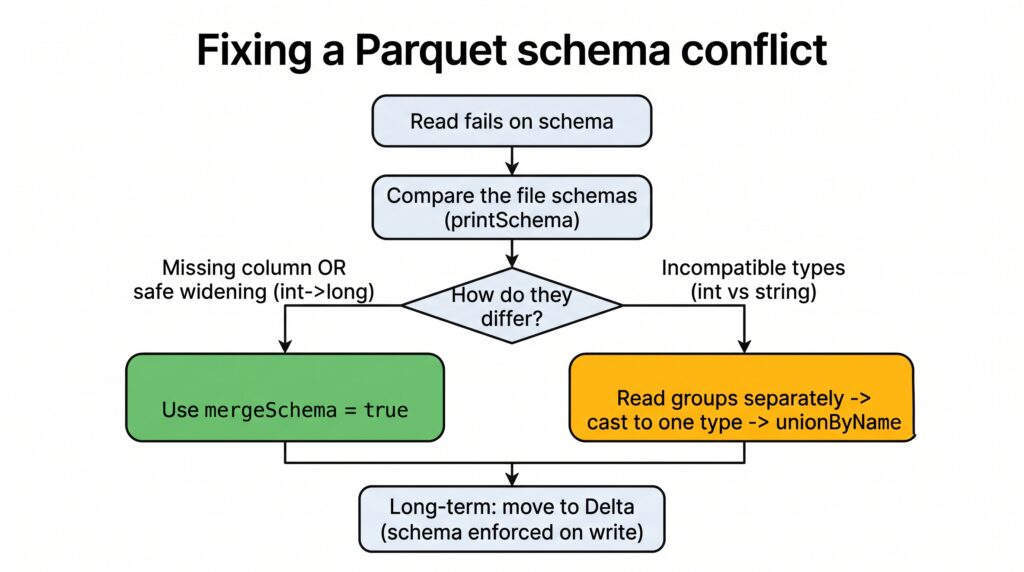
Compatible or incompatible? That single question decides your fix.
[ IMAGE 2 — compatible vs incompatible decision flowchart. Generate from the prompt provided, upload, set above, delete this note. ]
The real fix: stop it at the source
Casting on read is a rescue, not a cure. The clashing files are still sitting there, and the next read hits the same wall. Two durable fixes:
Rewrite the offending files once with a consistent schema, so the folder is clean going forward.
Move to Delta Lake. Delta enforces a schema on write, so a job that tries to append an incompatible type is rejected at write time — you get a clear error the moment the bad data shows up, not a mysterious read failure weeks later. Where you genuinely want the column to change, Delta’s controlled schema evolution handles it deliberately instead of by accident.
Hard-won rule: Raw Parquet folders have no schema police. The type of your columns drifts silently until a read explodes. Delta’s schema enforcement turns that silent, delayed failure into a loud, immediate one — which is exactly what you want.
How to verify it’s fixed
The read completes without the merge/convert exception.
df.printSchema() shows one consistent type for the column that was clashing.
A quick df.count() returns all expected rows — confirming no group was dropped in the union.
When it’s actually something else
Metastore vs file mismatch: “Parquet column cannot be converted” also appears when a table’s declared schema in the catalog disagrees with the files on disk. Fix the table definition or the files so they match.
Corrupted files: if a specific file won’t read at all, that’s a corruption problem, not a schema one.
Vectorized reader quirks: in rare cases the error text is clearer with spark.conf.set("spark.sql.parquet.enableVectorizedReader", "false") — useful for diagnosis, but it does not fix a genuine type conflict.
Frequently Asked Questions
What causes “Failed to merge incompatible data types” in Spark?
It happens when reading Parquet files where the same column is stored as different, incompatible types — for example an integer in one file and a string in another. Schema merging can combine compatible differences but cannot convert incompatible types, so it raises this error.
Does mergeSchema fix incompatible Parquet schemas?
Only for compatible differences, such as missing columns or a safe type widening like int to long. For genuinely incompatible types like int versus string, mergeSchema fails. You must read the mismatched files separately, cast them to a common type, and union them.
What does “Parquet column cannot be converted in file” mean?
It means the actual type of a column inside a Parquet file does not match the type Spark expected — either from other files at the path or from a table’s declared schema. Align the types by reconciling the files, or correct the table definition so it matches the data.
How do I combine Parquet files with different schemas?
For compatible schemas, read with the mergeSchema option enabled. For incompatible types, read each schema group separately, cast the clashing column to a shared target type, then combine them with unionByName so columns align correctly by name.
How do I prevent Parquet schema conflicts?
Use Delta Lake, which enforces a schema on write and rejects incompatible data immediately instead of failing on a later read. If you must use raw Parquet, standardize schemas at the write stage and rewrite any files that have already drifted.