The Small Files Problem in Spark: How to Detect and Fix It
41,600 files holding 14.8 GB took 34 minutes just to scan. Here is what causes the small files problem, the exact numbers that reveal it in the Spark UI, and four ways to fix it.
A table holds 14.8 GB of data. Reading it takes 34 minutes.
The cluster is fine. There is no skew, no spill, no complicated join. The problem is that those 14.8 GB are spread across 41,600 files.
This is the small files problem. This article covers what causes it, the exact numbers that reveal it in the Spark UI, and how to fix it.
What is the small files problem?
The small files problem happens when your data is stored in a large number of very small files instead of a smaller number of properly sized ones.
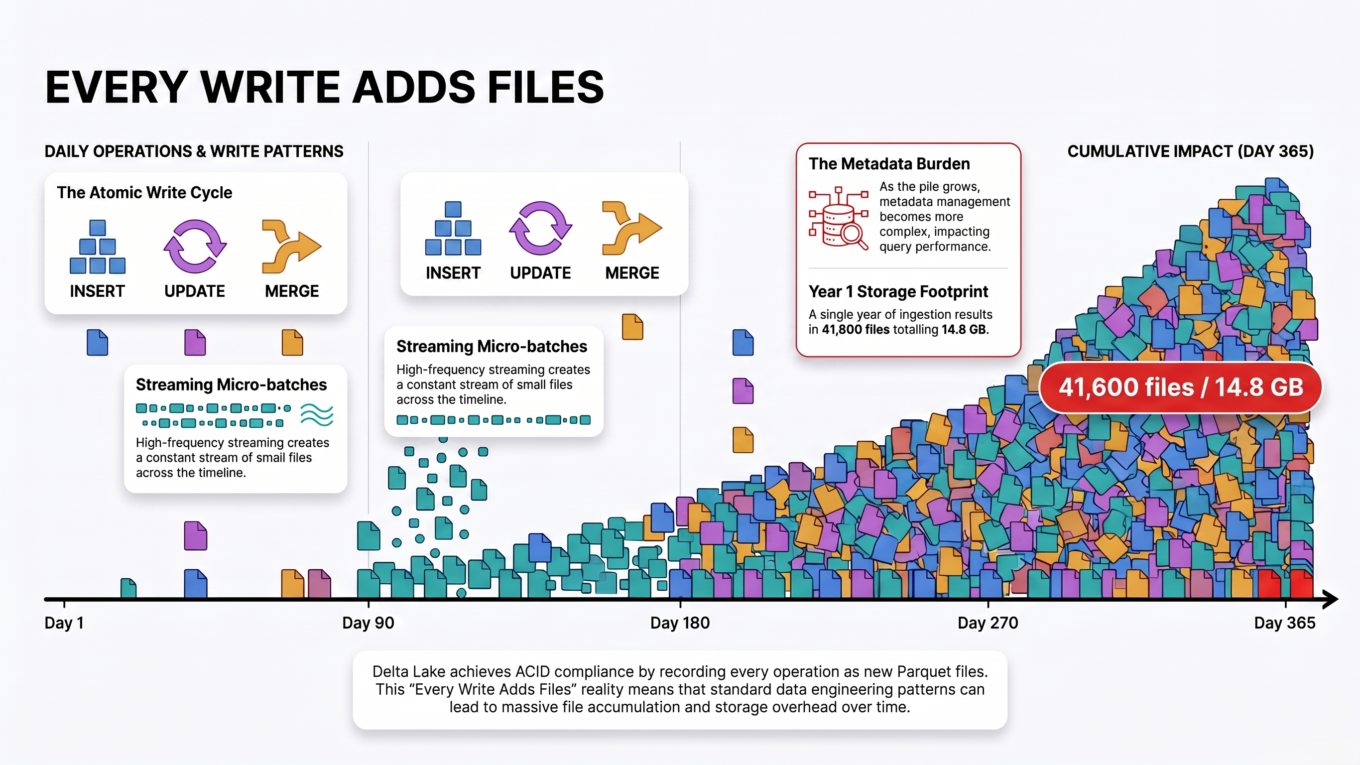
It builds up because every write operation creates new files. Each of these adds more:
Inserts — every append writes a new set of files.
Updates and deletes — in Delta and similar formats, files are never edited in place. Changing one row rewrites a whole file.
MERGE operations — a nightly merge touching a few rows can write hundreds of files.
Streaming writes — every micro-batch trigger produces its own files.
Over-partitioning — too many partition directories means each one holds very little data.
None of these is wrong on its own. The problem is cumulative. Run a small merge every hour for a year and you have 8,760 batches of files sitting in a table that should have a few hundred.
What size should files be? Aim for 128 MB to 1 GB per file. Anything consistently under 100 MB is worth looking at. Files measured in kilobytes are a clear problem.
Every write adds files. The problem is not any single operation — it is the accumulation.
Why small files are slow
Reading 14.8 GB should not take 34 minutes. Here is where the time actually goes.
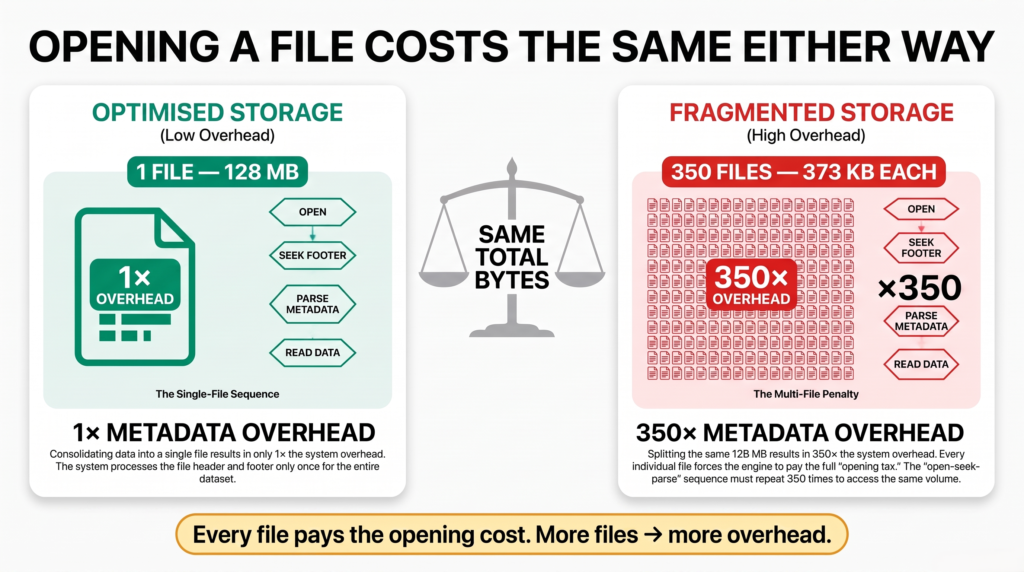
Fixed cost per file. To read any Parquet file, Spark must open it, seek to the end, read the footer, and parse the schema and row group metadata — before touching a single row. That cost is nearly the same whether the file holds 300 KB or 300 MB.
One request per file on cloud storage. Files on ADLS or S3 are fetched over HTTP. Each open is a network round trip with latency attached. 41,600 files means tens of thousands of round trips.
Listing overhead. Before reading anything, Spark has to list the directory and build the file index. The more files and directories, the longer this takes — and it happens before any job appears in the Spark UI.
Weak compression and statistics. Parquet compresses and encodes data per row group. A tiny file means a tiny row group, so compression works poorly and the min/max statistics used to skip data become far less useful.
Add these up and you get the situation above: the work of opening files completely dominates the work of reading them.
The cost of opening a file barely changes with its size. Multiply it by 41,600.
Detecting it in the Spark UI
This is the part worth learning, because the small files problem is easy to confirm precisely.
Open the Spark UI and go to the SQL / DataFrame tab.
Find the query that reads the table you are worried about.
Click it, then expand the Scan node at the bottom of the plan.
You get a long list of metrics. Four of them matter:
number of files read
size of files read
size of the largest file read
input read data size total
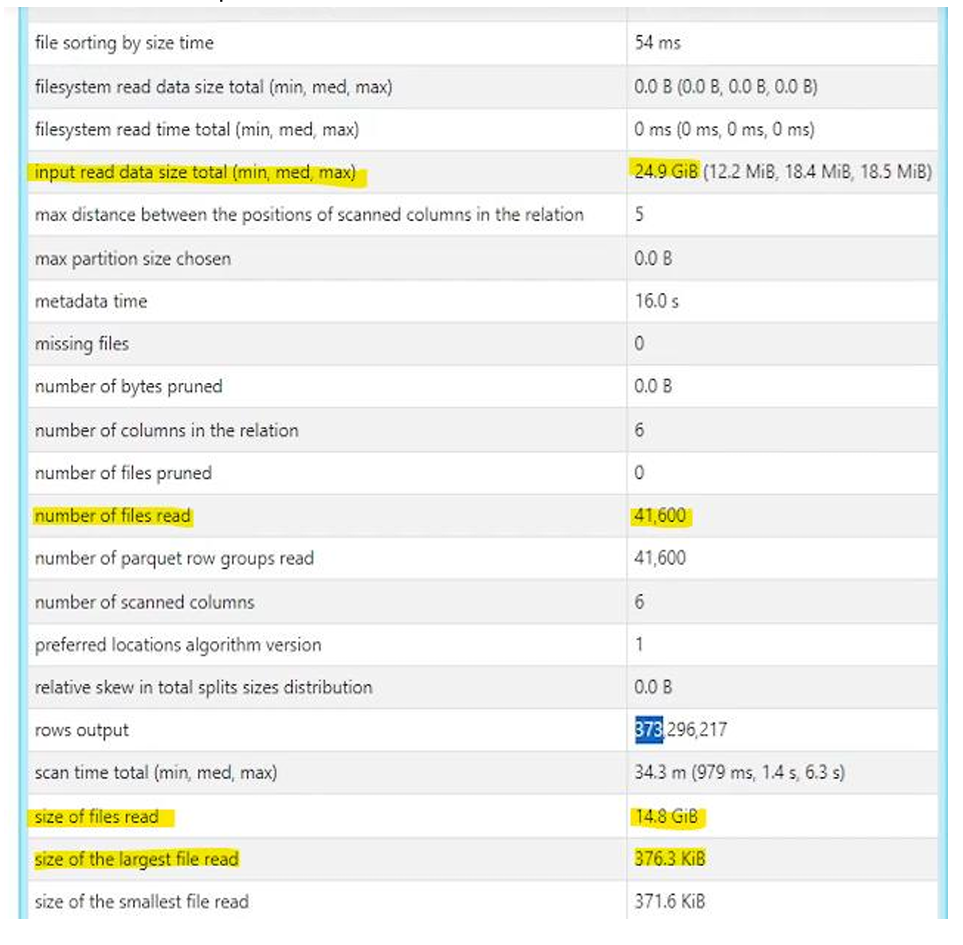
Here is what they looked like on the table described above.
The Scan node metrics: 41,600 files, 14.8 GiB of data, largest file 376.3 KiB, 34.3 minutes of scan time.
The two indicators
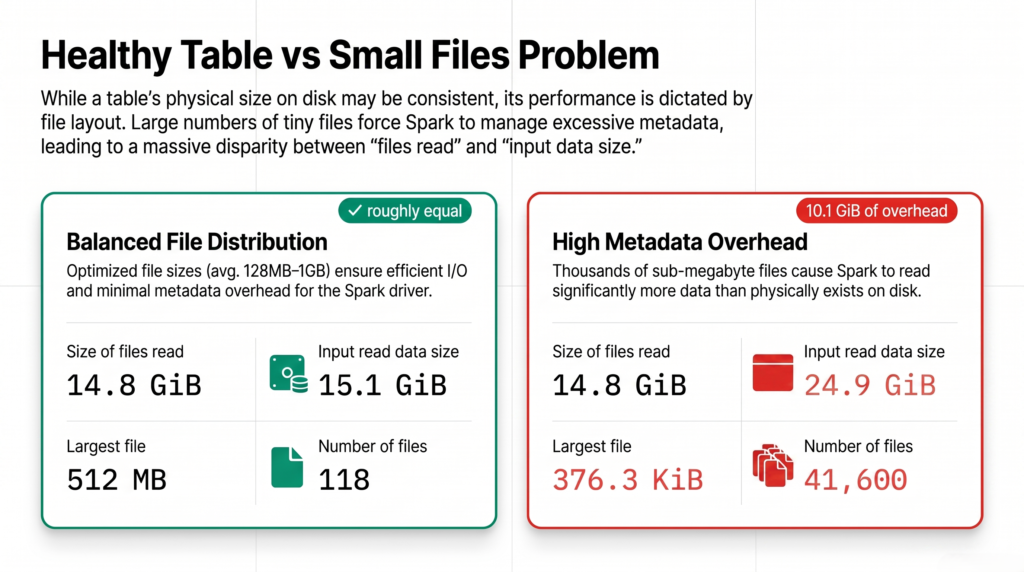
Indicator 1: input read data size is much larger than size of files read.
On a healthy table these two numbers are roughly equal. Here they are not:
Metric
Value
size of files read
14.8 GiB
input read data size total
24.9 GiB
Difference
10.1 GiB of pure overhead
Spark pulled 24.9 GiB through to read 14.8 GiB of actual files. That extra 68% is footers, metadata and per-file read overhead — work that produced no data.
Indicator 2: the largest file is tiny.
Metric
Value
number of files read
41,600
size of the largest file read
376.3 KiB
size of the smallest file read
371.6 KiB
Average file size
about 373 KiB
The largest file in the whole table is 376 KiB. Against a 128 MB target, every file is roughly 350 times too small. And because the largest and smallest are nearly identical, this is not a few stragglers — the entire table is built this way.
What you see
Healthy
Small files problem
input read vs size of files read
Roughly equal
Input read much larger
size of the largest file read
Hundreds of MB
Kilobytes
number of files read
Tens or hundreds
Thousands or tens of thousands
Two numbers give it away: input read size against size of files read, and the size of the largest file.
Two more numbers worth reading
number of parquet row groups read: 41,600. Exactly one row group per file. Each file is so small it holds a single row group, so Parquet’s columnar advantages barely apply.
metadata time: 16.0 s. Sixteen seconds spent purely on file metadata before real work began.
Here is the same data with properly sized files:
Now
At 128 MB per file
Data size
14.8 GiB
14.8 GiB
Number of files
41,600
about 118
Average file size
373 KiB
128 MB
Same bytes. 350 times fewer files to open.
Solution 1: run OPTIMIZE
For Delta tables, OPTIMIZE is the direct fix. It reads the small files and rewrites them as larger ones — a process called bin-packing.
-- Compact the whole tableOPTIMIZE sales;-- Compact only recent partitions, which is much cheaperOPTIMIZE sales WHEREyear=2026ANDmonth=8;
Points to know:
It is safe to run on a live table. Readers keep working while it runs.
Always use a WHERE clause if you can. Optimising a whole large table rewrites everything, which is slow and expensive.
The old small files are not deleted immediately — they stay for time travel. Run VACUUM later to reclaim the storage.
-- Remove files older than the retention period (default 7 days)VACUUM sales;
If you also filter this table on the same columns regularly, you can compact and cluster in one pass:
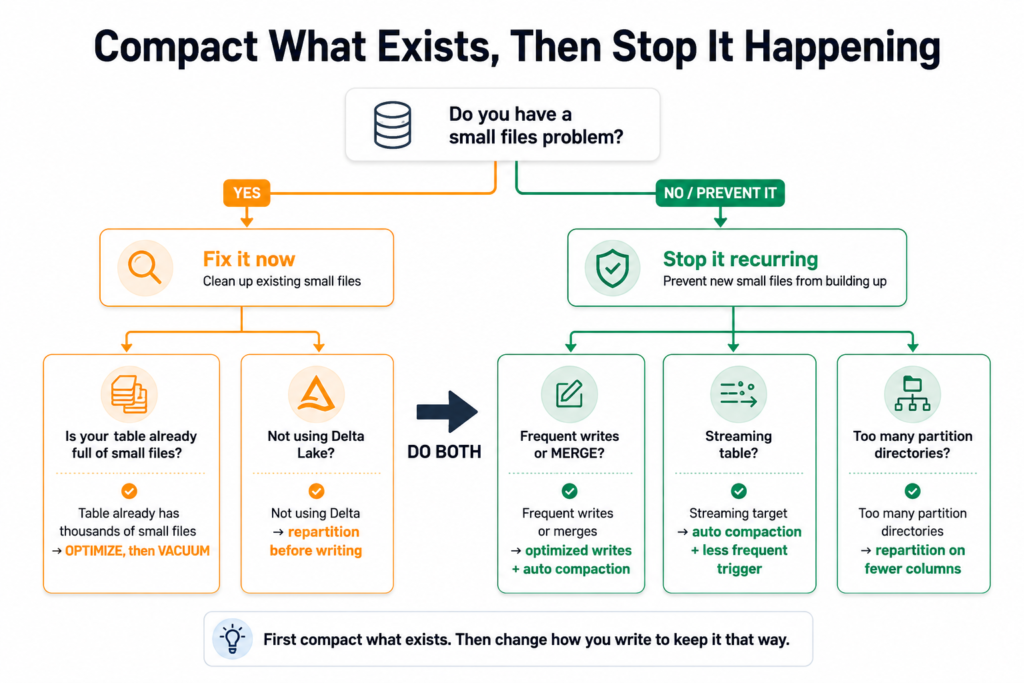
OPTIMIZE cleans up a mess that has already happened. These two settings stop it recurring.
ALTERTABLE sales SET TBLPROPERTIES ('delta.autoOptimize.optimizeWrite'='true','delta.autoOptimize.autoCompact'='true');
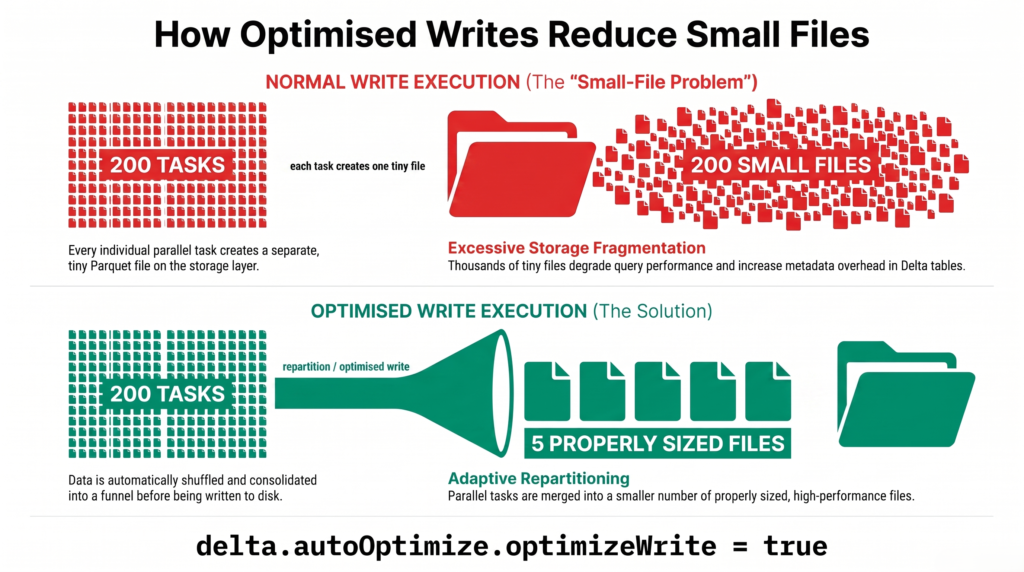
Optimized writes — Spark repartitions data just before writing, so each write produces fewer, larger files instead of one file per task.
Auto compaction — after a write finishes, Spark checks for small files and compacts them automatically.
These are the highest-value settings on the list, because they turn an ongoing maintenance chore into something that handles itself. Turn them on for any table that receives frequent writes — especially streaming targets and anything with a regular MERGE.
Optimized writes repartition before writing, so the small files are never created.
Solution 3: control file size when you write
If you are not on Delta, or you want direct control, size the output yourself.
The usual cause is simple: Spark writes one file per partition per task. With the default of 200 shuffle partitions, a write produces 200 files — per partition directory — no matter how little data there is.
# Reduce the number of output files before writingdf.repartition(10).write.format("delta").mode("overwrite").save("/data/sales")# Or cap the rows per file and let Spark work out the countdf.write.option("maxRecordsPerFile", 1000000).format("delta").mode("overwrite").save("/data/sales")
Two notes. coalesce is cheaper than repartition because it avoids a full shuffle, but it can leave you with uneven file sizes — the difference is covered in repartition vs coalesce. And maxRecordsPerFile is often the more practical option, because it adapts as your data volume grows rather than hardcoding a file count.
Solution 4: fix over-partitioning
Sometimes small files are a symptom rather than the disease. If a table is partitioned by year, month, day and hour, you have created 8,760 directories per year — and each one gets whatever small slice of data belongs to it.
Compacting will not help much here, because the partitioning itself guarantees small files.
The rule: partition on low-cardinality columns only, and aim for at least 1 GB of data per partition directory. Use Z-ordering or liquid clustering for the high-cardinality columns instead.
input read data size much larger than size of files read
Second indicator
size of the largest file read measured in kilobytes
Immediate fix
OPTIMIZE, then VACUUM
Permanent fix
Optimized writes and auto compaction
Summary
Every insert, update, merge and streaming batch writes new files. Over time a table accumulates thousands of tiny ones.
Opening a file costs almost the same whether it holds 300 KB or 300 MB, so the overhead dominates.
Check the Scan node in the Spark UI. If input read data size is much larger than size of files read, or the largest file is measured in kilobytes, you have the problem.
In the example above, 41,600 files held 14.8 GiB and took 34.3 minutes to scan. At 128 MB per file that same data would sit in around 118 files.
OPTIMIZE fixes what already exists. Optimized writes and auto compaction stop it coming back.
If the table is over-partitioned, fix that first — otherwise the small files will simply return.
It occurs when data is stored across a large number of very small files rather than fewer properly sized ones. Because opening a file, reading its footer and parsing its metadata costs roughly the same regardless of size, thousands of tiny files make that fixed overhead dominate the actual reading. It builds up gradually as inserts, updates, merges and streaming batches each add new files.
How do I detect the small files problem in the Spark UI?
Open the SQL / DataFrame tab, click the query reading the table, and expand the Scan node. Compare input read data size total with size of files read — on a healthy table they are roughly equal, and a big gap means overhead. Then check size of the largest file read. If the largest file in the table is measured in kilobytes, every file is too small.
What is the ideal file size in Spark and Delta Lake?
Between 128 MB and 1 GB per file. That is large enough for the per-file overhead to be negligible and for Parquet’s compression and statistics to work properly, while still small enough to parallelise across executors. Files consistently under 100 MB are worth investigating; files in kilobytes are a clear problem.
Does OPTIMIZE delete the old small files?
Not straight away. OPTIMIZE writes new compacted files and points the table at them, but the old ones remain so time travel keeps working. They are removed when you run VACUUM after the retention period, which defaults to seven days. Until then your storage usage will actually go up, not down.
How do I stop small files being created?
Enable optimized writes and auto compaction on the table. Optimized writes repartition data just before it is written so each write produces fewer, larger files; auto compaction then merges any small files left behind. Together they stop the problem recurring, which matters far more than compacting it once.
Why does my write create 200 files?
Spark writes one file per partition per task, and spark.sql.shuffle.partitions defaults to 200. So a write after any shuffle produces 200 files regardless of data volume — and if the table is also partitioned, that happens in every partition directory. Use repartition or maxRecordsPerFile to control it, or enable optimized writes to have Spark handle it.
Is the small files problem the same as over-partitioning?
They are related but different. Over-partitioning means too many partition directories, which then forces small files because each directory holds so little data. Compacting alone will not fix an over-partitioned table, because the partitioning guarantees the files stay small. Fix the partitioning first, then compact.
Why is input read data size larger than the size of the files?
Because reading a Parquet file involves more than its data. Spark opens the file, seeks to the footer, reads schema and row group metadata, then fetches the column chunks. That extra work is counted in the input read total. On a well-sized table it is negligible; on 41,600 tiny files it added 10.1 GiB on top of 14.8 GiB of real data.