Azure Storage Redundancy Explained: LRS vs ZRS vs GRS vs GZRS
Six redundancy options are really three yes/no questions. What each one protects against, why none of them is a backup, and how to pick per medallion layer.
You’re creating a storage account. You reach the Redundancy dropdown and it offers you six things: LRS, ZRS, GRS, GZRS, RA-GRS, RA-GZRS.
They look like six different products. Most people pick whatever is selected, or pick the most expensive one on the theory that more redundancy is always safer.
Both are guesses, and the second one is worse than it looks — because the priciest option in that list still doesn’t protect you from the thing most likely to destroy your data.
Here’s the thing nobody tells you: there aren’t six options. There are three yes/no questions, and the acronym is just the answers written down.
We’ll use one running example throughout: a retail company with a data lake — raw sales files landing in Bronze, cleaned tables in Silver, and the aggregates in Gold that feed the morning dashboards.
First, learn to read the acronym
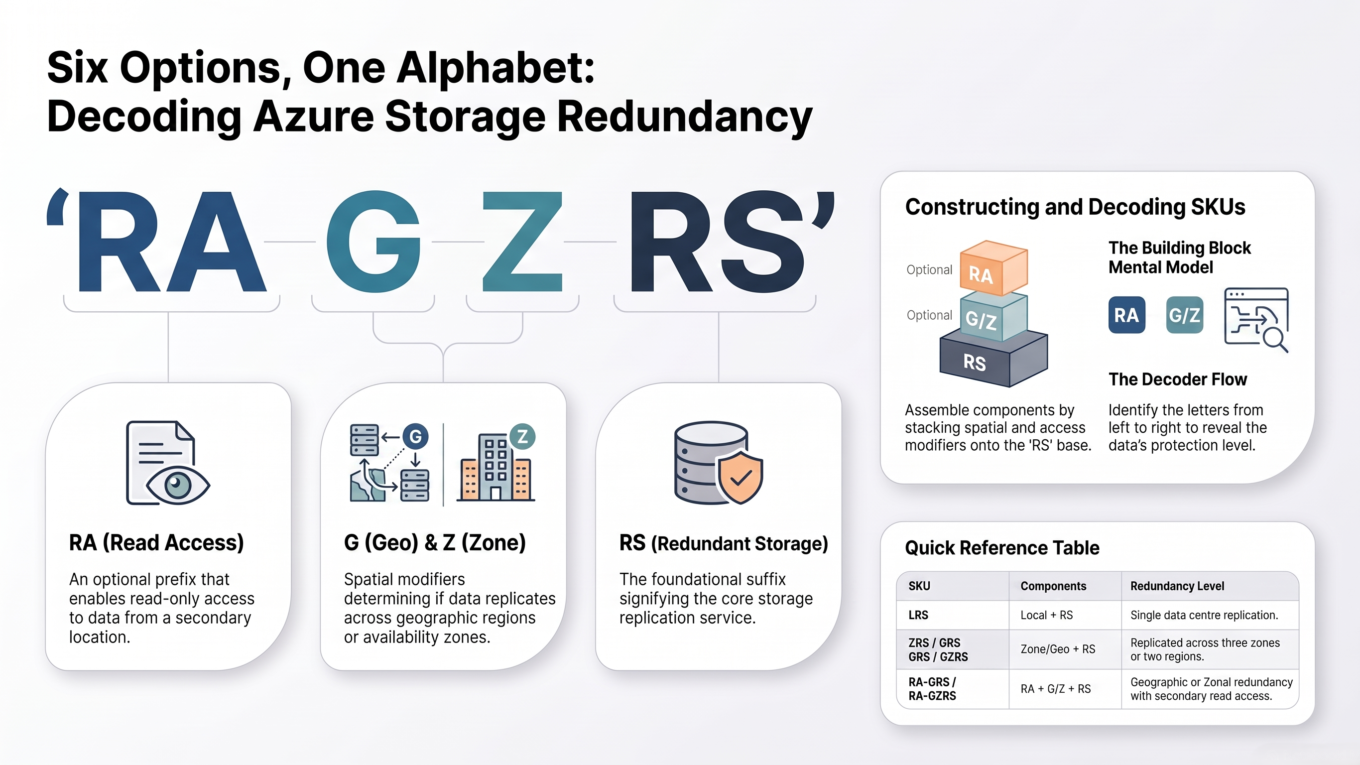
Every one of those six names is built from the same small set of letters. Learn them once and the dropdown reads itself.
Letter
Stands for
What it actually buys you
L
Locally
Three copies inside one datacenter
Z
Zone
Copies across three availability zones — separate buildings, separate power, cooling and networking
G
Geo
A second copy in another region, hundreds of miles away
RA-
Read Access
You’re allowed to read that second-region copy
RS
Redundant Storage
Nothing. It’s on every option — ignore it.
So the six names collapse into three independent decisions:
#
The question
Answer becomes
1
Inside the region — one building, or three?
L or Z
2
Do you also want a copy in another region?
add G
3
Do you need to read that other-region copy?
add RA-
Answer those three and you’ve named your option. GZRS is just “yes to zones, yes to a second region, no to reading it”. Nothing more mysterious than that.
One detail that surprises people, and it falls straight out of the decoder: the Z never travels. In GZRS, the primary region is zone-redundant, but the secondary copy is stored locally redundant — inside one datacenter over there. Azure always uses LRS in the secondary region, whichever geo option you choose.
Six option names, one small alphabet. Learn the letters and the dropdown reads itself.
The real question: what are you insuring against?
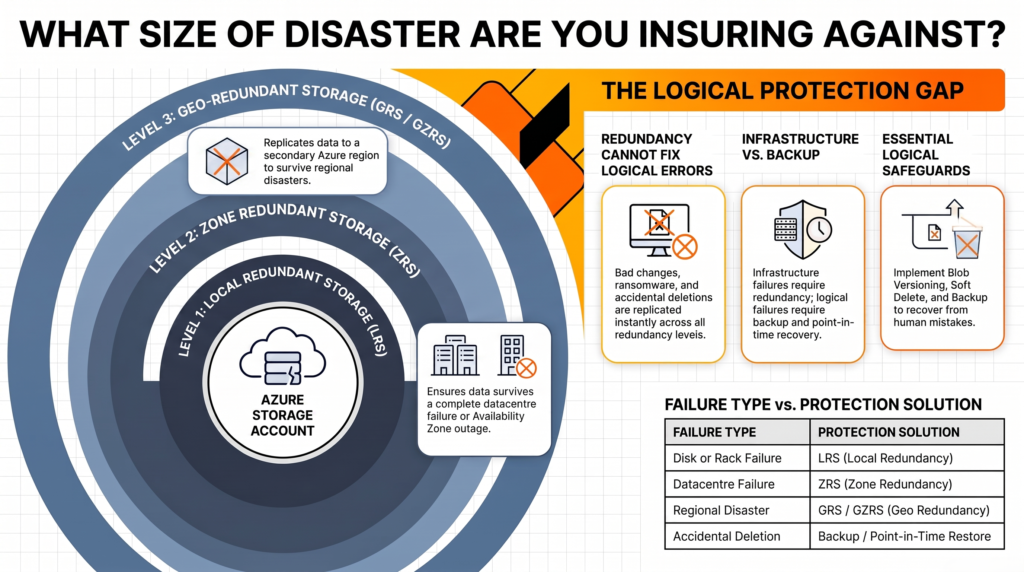
Every redundancy option is insurance against a specific size of disaster. Pick the size, and the option picks itself.
What goes wrong
LRS
ZRS
GRS / GZRS
A disk, server or rack dies
✅ Survives
✅ Survives
✅ Survives
An entire datacenter goes down
❌ Data unavailable
✅ Survives
✅ Survives
The whole region goes down
❌ Data unavailable
❌ Data unavailable
✅ Survives (after failover)
Someone deletes the container
❌ Gone
❌ Gone
❌ Gone
Read that last row again. It’s the same answer in every column, and it’s the single most expensive misunderstanding in this whole topic. We’ll come back to it.
Each option insures against a specific size of disaster. Decide the size first.
LRS — Locally Redundant Storage
What it is: three copies of your data inside a single physical datacenter in your chosen region.
Durability of at least 99.999999999% (11 nines) over a year.
The cheapest option, and the baseline every other option is priced against.
Protects against drive, server and rack failure — the failures that actually happen most often.
If that one building floods or burns, every copy can be lost at once.
Use it when the data can be rebuilt. Our retail company’s Bronze layer is raw sales extracts that still exist in the source systems — if the whole thing vanished, they’d re-run the ingestion. Paying to protect a copy of something you can regenerate on demand is money spent twice.
Also use it when data residency rules forbid replication outside a boundary. Azure’s paired regions sometimes sit in a different country, so for some regulated workloads LRS or ZRS is the only lawful choice.
Don’t use it when a few hours of unavailability would stop the business. A datacenter-level incident takes an LRS account completely offline until it’s resolved.
ZRS — Zone Redundant Storage
What it is: copies spread across three or more availability zones in the same region. Each zone is a physically separate location with its own power, cooling and network.
Durability of at least 99.9999999999% (12 nines).
Writes are synchronous — the write only returns success once all three zones have it. So there’s no window of data loss between zones.
You keep both read and write access if one zone fails. No failover, no downtime, no intervention.
Microsoft explicitly recommends ZRS in the primary region for Azure Data Lake Storage workloads.
Use it when the workload needs to stay up through an infrastructure incident — which for a data platform usually means anything a scheduled pipeline depends on. That recommendation above is the single most useful sentence in the Azure docs for anyone building a lake, and most people have never read it.
Don’t use it when you need the archive tier. Archive is not supported on ZRS, GZRS or RA-GZRS — only on LRS, GRS and RA-GRS. If you’re tiering cold data down to archive, that constraint decides for you.
GRS — Geo Redundant Storage
What it is: LRS in your primary region, plus an asynchronous copy to a paired secondary region hundreds of miles away, where it’s stored as LRS again.
Durability of at least 99.99999999999999% (16 nines).
The secondary region is determined by your primary region and cannot be changed.
Replication is asynchronous, so there’s a lag. Writes made just before a regional failure may never reach the secondary. Azure’s Geo priority replication targets a recovery point objective of 15 minutes or less for block blobs.
You cannot read the secondary copy. It sits there, invisible, until a failover.
Use it when you need to survive losing an entire region and the data can’t be rebuilt from elsewhere.
Don’t use it when what you actually wanted was zone protection. This catches people constantly: GRS is locally redundant in the primary region. A single-datacenter outage takes a GRS account offline exactly like LRS, even though you’re paying for geo-replication. If you want both, that’s GZRS.
GZRS — Geo Zone Redundant Storage
What it is: ZRS in the primary region plus asynchronous geo-replication to the secondary. The strongest combination Azure offers.
Durability of at least 99.99999999999999% (16 nines), same headline figure as GRS — the difference isn’t durability, it’s availability during a zone failure.
Survives a zone outage with no failover and no downtime, and survives a regional disaster.
Microsoft’s recommendation for applications needing maximum durability and availability.
Needs a region that has availability zones and a pair, so it isn’t offered everywhere.
Use it when the data is genuinely irreplaceable and downtime is genuinely expensive. Our retail company’s Gold layer qualifies: it took hours of compute to build, it feeds the executive dashboards, and rebuilding it means re-running the whole pipeline.
Don’t use it when you’re applying it to everything by default. This is the most expensive option on the list, and applying it to a Bronze layer you could re-ingest in an afternoon is how storage bills quietly triple.
RA-GRS and RA-GZRS — the read-access versions
What it is: the same as GRS or GZRS, except you’re allowed to read the secondary copy at any time, through a separate endpoint.
The secondary endpoint is your account name with -secondary appended — so myaccount.blob.core.windows.net gains myaccount-secondary.blob.core.windows.net. Same access keys.
Raises the read availability SLA from 99.9% to 99.99%.
You can read it whenever you like, which means you can test your failover path before you need it rather than discovering it doesn’t work during an outage.
The secondary is behind the primary, and files within a container may be inconsistent with each other. It’s a stale snapshot, not a mirror.
Azure Files does not support RA-GRS or RA-GZRS at all.
Use it when an application must keep serving reads through a regional outage, or when you want reporting workloads to read from the secondary without touching the primary.
Don’t use it when your reader can’t tolerate stale, partially-consistent data. For analytics that’s often fine. For anything doing a correctness-critical read, it isn’t.
The expensive misconception: this is not a backup
Here is the row from that earlier table that deserves its own section.
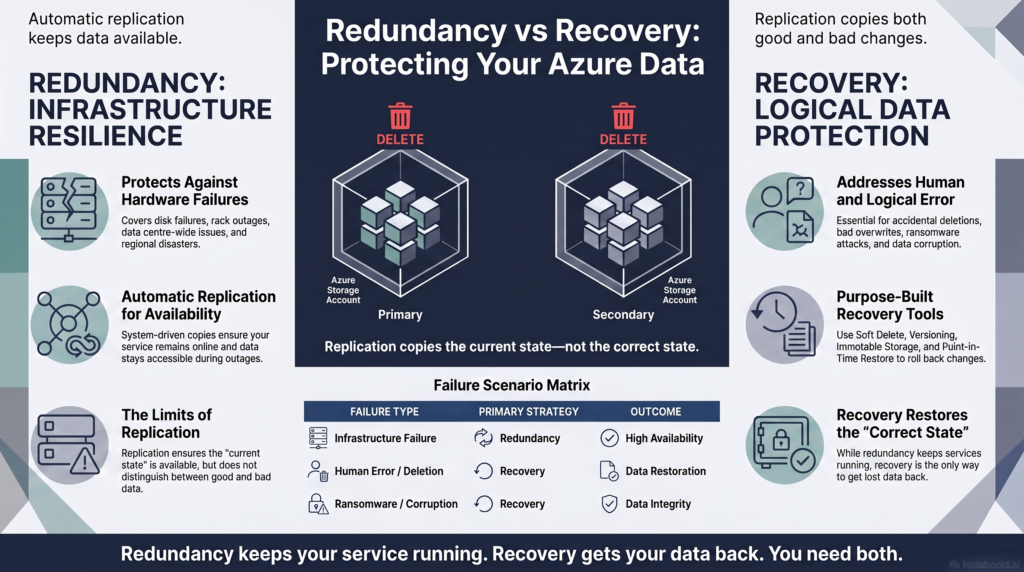
Every copy reflects the same current state. Deletions and overwrites are applied to all replicas simultaneously.
Redundancy protects against hardware failure. It does nothing about data-modifying operations. If someone runs a bad DELETE, drops a container, or a pipeline overwrites Gold with an empty DataFrame, that change replicates to all three zones and across to the secondary region — quickly, faithfully, and with no way to undo it.
Sixteen nines of durability means Azure will not lose your data. It is not a promise that you won’t.
Ransomware works the same way, and so does the far more common disaster: an ordinary human mistake on a Tuesday afternoon.
What actually protects you against those is a completely different set of features, and you need them in addition to whichever redundancy option you chose:
Threat
Redundancy helps?
What you actually need
Disk or rack failure
✅ Yes
LRS is enough
Datacenter outage
✅ Yes
ZRS
Regional disaster
✅ Yes
GRS or GZRS
Accidental delete
❌ No
Soft delete for blobs and containers
Bad overwrite
❌ No
Blob versioning, or Delta time travel
Corruption found days later
❌ No
Point-in-time restore
Ransomware or malicious insider
❌ No
Immutable storage with a legal hold
If you work with Delta tables there’s a useful nuance here: Delta’s transaction log means an overwrite is recoverable with time travel, as long as the underlying files haven’t been vacuumed away. That’s a real safety net the raw-file layers don’t have — see Delta Table Internals Explained for how the log makes that possible.
Redundancy answers “did the hardware fail?” It never answers “did someone make a mistake?”
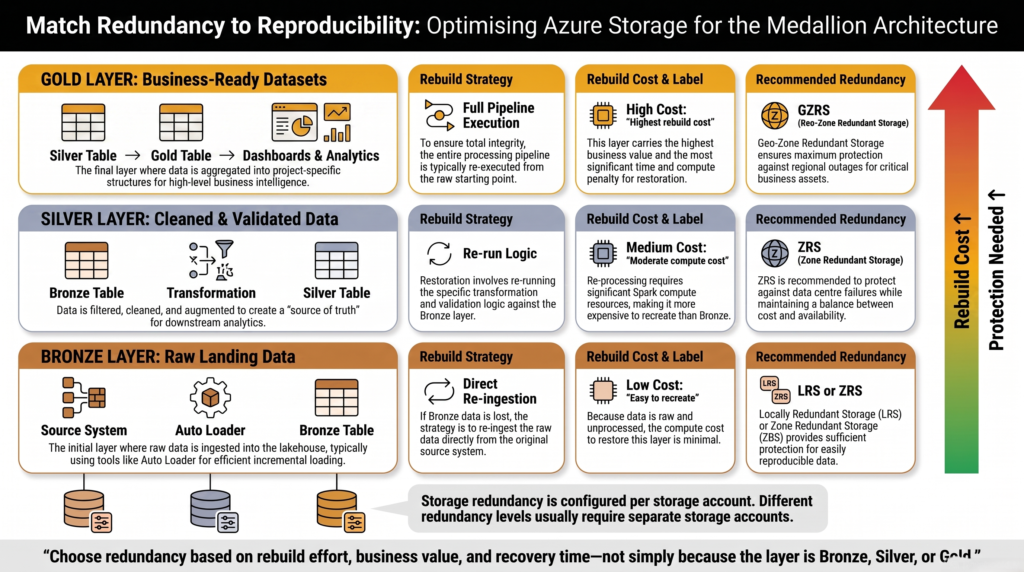
For a data lake: match redundancy to reproducibility
Most advice on this topic tells you to pick redundancy based on how important the data is. For a data platform that’s the wrong axis, because it pushes you toward maximum redundancy everywhere.
The better question is: how hard would this be to rebuild?
That maps cleanly onto the medallion architecture, because each layer has a genuinely different answer:
Layer
How would you rebuild it?
Sensible choice
Bronze
Re-ingest from the source systems
LRS, or ZRS if pipelines can’t pause
Silver
Re-run transformations from Bronze
ZRS
Gold
Re-run the whole pipeline — hours of compute, and the dashboards are down meanwhile
GZRS
Two caveats worth stating. If your source systems only retain 30 days, Bronze stops being reproducible past that point and needs to move up the list. And if a regulator requires you to prove you still hold the raw data exactly as received, Bronze becomes your most protected layer, not your least.
Now the part that makes this actionable, and it’s a genuine architectural constraint: redundancy is a property of the storage account, not the container. Every container, file share, queue and table inside one account shares the same setting. You cannot make Gold geo-redundant and leave Bronze local inside a single account.
Microsoft’s own guidance is to isolate resources with different redundancy requirements into separate storage accounts. So if you want to vary redundancy by layer — and the table above says you should — you have to split your layers across separate storage accounts, and that decision is much easier to make on day one than after two years of pipelines have hardcoded the paths.
Redundancy should follow reproducibility, not importance — which means separate storage accounts per layer.
Checking and changing what you’ve got
Most accounts were configured once and never revisited. Start by finding out what you’re actually paying for:
# What redundancy does one account use?azstorageaccountshow--namemystorageaccount--resource-groupmyrg--query"sku.name"--outputtsv# Every account in the subscription, in one tableazstorageaccountlist--query"[].{name:name, redundancy:sku.name, region:primaryLocation}"--outputtable
That second command is worth running today. It routinely turns up a Bronze landing account quietly sitting on GZRS.
Changing redundancy is possible after the fact, but not every transition is equal. Moving between LRS, GRS and RA-GRS is a straightforward setting change. Converting between LRS and ZRS is a migration. And adding geo-replication starts an initial sync that copies everything to the secondary region, which takes time and costs bandwidth on a large lake.
# Change redundancy on an existing accountazstorageaccountupdate--namemystorageaccount--resource-groupmyrg--skuStandard_GZRS
How to tell you picked wrong
Your Bronze or staging account is on GRS or GZRS → you’re paying to geo-replicate data you could re-ingest. Usually the biggest easy saving on the list.
You chose GRS wanting resilience, but a datacenter incident still took you offline → you wanted ZRS or GZRS. GRS is local in the primary region.
You assumed you could read the secondary during an outage and couldn’t → you needed the RA- prefix. Plain GRS and GZRS give you no read access at all.
You lost data to a bad delete despite paying for 16 nines → redundancy was never the control for that. Turn on soft delete and versioning.
You can’t move blobs to archive → you’re on ZRS, GZRS or RA-GZRS, which don’t support the archive tier.
Your compliance team objects to where the secondary sits → the paired region is fixed and can’t be changed. LRS or ZRS is the answer.
One more thing worth knowing before you need it: failover to the secondary region is customer-initiated, not automatic, and your data is inaccessible while the failover runs. A geo-redundant account is not a load balancer that quietly routes around a dead region — it’s a recovery option someone has to consciously trigger.
The takeaway
The six-item dropdown is three questions. L or Z decides whether you survive losing a building. Adding G decides whether you survive losing a region. Adding RA- decides whether you can read the far copy while the near one is down. That’s all the acronyms have ever meant.
For a data lake, pick per layer by how hard each would be to rebuild — which means separate storage accounts, decided early. ZRS is Microsoft’s recommendation for Data Lake Storage and is the right default for anything a pipeline depends on.
And keep the boundary clear in your head: redundancy answers “did the hardware fail?”. It never answers “did someone make a mistake?”. For that you need soft delete, versioning and point-in-time restore — and no number of nines will substitute for them.
What is the difference between LRS, ZRS, GRS and GZRS?
LRS keeps three copies in one datacenter. ZRS spreads copies across three availability zones in the same region, so you survive losing a building. GRS is LRS in your region plus an asynchronous copy in a distant paired region. GZRS combines both — zone redundancy at home and a copy in the secondary region. Durability runs from 11 nines for LRS to 16 nines for the geo options.
Does GRS protect against accidental deletion?
No. Deletions and overwrites are applied to every replica simultaneously, including the copy in the secondary region. Redundancy protects against hardware failure, not against data-modifying operations. To recover from mistakes you need blob soft delete, container soft delete, versioning, point-in-time restore, or immutable storage — these are separate features you enable independently of redundancy.
What does the RA- prefix mean in RA-GRS?
Read Access. With plain GRS or GZRS the secondary copy exists but you cannot read it — it’s only reachable after a failover. Adding RA- exposes a second endpoint with -secondary appended to the account name, readable at any time, and raises the read availability SLA from 99.9% to 99.99%. Note that Azure Files doesn’t support RA-GRS or RA-GZRS.
Which redundancy option should I use for Azure Data Lake Storage?
Microsoft recommends ZRS in the primary region for Data Lake Storage workloads. From there, add geo-redundancy for data you couldn’t rebuild — typically your curated Gold layer. Raw landing zones that can be re-ingested from source systems are often fine on LRS. Since redundancy is set per storage account, varying it by layer means using separate accounts.
Can I change redundancy after creating a storage account?
Yes, though not all transitions are equally simple. Switching between LRS, GRS and RA-GRS is a setting change. Converting between LRS and ZRS is a migration. Adding geo-redundancy triggers an initial replication of everything to the secondary region, which takes time and incurs bandwidth cost on a large dataset. The paired secondary region itself is fixed by your primary region and cannot be changed.
Why can’t I use the archive tier with GZRS?
The archive tier isn’t supported on ZRS, GZRS or RA-GZRS accounts — only on LRS, GRS and RA-GRS. If your lifecycle policy moves cold data to archive, that requirement rules out the zone-redundant options, so you’ll be choosing between LRS and GRS instead.
Is failover to the secondary region automatic?
No — customer-managed failover is something you initiate, and your data is inaccessible while it runs. Because replication to the secondary is asynchronous, writes made shortly before the outage may not have arrived, so some data loss is possible and files within a container can be inconsistent. Azure’s Geo priority replication targets a recovery point objective of 15 minutes or less for block blobs.