“Ingestion” just means getting data in — landing it in your lakehouse so everything downstream can use it. It sounds like the easy part. Then one team streams everything and the monthly bill is enormous, while another runs a nightly batch for data the business needed in real time and misses the deadline every day.
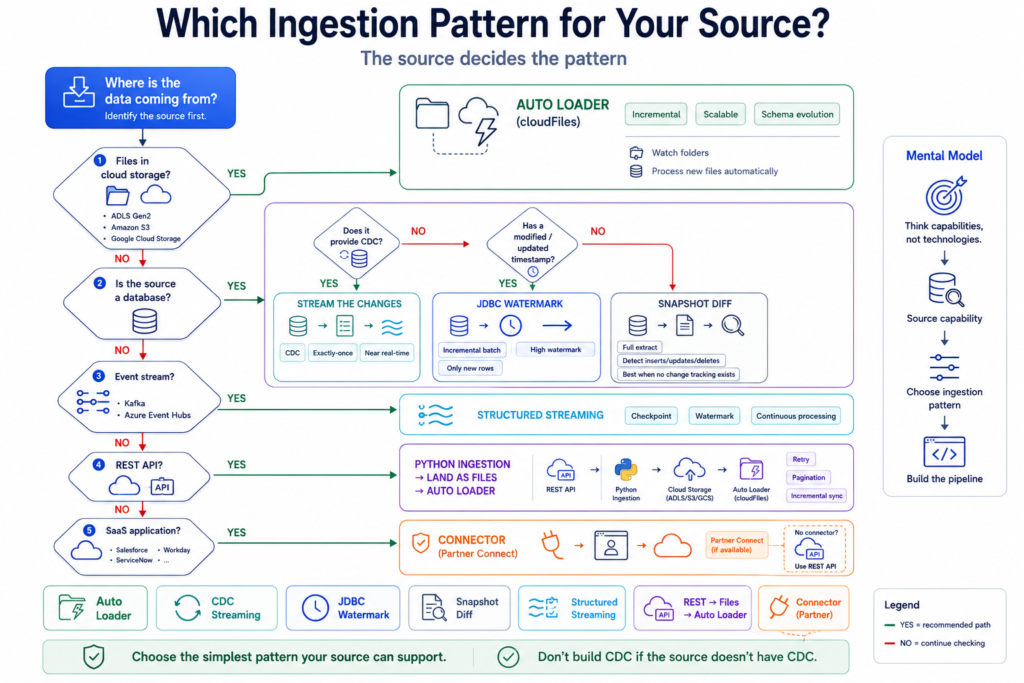
Choosing an ingestion pattern isn’t guesswork. It comes down to two questions, in order:
- Where is the data coming from? → this decides the pattern (the tool and technique).
- How fresh does it need to be? → this decides the architecture (streaming vs batch) and the cost.
Answer those two and the right approach falls out. It all lands in the Bronze layer — the raw first stop — so we’ll finish with the rules that keep Bronze clean.
Question 1: Where’s the data coming from?
The source dictates the pattern. Here are the five you’ll meet — what each tool is, the key facts, and the code.
Cloud files (ADLS / S3 / GCS) → Auto Loader
Auto Loader is a Databricks feature (the cloudFiles source) built specifically for ingesting files from cloud storage as they arrive. It’s the default, and usually the right answer, whenever your data shows up as files.
- Incremental and streaming — same code. Run it as an incremental batch (process what’s new, then stop) with
trigger(availableNow=True), or as a continuous stream with aprocessingTimetrigger. One line switches between them. - It tracks what it has already read. Auto Loader remembers processed files, so each run only picks up new ones — no manual bookkeeping, no reprocessing.
- It scales to millions of files and can use file-notification events instead of listing the folder, which keeps it fast even on huge directories.
- It handles schema changes. Stable schema? Give it an explicit one. Evolving schema? Turn on
inferColumnTypes+mergeSchemaand keep a_rescued_datacolumn so anything unexpected is captured, not lost.
from pyspark.sql.functions import input_file_name, current_timestamp, lit

# Read new files incrementally as they land
df = (spark.readStream.format("cloudFiles")
      .option("cloudFiles.format", "json")
      .option("cloudFiles.schemaLocation", checkpoint + "/schema")
      .option("cloudFiles.inferColumnTypes", "true")   # evolving schema
      .load(source_path))

# Add the required Bronze metadata
df = (df.withColumn("_source_file", input_file_name())
        .withColumn("_ingest_timestamp", current_timestamp())
        .withColumn("_batch_id", lit(batch_id)))

# Write append-only to a Bronze Delta table
(df.writeStream.format("delta").outputMode("append")
   .option("checkpointLocation", checkpoint)
   .option("mergeSchema", "true")
   .trigger(availableNow=True)   # incremental batch; use processingTime="5 minutes" to stream
.toTable("prod.bronze.orders"))Databases (SQL / Oracle / Postgres) → CDC, watermark, or full diff
Databases are read over JDBC, and the right technique depends on what the source table gives you.
- CDC (Change Data Capture) available → stream the changes for near-real-time freshness. Best option when the source supports it.
- A modified/updated timestamp column → use a watermark batch: each run pulls only rows newer than the last high-water mark you saved, so you never re-read the whole table.
- Neither → do a full extract + snapshot diff: pull everything and compare to the last copy to find what changed. The heaviest option — a last resort.
- Practical tips: keep credentials in a secret scope (never hard-code), set a sensible
fetchsize, and for big pulls parallelize with a partition column so it doesn’t come down one connection.
from pyspark.sql.functions import current_timestamp

pwd = dbutils.secrets.get(scope="db", key="password")   # never hard-code secrets

# Pull ONLY rows newer than the last run's high-water mark
df = (spark.read.format("jdbc")
      .option("url", jdbc_url)
      .option("dbtable",
              f"(SELECT * FROM sales WHERE modified_date > '{last_watermark}') t")
      .option("password", pwd)
      .option("fetchsize", 10000)
      .load())

# Append to Bronze, then save the new max(modified_date) as the next watermark
(df.withColumn("_ingest_timestamp", current_timestamp())
   .write.format("delta").mode("append")
.saveAsTable("prod.bronze.sales"))Kafka / Event Hubs → Structured Streaming
Structured Streaming is Spark’s engine for reading never-ending event streams like Kafka or Azure Event Hubs (via its Kafka-compatible endpoint).
- Continuous by nature — it keeps reading events as they flow, though you can also run it triggered (
availableNow) for cheaper micro-batches if the SLA allows. - Checkpoints give exactly-once resume. A checkpoint on cloud storage lets the job restart precisely where it stopped — no duplicates, no gaps.
- Watermarks handle late data. Events that arrive a few minutes late are still placed correctly instead of being dropped.
- It scales with the stream’s partitions, so throughput grows as you add cluster capacity.
# Read a continuous stream from Kafka (or Event Hubs' Kafka endpoint)
df = (spark.readStream.format("kafka")
      .option("kafka.bootstrap.servers", brokers)
      .option("subscribe", "orders")
      .option("startingOffsets", "latest")
      .load())

(df.writeStream.format("delta").outputMode("append")
   .option("checkpointLocation", checkpoint)   # resume exactly where it stopped
.toTable("prod.bronze.order_events"))REST API → pull, land, then Auto Loader
REST APIs have no native Spark connector, so the pattern is a two-step relay: pull with a small Python job, land the raw responses as files, then hand off to Auto Loader.
- Land the raw response first. Saving each API response as a file in cloud storage gives you a replayable copy if anything downstream breaks.
- Then reuse Auto Loader on that landing folder — you get all its incremental, schema-handling benefits for free.
- Parallelize and throttle the API calls once you’re pulling more than roughly a million records a day, so you don’t get rate-limited.
import requests

# 1) Pull from the API, page by page
resp = requests.get(api_url, params={"page": page}, headers=headers)

# 2) Land the raw response as a file in cloud storage
dbutils.fs.put(f"{landing_path}/orders_{page}.json", resp.text, overwrite=True)

# 3) ...then let the Auto Loader job above ingest the landing folderSaaS apps (Salesforce, etc.) → connector or REST
For SaaS platforms, first check for a ready-made connector (on Databricks, via Partner Connect). If one exists it’s the fastest, lowest-maintenance path — no code to own. If there’s no connector, fall back to the REST relay above: pull with Python, land as files, ingest with Auto Loader. Either way the goal is the same — get the SaaS data into Bronze reliably and repeatably.
Question 2: How fresh does it need to be?
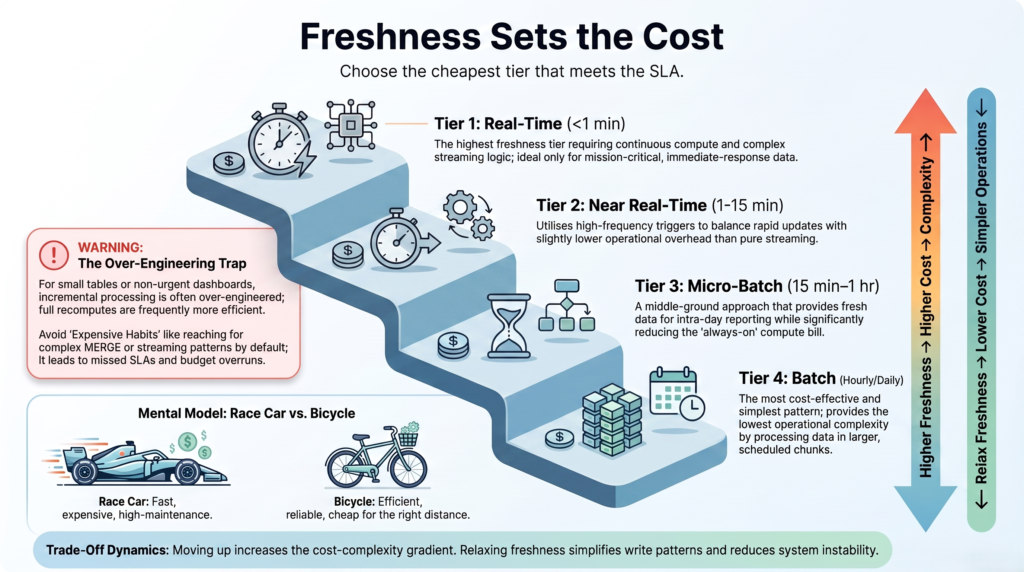
Once you know the source, the freshness requirement (the SLA) decides the architecture and the cost. The golden rule: pick the cheapest option that meets the SLA — no fresher.
| Freshness needed | Architecture | Relative cost |
|---|---|---|
| Real-time (< 1 min) | Streaming, always-on | Highest |
| Near-real-time (1–15 min) | Streaming, triggered | High |
| Micro-batch (15 min–1 hr) | Scheduled workflow, job cluster | Moderate |
| Batch (hourly/daily) | Workflow + job cluster + spot | Lowest |
(Costs are relative and illustrative — the exact numbers depend on data volume and cluster size, but the ranking always holds: always-on streaming is the most expensive tier, batch the cheapest.)
The most expensive mistake in ingestion: reaching for streaming when a batch would have met the SLA. That single misjudgment can cost roughly 10× more — for freshness nobody asked for.
So before you build a streaming pipeline, ask the business one question: “If this data were 30 minutes old, would anything actually go wrong?” If the honest answer is no, you just saved a fortune with a scheduled batch — and note that Auto Loader’s availableNow trigger lets you run the exact same file pipeline as a cheap batch job.
The Bronze rules that keep ingestion clean
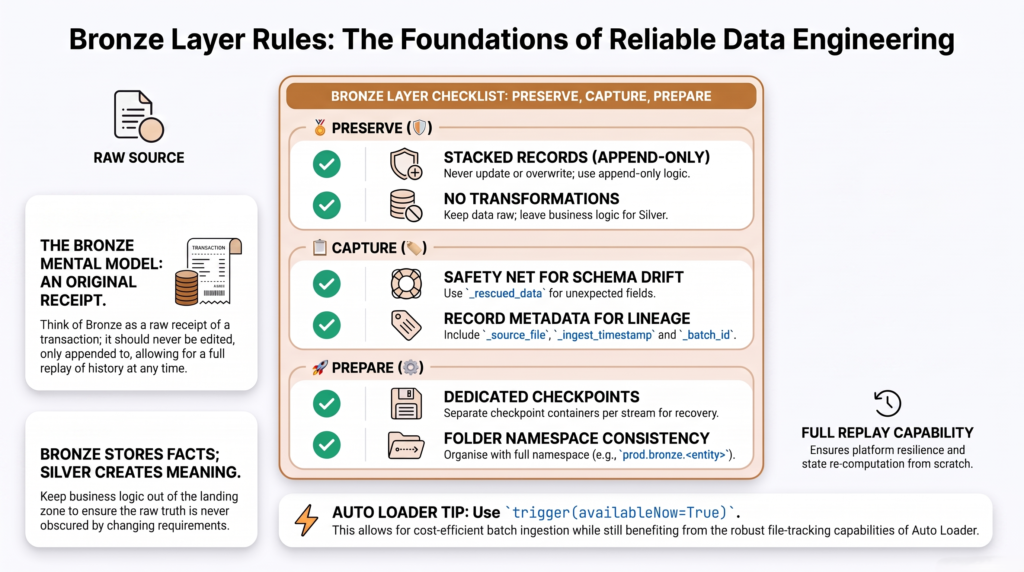
Whatever the source or SLA, the data lands in Bronze — and Bronze has a strict job: be the raw, faithful, replayable record of what arrived. Follow these rules and everything downstream stays trustworthy:
- Append-only. Never update or overwrite Bronze — you only add. It’s the permanent record of exactly what the source sent.
- Capture drift, don’t drop it. Read in a permissive mode with a
_rescued_datacolumn, so any unexpected or malformed fields are captured instead of silently lost. - Add the required metadata to every row:
_source_file,_ingest_timestamp,_batch_id, and_rescued_data. This is what makes debugging and reprocessing possible later. - No transformations. Don’t clean, join, or reshape in Bronze — that’s Silver’s job. Bronze stays raw on purpose.
- Checkpoints on a dedicated storage container. They let streaming and Auto Loader resume exactly where they stopped, with no duplicates or gaps.
- Use the full three-part namespace (like
prod.bronze.orders) so every table has a clear, governed home in Unity Catalog.
Putting it together: a worked example
A supplier drops CSV price files into ADLS every hour, and the business wants the pricing dashboard refreshed within the hour. Walk the two questions:
- Source? Cloud files → Auto Loader.
- Freshness? “Within the hour” = the micro-batch tier → a scheduled hourly workflow running Auto Loader with
availableNow=Trueon a job cluster.
Result: cheap, reliable, and it meets the SLA with room to spare. Had the team defaulted to an always-on stream, they’d have paid roughly ten times as much for freshness the business never needed. Same data, same result — a fraction of the cost, just by asking the second question.
Common mistakes
- Streaming everything. The number-one cost mistake — always-on streaming for data a batch could deliver.
- Skipping
_rescued_data. Without it, a quiet schema change means data silently disappears — you won’t notice until a report is wrong. - Transforming in Bronze. Cleaning belongs in Silver. Bronze must stay raw so you can always reprocess from it.
- No checkpoints. Streaming or Auto Loader without a checkpoint means reprocessing and duplicates after any restart.
The takeaway
Every ingestion decision reduces to two questions. The source picks the pattern: Auto Loader for cloud files (incremental or streaming, same code), CDC or a watermark for databases, Structured Streaming for Kafka and Event Hubs, and a land-then-Auto-Loader relay for REST and SaaS. The freshness SLA picks the architecture and the cost — and the discipline is choosing the cheapest tier that still meets it, because reaching for streaming when batch would do is the classic 10× waste. Land it all in an append-only, raw, well-tagged Bronze layer with checkpoints, and you’ve got ingestion that’s fast enough, cheap enough, and trustworthy — every time.
Frequently Asked Questions
What is Auto Loader and does it support streaming and batch?
Auto Loader is a Databricks feature (the cloudFiles source) for incrementally ingesting files from cloud storage. It supports both modes with the same code: run it as an incremental batch with trigger(availableNow=True), or as a continuous stream with a processingTime trigger. It also tracks already-processed files and handles schema evolution.
When should I use Auto Loader?
Use Auto Loader whenever data arrives as files in cloud storage (ADLS, S3, or GCS). It detects and processes new files incrementally, remembers what it has ingested, scales to millions of files, and handles schema changes with column inference and a rescued-data column. It’s the default pattern for file-based ingestion in the lakehouse.
Should I use streaming or batch for ingestion?
Choose the cheapest option that meets your freshness requirement. Use streaming only when the data genuinely needs to be seconds-to-minutes fresh; if a scheduled batch every 15–60 minutes (or hourly) satisfies the business, use that instead. Streaming when batch would do can cost roughly ten times more for no real benefit.
How do I ingest from a database incrementally?
If the source supports Change Data Capture, stream the changes. Otherwise, if the table has a modified or updated timestamp, use a watermark batch that pulls only rows newer than the last high-water mark you saved. If there’s no timestamp either, do a full extract and compare against the previous snapshot to find changes.
Why must the Bronze layer be append-only and raw?
Because Bronze is the faithful, replayable record of exactly what each source sent. Keeping it append-only and free of transformations means you can always rebuild the cleaned (Silver) and business (Gold) layers from it after a bug fix or logic change. Metadata columns and a rescued-data column ensure nothing is lost and every row can be traced.
How do I ingest data from a REST API?
REST APIs have no native Spark connector, so pull the data with a small Python job, page through the results, and land the raw responses as files in cloud storage. Then ingest those files with Auto Loader. Parallelize and throttle the API calls once volumes exceed roughly a million records a day to avoid rate limits.