Broadcast Join vs Bucketing: Two Ways to Skip the Shuffle in Spark
A join shuffles both tables across the network. If one side is small you can broadcast it. If both are large, bucketing lets you do the shuffle once and never again.
Joins are the most expensive thing in most Spark jobs, and the reason is always the same: the shuffle.
There are two ways to avoid it, and which one applies depends entirely on the size of your tables. This article covers both, and how to tell which situation you are in.
Why a join is slow in the first place
When Spark joins two tables, it goes through five steps:
Read the data — load both datasets from source.
Repartition by key — work out which partition each row belongs to, so rows with the same key end up together.
Shuffle over the network — actually move the rows to those partitions, across the cluster.
Sort within each partition — order the rows by join key so they can be merged.
Perform the join — match the rows within each partition.
Steps 2 to 4 are the expensive part. Both tables move across the network, get written to local disk, and get sorted. If one table is 2 TB and the other is 5 MB, Spark still shuffles all 2 TB. The sorting in step 4 is also a common source of spill to disk.
This is called a sort-merge join, and it is Spark’s default. For the underlying mechanics, see Spark Shuffle Explained.
Two ways out
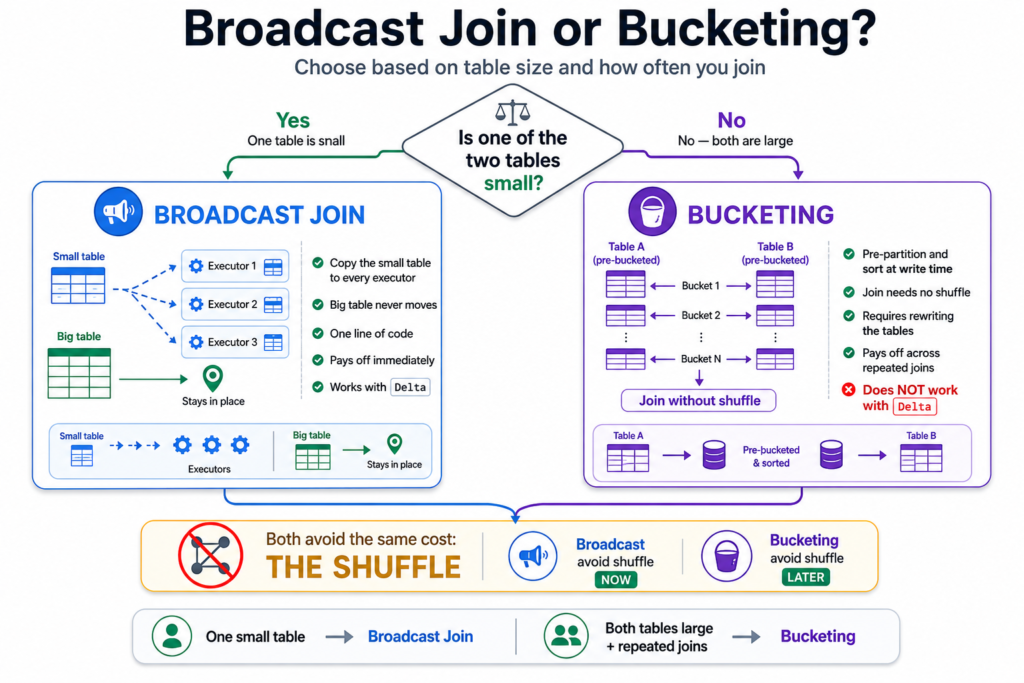
Both techniques below attack the same steps. They differ in when you can use them.
Broadcast join
Bucketing
Use when
One table is small
Both tables are large
How it avoids the shuffle
Copies the small table to every executor
Does the shuffle once, at write time
Effort
One line of code
Rewrite the tables
Pays off
Immediately
Across many repeated joins
Works with Delta
Yes
No
The decision is that simple. If one side fits in memory, broadcast it and stop reading. If both sides are genuinely large, broadcasting is not available and bucketing is the remaining option.
One small table means broadcast. Two large tables means bucketing.
Part 1: Broadcast join
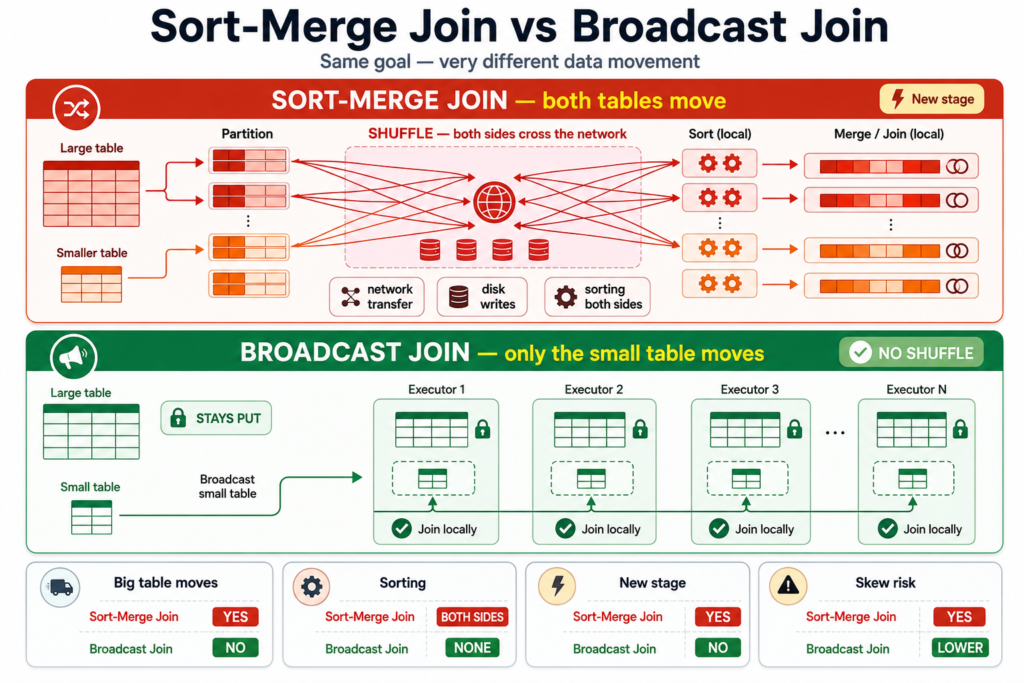
If one of your tables is small, Spark can send a full copy of it to every executor. Each executor then has it locally and can do the join against the rows it already holds. The big table never moves.
Sort-merge join
Broadcast join
Big table
Shuffled across the network
Never moves
Small table
Shuffled across the network
Copied to every executor
Sorting
Both sides sorted
None
Skew risk
Yes — hot keys pile up
None
That last row matters. Skew happens because a shuffle concentrates one hot key into a single partition. No shuffle means no concentration, which is why broadcasting is a standard fix for data skew.
Sort-merge moves both tables. Broadcast copies the small one and leaves the big one where it is.
Why use one
No shuffling. Every executor already has the small table, so no data crosses the network.
Much faster. Removing the shuffle removes the transfer, the disk writes and the sorting.
Efficient use of resources. Ideal when one table fits in each executor’s memory.
Immune to skew. There is no shuffle for a hot key to overload.
When Spark does it automatically
Spark broadcasts automatically if it estimates a table at 10 MB or smaller — the default of spark.sql.autoBroadcastJoinThreshold.
The documented ceiling is 8 GB, and only if the driver and every executor genuinely have the memory. On Spark 3.x, Adaptive Query Execution adds a second chance: if Spark planned a sort-merge join but finds at runtime that one side is small, it converts to a broadcast join mid-query.
SELECT/*+ BROADCAST(customers) */*FROM orders JOIN customers USING (customer_id);
broadcast() is a hint, not a command. If the table turns out to be too large, Spark quietly falls back to a sort-merge join rather than failing. So always verify.
How to check it actually happened
result.explain()
It worked if you see BroadcastHashJoin and a BroadcastExchange:
It did not if you see SortMergeJoin with two Exchange hashpartitioning steps — one per side, which is the shuffle you were trying to avoid.
Why the 10 MB check often gets it wrong
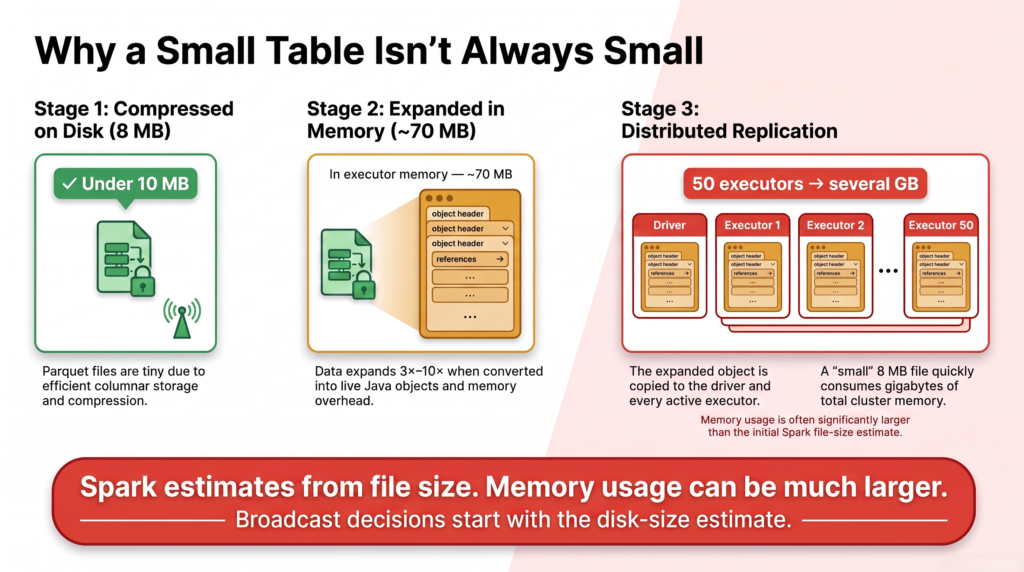
This trap catches almost everyone. Your table is not the size of its files.
Parquet on disk is compressed and columnar. In memory, Spark holds it as live Java objects with all their overhead. The same data routinely expands three to ten times on the way in.
Size
Parquet files on disk
8 MB
Under the 10 MB threshold?
Yes — Spark broadcasts it
Actual size in memory
60–80 MB
Copies in the cluster
One per executor, plus one on the driver
With 50 executors, that “8 MB” table now occupies several gigabytes of cluster memory. String-heavy tables are worst, because strings carry the most per-object overhead. See CSV vs JSON vs Parquet vs Avro for why the on-disk format is so much smaller.
8 MB on disk is not 8 MB in memory — and then it is copied once per executor.
Why it can crash your driver
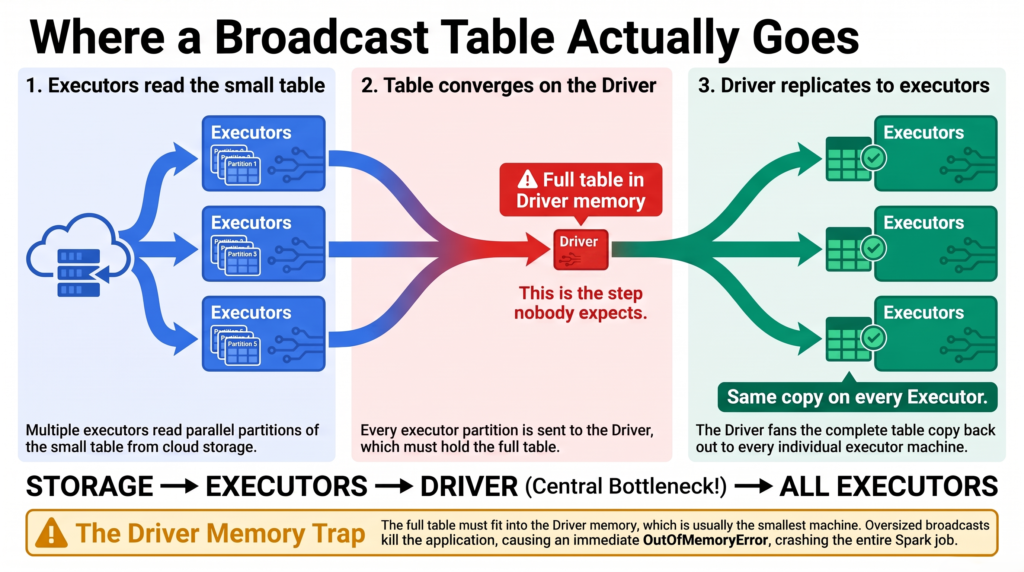
“Broadcast” suggests the table goes straight from storage to the executors. It does not:
The executors read the small table.
They send it to the driver, which assembles the whole thing in its memory.
The driver broadcasts that copy out to every executor.
Step 2 is the one nobody expects. The entire table must fit in driver memory first, and the driver is usually the smallest machine in the cluster. An oversized broadcast does not warn you — it kills the driver, and that ends the application. Same mechanism from the other direction in Spark Driver OOM.
There is a gentler failure too: if the broadcast takes longer than spark.sql.broadcastTimeout (default 300 seconds), the query fails. Raising that is usually the wrong fix — a broadcast taking five minutes is telling you the table is too big.
The broadcast table travels via the driver — usually the smallest machine in the cluster.
Which joins can be broadcast
Join type
Which side can be broadcast
INNER
Either side
LEFT OUTER
Right side only
RIGHT OUTER
Left side only
LEFT SEMI / LEFT ANTI
Right side only
FULL OUTER
Neither
Write a LEFT OUTER join with the small table on the left, wrap it in broadcast(), and Spark silently ignores your hint. The plan is the only place that tells you.
Part 2: Bucketing
Now the harder case. Both tables are large. Neither fits in memory, so broadcasting is off the table — and Spark has to shuffle.
Bucketing accepts that, and asks a different question: if the shuffle has to happen, why does it have to happen every time?
What bucketing is
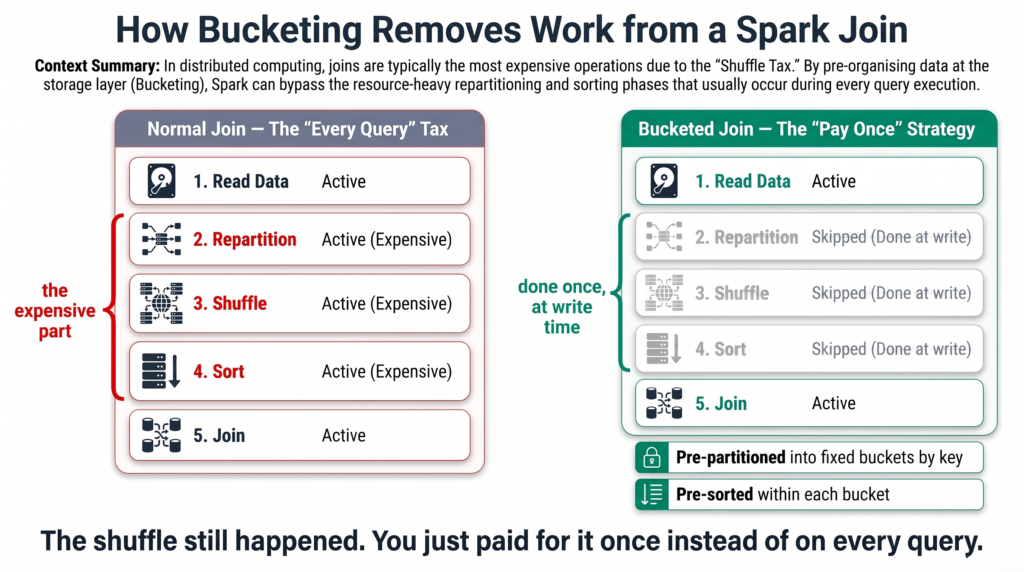
Go back to those five join steps. Bucketing precomputes steps 2 to 5 and stores the result, so they never need doing at query time.
When you write a bucketed table, the data is:
Pre-partitioned — divided into a fixed number of buckets based on a key you choose.
Pre-sorted — within each bucket, rows are already sorted by that key.
Later, when you join two tables that are bucketed the same way, Spark already knows that bucket 7 of one table can only match bucket 7 of the other. It reads them together and joins. No shuffle, no sort.
The shuffle still happened — you just paid for it once, when writing, instead of on every query.
Bucketing does the repartition and sort once at write time, so the join skips straight to matching.
How many buckets?
Work backwards from file size:
Find the total data size. Say 1 TB, which is 1,048,576 MB.
Pick a target size per bucket. 128 MB is a common choice.
Divide. 1,048,576 ÷ 128 = 8,192 buckets.
Match the repartition count to the bucket count.
That fourth step is not optional, and it is the detail people miss. Without a matching repartition, every writing task produces its own file for every bucket — so 200 tasks writing 8,192 buckets gives you 1.6 million files, and you have traded a shuffle problem for a small files problem.
How to create a bucketed table
(sales_df .repartition(8192, "trxn_id") # match the bucket count exactly .write .format("parquet") # Delta does not support bucketing .mode("overwrite") .bucketBy(8192, "trxn_id") # 1 TB / 128 MB = 8192 buckets .sortBy("trxn_id") # pre-sort within each bucket .option("path", "/mnt/data/bucketed/sales") .saveAsTable("b_sales") # must be saved as a table)
Three things in that snippet are requirements, not style choices. The repartition count must match bucketBy. The format cannot be Delta. And it must be saveAsTable — bucketing lives in table metadata, so save() to a path will not work.
How to check it worked
Same technique as broadcast — read the plan, but this time you are looking for something missing.
A bucketed join still shows SortMergeJoin — but with no Exchange steps above it. That absence is the whole point. If you still see Exchange hashpartitioning, the bucketing is not being used.
Bucketing on the same key — which must also be the join key.
Situation
Result
Both bucketed, same count and key
✅ No shuffle at all
Only one bucketed
⚠️ The unbucketed side is still shuffled
Different bucket counts
⚠️ Usually shuffled
Bucketed on a different column
❌ Full shuffle, no benefit
The second row is worth understanding. The bucketed table is already partitioned and sorted so it does not move — but the unbucketed one has no such layout, so Spark must shuffle it to line up. You get half the benefit.
The limitations
It must be on the join key. Bucketing on a column you never join on gives you nothing.
Delta tables do not support it. This rules bucketing out of most modern lakehouse work — see below.
Updates and deletes mean re-bucketing. The layout is fixed at write time, so changing data invalidates it.
It only works on saved tables. Bucketing lives in the metastore, not in the files.
Skewed data creates skewed buckets. A hot key still lands in one bucket, so bucketing does not fix skew.
Spark reads each bucket as a single partition. So your bucket count also fixes your parallelism — too few buckets means too few tasks.
Point 2 deserves emphasis. If your tables are Delta — and on Databricks they usually are — bucketing is not available to you. The modern equivalents are liquid clustering and Z-ordering, which optimise data layout without the metastore requirement or the rigidity. Those are covered in Liquid Clustering vs Z-ORDER vs Partitioning.
Point 3 is the other big one. Bucketing suits data that is written once and read many times. A table receiving daily merges will need constant rebuilding, which usually costs more than the shuffle you were avoiding.
The workaround for daily-updated tables
There is a neat pattern for this, and it is the most practical thing in this section.
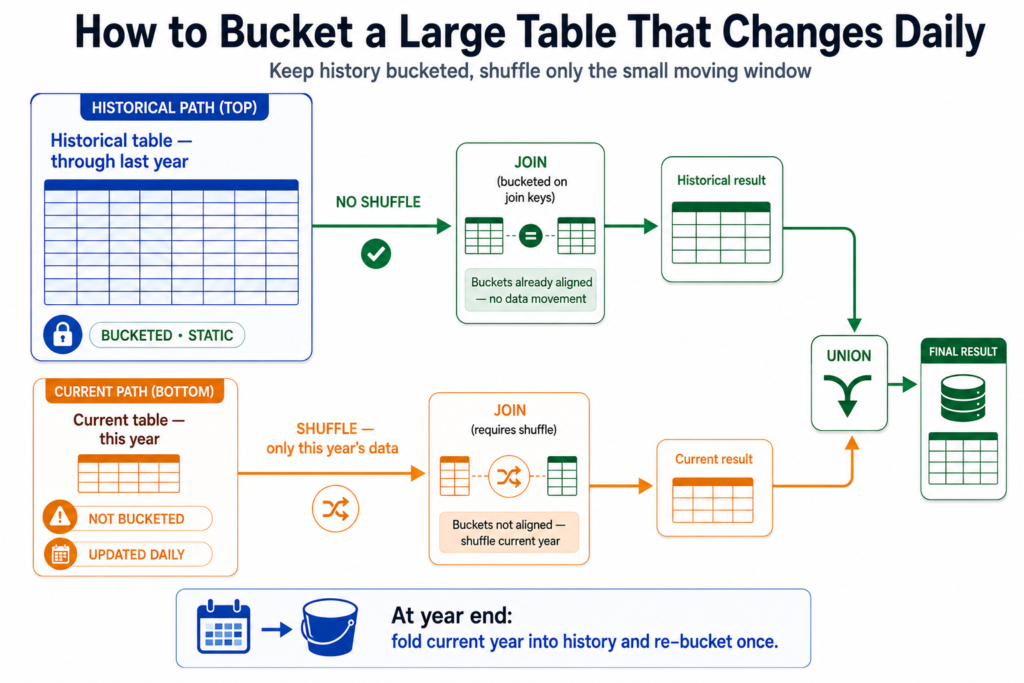
Rebuilding a bucketed table every day is impractical. So split the table in two:
A historical table holding everything up to the previous year. This data is static, so bucket it once and reuse it forever.
A current table holding only the current year. Leave it unbucketed so daily updates stay fast and cheap.
Then run the join twice and combine:
# Bucketed side - no shufflehist_result = spark.table("sales_historical").join(other_table, "trxn_id")# Unbucketed side - shuffled, but it is only one year of datacurr_result = spark.table("sales_current").join(other_table, "trxn_id")final_result = hist_result.union(curr_result)
The large historical join skips the shuffle entirely. The small current join still shuffles, but it is a fraction of the data. At year end, fold the current year into the historical table, re-bucket once, and start again.
Bucket the static history once, leave the current year flexible, and union the two results.
Both large, Parquet, joined repeatedly on the same key
Bucket both tables on that key
Both large, joined once
Not worth bucketing. Just let it shuffle
Both large, updated daily
Split into historical (bucketed) and current (not), then union
One key dominates the data
That is skew, not a join problem
The honest summary is that broadcast joins apply far more often. Bucketing is powerful but demanding — Parquet only, saved tables only, static data only, and both sides must match. When those conditions hold it is excellent. They frequently do not.
Quick reference
Question
Answer
Why is a join slow?
Both tables are shuffled across the network, then sorted
One table is small
Broadcast it — a copy goes to every executor, no shuffle
Broadcast threshold
spark.sql.autoBroadcastJoinThreshold, default 10 MB, max 8 GB
Verify a broadcast
.explain() → look for BroadcastHashJoin
Broadcast gotcha
File size is not memory size. Parquet expands 3–10×
Not supported on Delta, and updates force a rebuild
Daily-updated large tables
Historical bucketed + current unbucketed, then union
Summary
A join shuffles both tables and sorts them. That is the cost you are trying to remove.
If one table is small, broadcast it — a full copy goes to every executor and the big table never moves.
Broadcasting happens automatically at 10 MB, but the estimate uses compressed file size, so check the real memory size and remember the table passes through the driver.
If both tables are large, bucketing precomputes the repartition and sort at write time so the join needs neither.
Bucketing requires both sides to have the same bucket count and key, only works on saved Parquet tables, and is unavailable on Delta.
For large tables updated daily, bucket the static history and leave the current period unbucketed, then union the two joins.
Verify both with .explain(). Broadcast shows BroadcastHashJoin; bucketing shows a SortMergeJoin with no Exchange above it.
Frequently Asked Questions
What is a broadcast join in Spark?
A broadcast join sends a complete copy of the smaller table to every executor, so each one joins locally against the rows it already holds. No data is redistributed by key, so the shuffle is eliminated entirely. It is usually the fastest option when one side of the join is small.
What is bucketing in Spark?
Bucketing divides a table into a fixed number of buckets by hashing a chosen key, and sorts the rows within each bucket, at write time. When two tables bucketed the same way are joined on that key, Spark already knows which buckets can match, so the join needs no shuffle and no sort. The shuffle still happened — you paid for it once instead of on every query.
When should I use bucketing instead of a broadcast join?
When both tables are too large to broadcast. A broadcast join requires one side to fit in each executor’s memory, so once both sides are genuinely large it is not available. Bucketing is the alternative — but it only pays off if the same tables are joined on the same key repeatedly, since creating them is expensive.
How many buckets should I use?
Divide the total data size by your target file size. For 1 TB of data at 128 MB per bucket, that is 1,048,576 MB ÷ 128 MB = 8,192 buckets. Set your repartition count to the same number, otherwise every writing task creates a file for every bucket and you end up with a small files problem.
Does bucketing work with Delta tables?
No. Bucketing is not supported for Delta tables, which rules it out of most modern lakehouse work. The equivalent optimisations for Delta are liquid clustering and Z-ordering, which improve data layout without requiring the metastore or a fixed bucket count.
What happens if only one table is bucketed?
You get half the benefit. The bucketed table is already partitioned and sorted so it does not move, but the unbucketed one has no matching layout, so Spark must shuffle it to line up. For the shuffle to disappear completely, both tables need the same number of buckets on the same key.
How do I know if Spark used a broadcast join?
Call .explain() and read the physical plan. BroadcastHashJoin with a BroadcastExchange means it worked. SortMergeJoin with two Exchange hashpartitioning steps means both tables were shuffled and your hint was ignored — most often because the table was too large or the join type does not allow that side to be broadcast.
Why did my broadcast join cause an out of memory error?
Usually because the table was far larger in memory than on disk. Parquet is compressed and columnar, and the same data can expand three to ten times when loaded — so an 8 MB file becomes 70 MB in memory, then gets copied to every executor. The broadcast is also assembled in driver memory first, so an oversized one kills the driver and ends the whole application.
Does bucketing fix data skew?
No. Buckets are assigned by hashing the key, so a hot key still lands entirely in one bucket — skewed data simply produces skewed buckets. Since Spark reads each bucket as a single partition, that oversized bucket becomes an oversized task. Skew needs its own fix, such as salting or AQE.
How do I bucket a table that is updated daily?
Split it. Keep a historical table containing everything up to the previous year, bucketed once since it never changes, and a current table holding only the recent period, left unbucketed so updates stay fast. Join each against the other table separately and union the results. At year end, fold the current data into the historical table and re-bucket.