One storage account, four very different tools. Here's what Blob, File, Queue, and Table each do — and one app that uses all four — in the simplest way possible.
People say “just put it in Azure Storage” as if it’s one thing. It isn’t. A single Azure Storage account actually holds four completely different services — Blob, File, Queue, and Table — each built for a different job. Pick the wrong one and you’ll fight the tool forever; pick the right one and it just works.
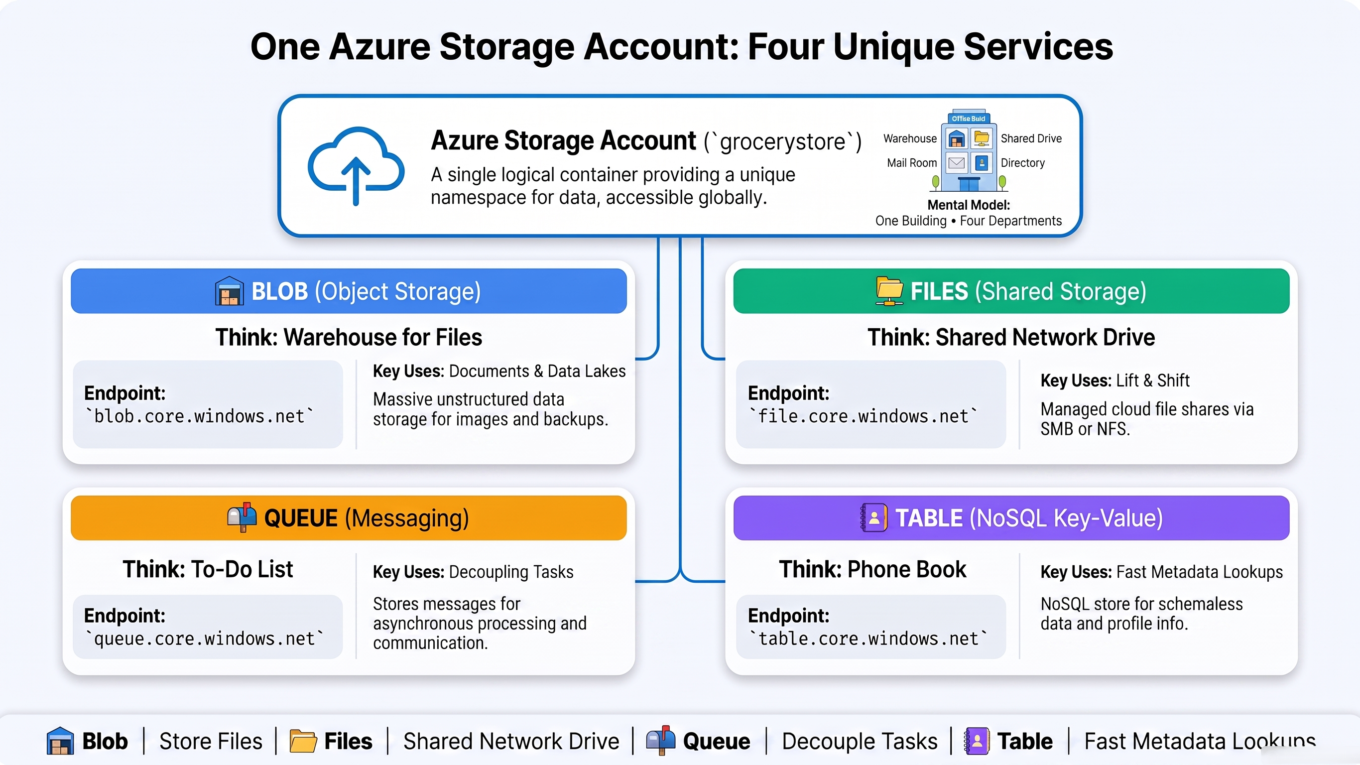
Think of a Storage account as a building with four specialized departments. Same address, four very different rooms. Let’s walk through each with a real example, then see one app that uses all four together.
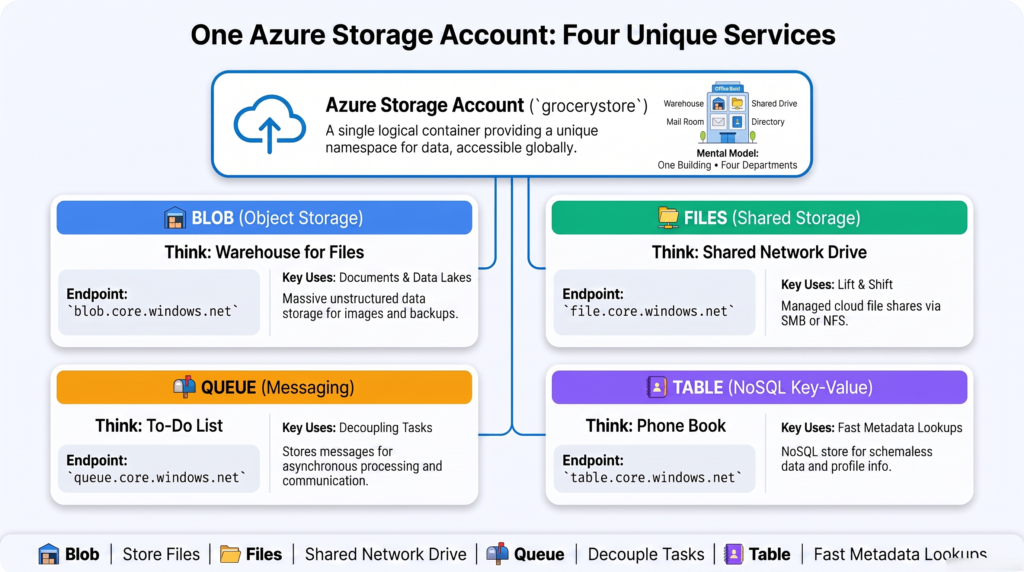
One Storage account, four services — Blob, File, Queue, and Table — each for a different job.
1. Blob Storage — the warehouse for files
Blob storage is for files of any kind — images, videos, PDFs, backups, logs, and big data files like CSV or Parquet. (“Blob” = Binary Large Object.) It’s massively scalable and cheap, and every file gets its own URL.
It’s the giant warehouse of the four — throw in any box (file), keep billions of them, grab any one by its address.
# Every blob has a URL:https://grocerystore.blob.core.windows.net/product-images/milk.jpg# └ account ┘ └ service ┘ └ container ┘ └ file ┘
Use for: storing files and unstructured data at scale — app uploads, media, backups, and data-lake files.
Data engineering note: the analytics “data lake” (ADLS Gen2) is Blob storage with a “hierarchical namespace” turned on, giving it real folders. Your Parquet and CSV lake lives here.
Grocery app example: store every product photo and every customer invoice PDF; also land the raw daily sales files for the data team.
2. File Storage — the shared network drive
Azure Files is a fully managed file share you can mount like a network drive (the Z: drive) on Windows, Linux, or on-prem machines, using the standard SMB/NFS protocols. Multiple machines can mount the same share at once.
If Blob is a warehouse you talk to over the web, File is the shared drive your computer maps and browses like ordinary folders.
# Mount an Azure file share as a network drive (Windows)netuseZ:\grocerystore.file.core.windows.netreports
Use for: replacing an on-prem file server, or a shared folder several servers/apps need to read and write like a normal drive.
Blob vs File — the key difference: Blob is accessed by URL/SDK (great for apps and analytics); File is mounted as a drive (great for lift-and-shift and legacy apps that expect a file path).
Grocery app example: a shared reports drive that the finance team’s tools and a couple of internal servers all map and read from.
3. Queue Storage — the to-do list between components
Queue storage holds a simple list of messages. One part of your system drops messages in; another part picks them up and processes them, later, at its own pace. It lets components talk without waiting on each other.
Picture a ticket spike at a diner: waiters clip orders on; cooks pull them off when they’re ready. The waiter doesn’t stand and wait — they move on. That decoupling is the whole point.
# Producer (the website) adds a messagequeue.send_message("fulfill-order:12345")# Consumer (a background worker) picks it up when freemsg = queue.receive_message() # "fulfill-order:12345"process(msg)queue.delete_message(msg) # remove once done
Use for: background jobs, smoothing out spikes, and decoupling a fast front-end from slower back-end work.
Grocery app example: when a customer places an order, the website drops a fulfill-order message and instantly responds “order received.” A warehouse worker service processes the queue in the background — so a rush of orders never freezes the site.
Note: Queue storage is the simple option. For advanced messaging (topics, ordering, larger messages) Azure has Service Bus — but for basic “drop a task, pick it up later,” Queue is perfect and cheap.
4. Table Storage — the giant, simple lookup book
Table storage is a NoSQL store for huge amounts of structured data that you look up by key. Each row (an “entity”) is identified by a PartitionKey + RowKey, and rows don’t all need the same columns. It’s cheap, scales enormously, and is lightning-fast for “give me the row with this key.”
Think of it as a massive phone book: instant lookups by name, billions of entries, almost free — but no complex queries and no joins. It is not a relational database.
# An entity keyed by PartitionKey + RowKey{"PartitionKey": "Dairy", # groups related rows"RowKey": "milk-2l", # unique within the partition"name": "Milk 2L","price": 1.50,"stock": 240}# Look it up instantly by (PartitionKey="Dairy", RowKey="milk-2l")
Use for: massive volumes of simple, key-based data — user profiles, device/IoT readings, session data, catalogs.
Not for: complex queries, joins, or reporting — that’s what a real database or warehouse is for.
Grocery app example: store the product catalog and per-device app settings, looked up instantly by key. (Need more power later? Cosmos DB’s Table API is the premium, globally-distributed upgrade with the same shape.)
Side by side
Service
Holds
Think of it as
Use for
Blob
Files / objects
A warehouse for boxes
Images, backups, data-lake files
File
File shares
A mapped network drive
Shared drives, lift-and-shift apps
Queue
Messages
A ticket spike / to-do list
Background jobs, decoupling
Table
Key-value rows
A giant phone book
Simple lookups at massive scale
One handy tell: each service has its own endpoint under the account — blob.core.windows.net, file.core.windows.net, queue.core.windows.net, table.core.windows.net. Same account name, four doors.
One app, all four together
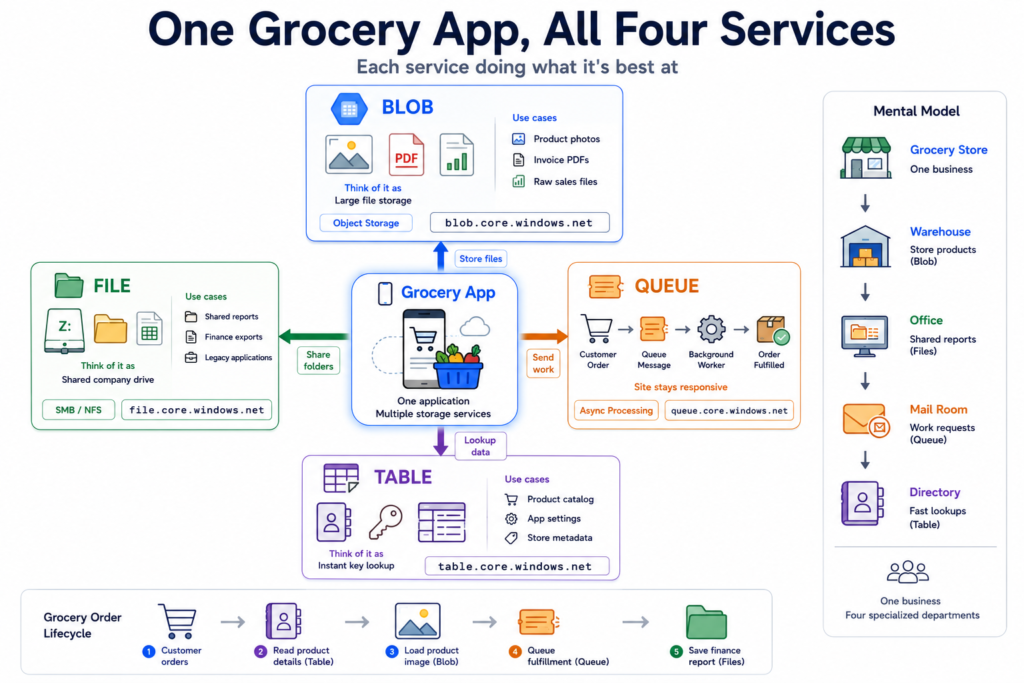
Here’s where it clicks. Our grocery app uses every service, each for what it’s best at:
🗄️ Blob — stores the product photos and invoice PDFs, and lands the raw sales files for analytics.
📁 File — a shared reports drive the finance tools map like a normal folder.
📬 Queue — each new order becomes a message so the site stays fast and a worker fulfills orders in the background.
📇 Table — the product catalog and app settings, looked up instantly by key.
One grocery app, four Azure Storage services — each doing the job it’s best at.
Which one do I pick?
Storing files or building a data lake? → Blob (it’s the one data engineers use most).
Need a shared drive apps can mount? → File.
Passing tasks between components without waiting? → Queue.
Storing tons of simple data looked up by key? → Table.
The takeaway
“Azure Storage” isn’t one thing — it’s a single account with four specialized services. Blob is the warehouse for files and the home of your data lake. File is a shared network drive you mount like a folder. Queue is a simple to-do list that lets parts of your system work independently. Table is a giant phone book for fast, key-based lookups at huge scale. Match the service to the job — files, drives, messages, or key-value data — and Azure Storage becomes simple. For data engineering specifically, you’ll live in Blob (ADLS Gen2) most of the time, but knowing all four means you’ll always reach for the right door.
Frequently Asked Questions
What are the four services in an Azure Storage account?
An Azure Storage account provides four data services: Blob (files and objects), File (managed file shares you mount as a drive), Queue (simple messages for decoupling components), and Table (a NoSQL key-value store). They share one account but each has its own endpoint and its own purpose.
What is the difference between Blob and File storage?
Blob storage holds files accessed by URL or SDK and scales massively — ideal for app uploads, media, backups, and data-lake files. File storage is a managed file share you mount like a network drive using SMB/NFS, ideal for shared folders and legacy apps that expect a file path. Blob is web-accessed; File is drive-mounted.
What is Azure Table storage used for?
Table storage is a NoSQL key-value store for large volumes of simple structured data looked up by a PartitionKey and RowKey — such as user profiles, device readings, or catalogs. It’s cheap and fast for key-based lookups but doesn’t support joins or complex queries, so it isn’t a replacement for a relational database.
When should I use Queue storage?
Use Queue storage to pass tasks between parts of a system without them waiting on each other — for example, a website dropping an “order received” message that a background worker processes later. It smooths out spikes and decouples fast front-ends from slower back-end work. For advanced messaging features, Azure Service Bus is the richer option.
Is Azure Data Lake the same as Blob storage?
Azure Data Lake Storage Gen2 is Blob storage with a “hierarchical namespace” enabled, which adds real folders and file-system semantics optimized for analytics. So the data lake you use for Parquet and CSV files is built on Blob storage — the same service, tuned for big-data workloads.
Which Azure Storage service do data engineers use most?
Blob storage, by far — specifically ADLS Gen2, which is the foundation of the data lake where raw and processed files (like Parquet) live. File, Queue, and Table appear in broader application architectures, but day-to-day data engineering work centers on Blob.