Spark Driver OOM: Why collect() and Broadcast Joins Crash Your Job
Your executors have 64 GB and the job still dies with OutOfMemoryError. The culprit is the one part of Spark everyone forgets about — the Driver. Here's why it crashes and how to size it, in plain English.
It’s 3 AM. A job that’s run fine for months suddenly dies:
java.lang.OutOfMemoryError:Javaheapspace
You check the cluster — the executors have 64 GB of memory between them, barely touched. So how did it run out of memory? Because the crash wasn’t on the executors at all. It was on the one part of Spark almost everyone ignores: the Driver. Let’s make this simple.
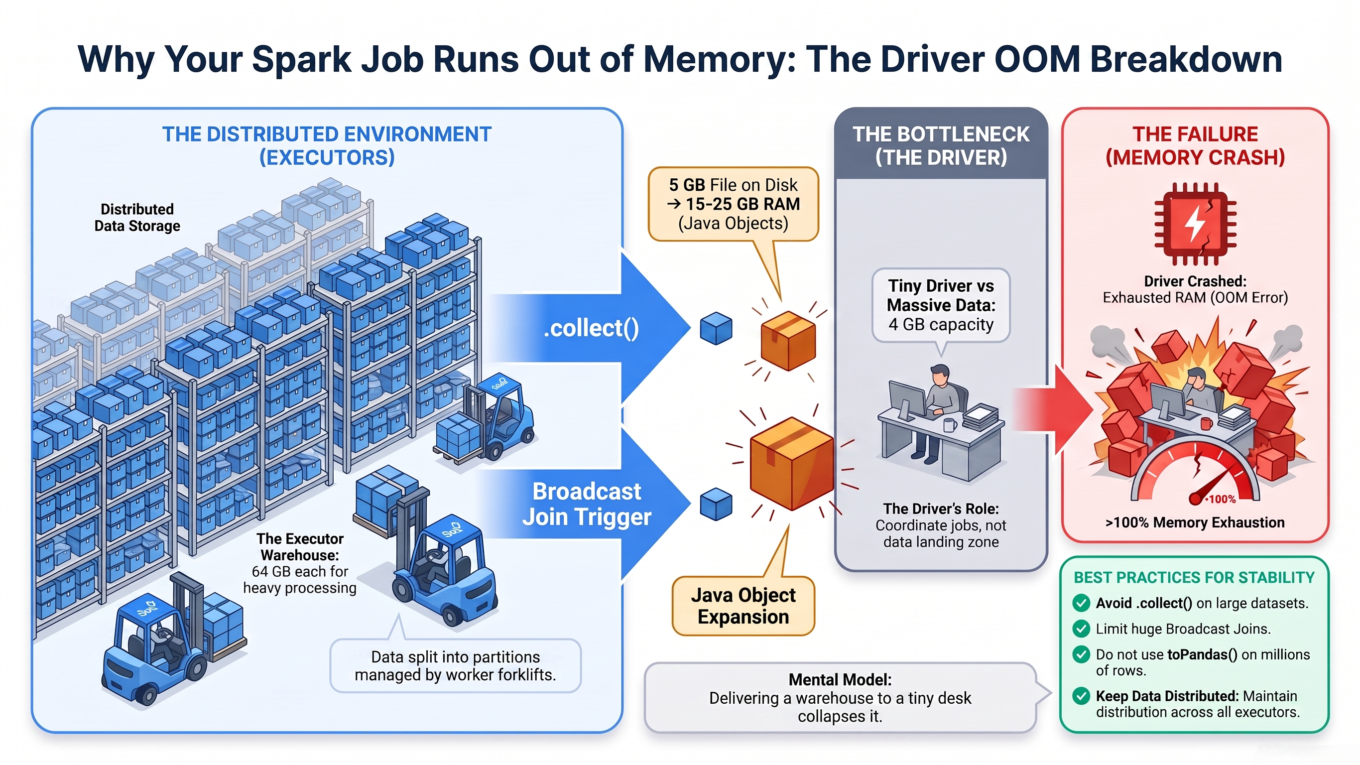
Executors = a huge warehouse. Many workers, lots of shelf space (memory), spread across machines. This is where the heavy lifting happens, and where all your data normally lives.
The Driver = one small desk. There’s only one driver, and it has its own, usually much smaller, memory. Its job is to coordinate — not to hold data.
Most of the time, data stays out in the warehouse. But a few operations grab all that data and pile it onto the driver’s little desk. If it doesn’t fit, the desk collapses — and because the driver is the brain of the whole app, everything crashes. Your 64 GB of warehouse space is irrelevant; the desk is what broke.
Executors are a huge warehouse; the driver is one small desk. Certain operations dump everything onto that desk.
Three things that dump data onto the desk
Only a handful of operations move data to the driver. These are the ones that cause driver OOM:
.collect() (and friends like .toPandas(), .collectAsList()) — pulls every row to the driver.
Broadcast joins — the “small” table is first collected to the driver, then shipped out to every executor.
Large metadata — listing millions of files or loading a giant catalog can pile up on the driver too.
Let’s take the biggest offender first.
Why .collect() is so dangerous (and the trap everyone falls into)
.collect() tells Spark: “take all the rows from every executor and bring them to me, on the driver.” For a small result, fine. For a big one, the desk collapses.
Here’s the part most guides get wrong, and it’s the single most important thing in this article. People say “my file is 5 GB, so I need 5 GB on the driver.” Not even close.
Data on disk is packed tight. In the driver’s memory it puffs up — often 2 to 5 times bigger, sometimes more.
Think of a Parquet file like vacuum-packed clothes: compressed, columnar, tiny. When you .collect() it, the driver has to unpack every value into a full Java object — decompressed, in rows, each with its own memory overhead. Those vacuum-packed clothes spring open and fill the whole suitcase. A 5 GB Parquet file can easily need 15–25 GB of driver memory once collected.
So the honest rule isn’t a tidy formula — it’s this: never size the driver by the on-disk size, and never .collect() large data in the first place.
What to do instead of .collect()
99% of the time, you don’t actually need all the rows on the driver. You wanted to look at the data, or save it. Both have safe options:
# ❌ Dangerous — pulls everything to the driverbig_df.collect()# ✅ Just peeking? Show a few rowsbig_df.show(20)# ✅ Need a small sample on the driver? Take a bounded numberbig_df.take(1000)# ✅ Need to keep the data? Write it in parallel — nothing touches the driverbig_df.write.parquet("s3a://bucket/output")
write is the big one: every executor writes its own slice straight to storage, in parallel, and the driver never holds the data. If you find yourself reaching for .collect() on anything large, the answer is almost always write instead.
Broadcast joins: the “small” table that wasn’t small
A broadcast join is a great optimization: send a small lookup table to every executor so the join needs no shuffle. But watch the mechanics — the small table is collected to the driver first, then broadcast out. So if that “small” table is actually 2 GB, your driver has to hold 2 GB (puffed up) before it can send it anywhere. Same desk, same collapse.
Only broadcast genuinely small tables — think tens of megabytes, not gigabytes.
Spark auto-broadcasts tables under a threshold (default 10 MB). Raise it only a little, and only when you’re sure the table is small.
If the table is big, don’t broadcast it — let Spark do a normal (shuffle) join instead.
from pyspark.sql.functions import broadcast# Only if 'lookup' is truly small (tens of MB)result = big_df.join(broadcast(lookup), "key")# The auto-broadcast threshold (default 10 MB)spark.conf.set("spark.sql.autoBroadcastJoinThreshold", "10485760") # 10 MB
Large metadata: death by a million files
The quieter one. If a query has to list an enormous number of files (an over-partitioned table with millions of tiny partitions), or load metadata for a catalog with hundreds of thousands of tables, all that bookkeeping lands on the driver. It’s not your row data, but it still fills the desk. The fix is upstream: avoid over-partitioning, keep files reasonably sized, and don’t scan more than you need.
How driver memory is actually set up
When you give the driver memory, it’s split into two parts:
Heap (spark.driver.memory) — the main workspace, where collected data and broadcast tables live.
Overhead (spark.driver.memoryOverhead) — extra room Spark needs for behind-the-scenes work. It defaults to max(384 MB, 10% of the heap).
The container the driver runs in must fit heap + overhead. This is a classic mistake: you set spark.driver.memory = 4g and assume 4 GB is enough — but the real requirement is 4 GB + ~400 MB. On Kubernetes or YARN, if the driver exceeds its container limit, the orchestrator simply kills it (you’ll see the driver container die, often with exit code 137). Always leave room for overhead.
# Set these at cluster/launch time (driver memory can't grow after it starts)spark.driver.memory 8g# heapspark.driver.memoryOverhead 1g# extra non-heap roomspark.driver.maxResultSize 2g# guardrail (see below)
The guardrail: maxResultSize
There’s a built-in safety net most people don’t know about: spark.driver.maxResultSize (default 1 GB). It caps how much a single action like .collect() is allowed to bring back. If a collect would exceed it, Spark aborts the job with a clear error instead of letting the driver crash with a raw OOM:
Total size of serialized results ...is bigger than spark.driver.maxResultSize
That’s a good error — a polite “you’re about to do something dangerous” instead of a 3 AM heap crash. Keep it set. Raising it should make you pause and ask “do I really need to collect this much?”
The 5 GB scenario, done right
Back to the classic question: you run .collect() on a 5 GB dataset with a 4 GB driver — what happens?
What happens: the executors ship 5 GB toward the driver, it puffs up well past 4 GB as Java objects, the heap fills, and you get OutOfMemoryError: Java heap space. The job dies.
The wrong fix: “bump the driver to 5 GB.” It’ll still crash, because collected data is bigger than the file. You’d realistically need much more, and you’d be guessing.
The right fix: ask why you’re collecting 5 GB at all. If you need to look, show()/take(). If you need to keep it, write it. If you genuinely must have it all on the driver (rare), give the driver generous headroom (many times the file size), keep maxResultSize as a guardrail, and test.
Common mistakes
“My executors are huge, so I’m fine.” Executor memory does nothing for driver OOM — .collect() and broadcast target the driver.
Forgetting overhead. Setting driver.memory = 4g in a 4 GB container leaves no room for overhead, so the orchestrator kills the driver.
Using .collect() just to peek. Use show() or take() — collecting everything to see ten rows is how the 3 AM crash starts.
Broadcasting a big table. If the “small” side is really gigabytes, don’t broadcast it.
The takeaway
Driver OOM has one root cause: an operation piled too much data onto the driver’s small desk. The three culprits are .collect(), broadcast joins, and heavy metadata. The trap is assuming memory needed equals file size — but data puffs up several times over when it lands on the driver as Java objects, so on-disk size is a dangerous guide. The real fixes are simple: don’t .collect() large data (use show(), take(), or write), only broadcast genuinely small tables, always leave room for overhead, and keep maxResultSize as a guardrail. Respect the little desk, and the 3 AM crashes stop.
Frequently Asked Questions
Why does .collect() cause an OutOfMemoryError?
Because .collect() brings every row from the executors to the single driver, and stores it in the driver’s heap as Java objects. That representation is much larger than the compressed on-disk file, so it can easily exceed the driver’s memory and crash with OutOfMemoryError — regardless of how much memory the executors have.
How much driver memory do I need to collect a 5 GB dataset?
Far more than 5 GB. Data decompresses and expands into Java objects when collected — commonly 2 to 5 times the on-disk size, sometimes more — so a 5 GB file may need 15–25 GB of driver heap. The better answer is to avoid collecting large data at all and use show(), take(), or a distributed write instead.
Does increasing executor memory fix driver OOM?
No. Operations like .collect() and broadcast joins send data to the driver, not the executors. No amount of executor memory helps if the driver is too small. You must increase spark.driver.memory, or better, avoid piling data onto the driver in the first place.
Why do broadcast joins cause driver memory problems?
Because Spark collects the smaller table to the driver first, then broadcasts it to every executor. If that “small” table is actually large, the driver runs out of memory during the collect step. Only broadcast genuinely small tables (tens of megabytes), and let big tables use a normal shuffle join.
What is spark.driver.maxResultSize?
It’s a safety limit (default 1 GB) on how much data a single action like .collect() can return to the driver. If a collect would exceed it, Spark aborts the job with a clear error instead of crashing with a raw OutOfMemoryError. It’s a useful guardrail that turns a dangerous crash into a controlled, understandable failure.
What is driver memory overhead?
Overhead (spark.driver.memoryOverhead) is extra memory Spark needs outside the main heap, defaulting to max(384 MB, 10% of the heap). The driver’s container must fit heap plus overhead; if you forget the overhead, the cluster manager can kill the driver for exceeding its container limit even though the heap looked fine.