The words all sound the same and that's why it's confusing. One kitchen analogy makes the whole thing click — driver, executors, jobs, stages, tasks, and shuffles.
Driver. Executor. Job. Stage. Task. Partition. Shuffle. Spark throws all of these at you at once, they all sound similar, and most tutorials define them in isolation — so they never quite connect. We’re going to do it differently: take one small piece of code and trace it all the way from “run” to results, watching each of those words appear exactly where it belongs.
To keep a picture in your head, think of Spark as a construction company building a skyscraper. There’s a project manager who plans everything, work crews who do the actual building, and a head office that supplies the crews. Every Spark term maps onto that site — and we’ll point it out as we go.
The players: who’s on the site
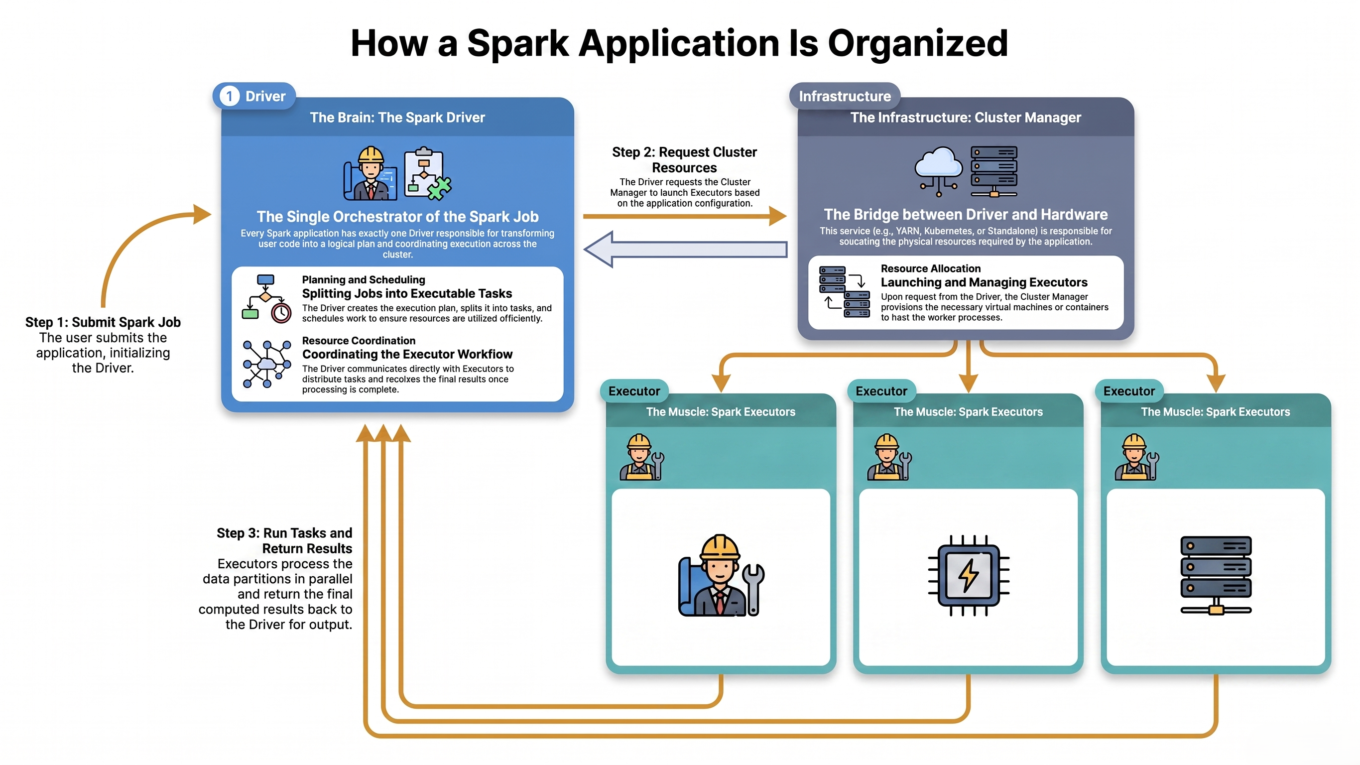
Driver = the project manager. One per application. It reads your code (the blueprint), makes the plan, breaks the work into pieces, hands them out, and tracks progress. It coordinates — it doesn’t lay bricks.
Cluster Manager = the head office. It supplies the crews and equipment — it launches the executors on machines for the driver (Databricks, YARN, Kubernetes, etc.).
Executors = the work crews. Many of them, each on its own machine, each with its own tools and materials (memory). They do the real work.
Cores (slots) = workers in a crew. A crew with 4 cores can build 4 sections at once — i.e. run 4 tasks in parallel.
The driver plans and coordinates; executors on worker nodes do the actual work in parallel.
Driver = brain, executors = muscle. Kill the driver and the whole application dies. Kill one executor and the driver just re-assigns its work to another crew.
Step 1: You submit the code
Here’s the code we’ll trace the whole way. It reads orders, filters the big ones, and counts them by region:
from pyspark.sql import SparkSessionspark = SparkSession.builder.appName("SalesReport").getOrCreate()orders = spark.read.parquet("/data/orders") # line Abig = orders.filter(orders.amount >100) # line Bby_region = big.groupBy("region").count() # line Cby_region.show() # line D
When you run this (via a notebook cell or spark-submit), the first thing that happens is the driver process starts. It creates the SparkSession, and the cluster manager launches your executors in the background. The site is now staffed and waiting for a plan.
Step 2: Lines A–C do nothing (yet)
This surprises everyone the first time: lines A, B, and C don’t actually process any data. They’re transformations, and transformations are lazy — they just add steps to a plan. The driver quietly records “read, then filter, then group-and-count” into a DAG (a directed graph of steps, i.e. the build plan). No crew has lifted a finger.
You can prove it — run only lines A–C and nothing computes. Add .explain() and Spark shows you the plan it has built, without running it:
by_region.explain()# Shows the physical plan, including an "Exchange" — that's the shuffle.# Still nothing has executed.
Step 3: Line D triggers a Job
Line D, show(), is different. It’s an action — it asks for a real result. That’s the “start building” command, and it forces the driver to actually execute the plan. The driver turns the DAG into a Job.
Transformations are lazy (read, filter, groupBy): build the plan, run nothing.
Actions are eager (show, count, collect, write): trigger a job and execute.
The rule to remember: one action = one job. Our script has exactly one action, so it produces exactly one job. Two actions would produce two jobs.
Step 4: The Job splits into Stages (at the shuffle)
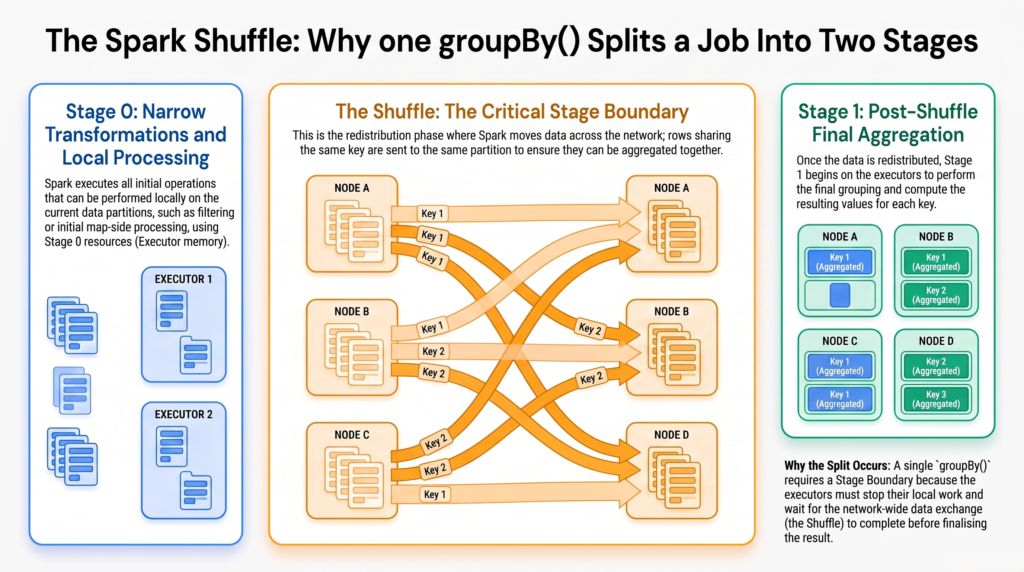
Now the driver breaks the job into Stages. The rule for where a stage ends is the single most important idea in Spark performance: a stage boundary happens at every shuffle.
Why? Some steps let each crew work on its own section alone — filter, read, map. Nobody needs anything from another crew. But groupBy("region") needs every “West” row gathered together, no matter which crew currently holds it. That requires trucking data across the whole site — a shuffle — and the next phase can’t begin until it’s done.
The groupBy forces a shuffle, so the job splits into two stages at that boundary.
Quick rule of thumb: number of stages ≈ number of shuffles + 1. One shuffle here, so two stages. Wide transformations (groupBy, join, distinct, orderBy) create shuffles; narrow ones (filter, map, select) don’t.
Step 5: Each Stage breaks into Tasks (one per partition)
A stage doesn’t run as one lump — it runs as many Tasks. A task is the smallest unit of work: it processes exactly one partition (one chunk) of the data. The mapping is one-to-one: number of tasks in a stage = number of partitions it processes.
You can see the partition count directly:
orders.rdd.getNumPartitions()# say it returns 8 -> Stage 0 will run 8 tasks (one per partition)
So if the input is 8 partitions, Stage 0 runs 8 tasks. After the shuffle, the number of partitions is set by the shuffle configuration (or tuned automatically), so Stage 1 runs one task per shuffle partition.
Step 6: Tasks run on executors, in parallel
The driver hands the tasks to the executors, which run them on their cores in parallel. If you have 2 executors with 4 cores each, you can run 8 tasks at the same time — so Stage 0’s 8 tasks all run in one wave. The results flow back to the driver, which returns them to your show().
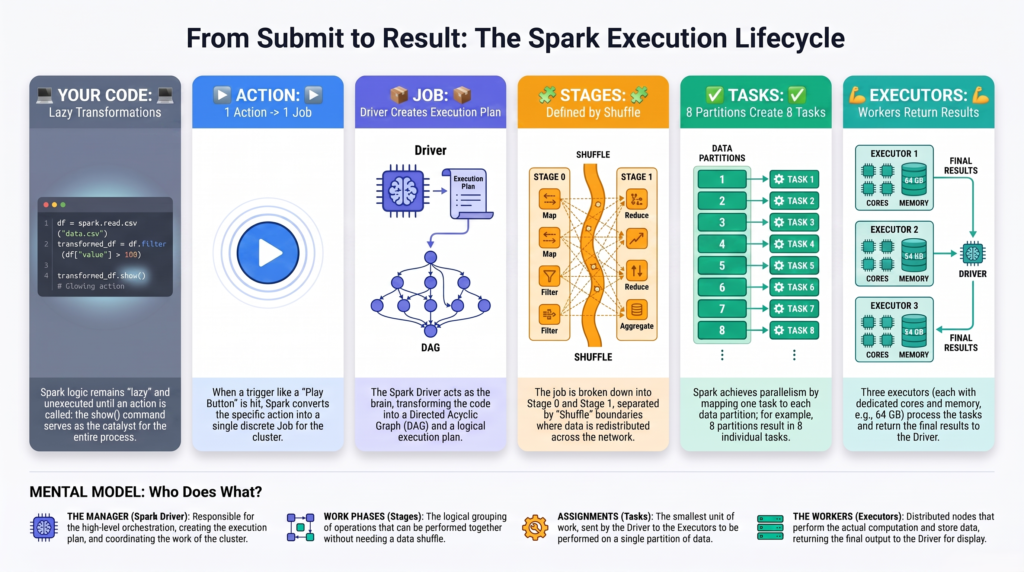
The full path: code → action → job → stages → tasks running in parallel across executor cores.
The whole trace in one table
Code
What Spark does
What it creates
read / filter / groupBy (A–C)
Builds the plan, lazily
A DAG — no execution yet
show() (D)
Action — forces execution
1 Job
groupBy shuffle
Splits the job at the shuffle
2 Stages
8 input partitions
One unit of work each
8 Tasks in Stage 0
Tasks scheduled
Run in parallel on cores
Work done on the executors
See it yourself in the Spark UI
This isn’t theory you have to take on faith — Spark shows you all of it. Run the code, then open the Spark UI:
Jobs tab — one row for your show() action.
Click the job → Stages — you’ll see the two stages, split at the shuffle (labelled “Exchange”).
Click a stage → Tasks — one row per partition, with timing and data size for each.
Reading that screen used to feel like hieroglyphics. Now every column has a name you know.
The cheat sheet
Spark term
Construction analogy
What it really is
Driver
Project manager
Plans & coordinates the app (one per application)
Cluster manager
Head office
Supplies machines and launches executors
Executor
Work crew
Runs tasks, holds data in memory
Core / slot
A worker in the crew
Runs one task at a time (parallelism)
Partition
A section of the site
One chunk of the distributed data
Job
One deliverable
Triggered by one action
Stage
A build phase
Work between two shuffles
Task
Building one section
One unit of work on one partition
Shuffle
Trucking materials between crews
Redistributing data across the cluster
DAG
The master build plan
The graph of all steps in your query
The takeaway
Every Spark run follows the same path. You submit code; the driver records your lazy transformations into a DAG; the moment an action fires, that DAG becomes a job; the job splits into stages at every shuffle; each stage runs one task per partition; and those tasks run in parallel on the executors’ cores. Trace any script through those six steps and Spark stops being a black box. Better still, you’ll know exactly which line caused that expensive shuffle — which is where real performance tuning begins.
Frequently Asked Questions
What is the difference between the driver and executors in Spark?
The driver is the coordinator: it runs your main program, builds the plan, splits work into tasks, and tracks progress — one per application. Executors are the workers that actually run the tasks and hold data in memory. The driver is the brain; executors are the muscle.
What is the difference between a job, a stage, and a task?
They are nested levels of work. A job is the whole computation triggered by one action. It splits into stages, with a new stage at each shuffle. A stage is made of tasks, and each task processes one partition. So one job has several stages, and each stage has many tasks.
What triggers a Spark job?
An action triggers a job. Transformations like filter, groupBy, and join are lazy and only build the plan, while actions like show, count, collect, and write force execution. Each action generally creates one job.
Why does a groupBy or join create a new stage?
Because they require a shuffle — data must be redistributed across the cluster so related rows end up together. Spark places a stage boundary at every shuffle, since the next stage cannot start until the reshuffle is complete. Narrow operations like filter and map do not cause this.
How many tasks does a Spark stage run?
One task per partition of the data the stage processes. If a stage works on 8 partitions it runs 8 tasks; those tasks run in parallel across the available executor cores, so more cores means more tasks running at once. You can check partition count with df.rdd.getNumPartitions().
How can I see the jobs, stages, and tasks for my code?
Open the Spark UI after running your code. The Jobs tab lists jobs (one per action), clicking a job shows its stages split at shuffles, and clicking a stage shows its tasks with timing and data size. You can also call .explain() to see the plan and where the shuffle (Exchange) occurs before running anything.