PySpark Data Serialization: Why Python UDFs Are Slow
Spark runs on the JVM. Python UDFs do not. Every row has to be converted between the two — and here is what that costs, how to spot it, and how to fix it.
You add a small Python function to your PySpark job. Your runtime triples. Nothing fails, nothing errors — it is just slow.
The cause is data serialization. This article covers what it is, why Python UDFs trigger it, how to detect it in the Spark UI, and how to fix it.
What is data serialization?
Data serialization is the process of converting data into a format that can be efficiently:
Saved to disk or storage — stored in a format that can be read back later.
Transmitted over the network — sent between nodes in a Spark cluster.
Transferred between processes — for example, moving data from a Scala JVM process to a Python process in PySpark.
The third one is what causes the problem in this article.
How PySpark actually runs
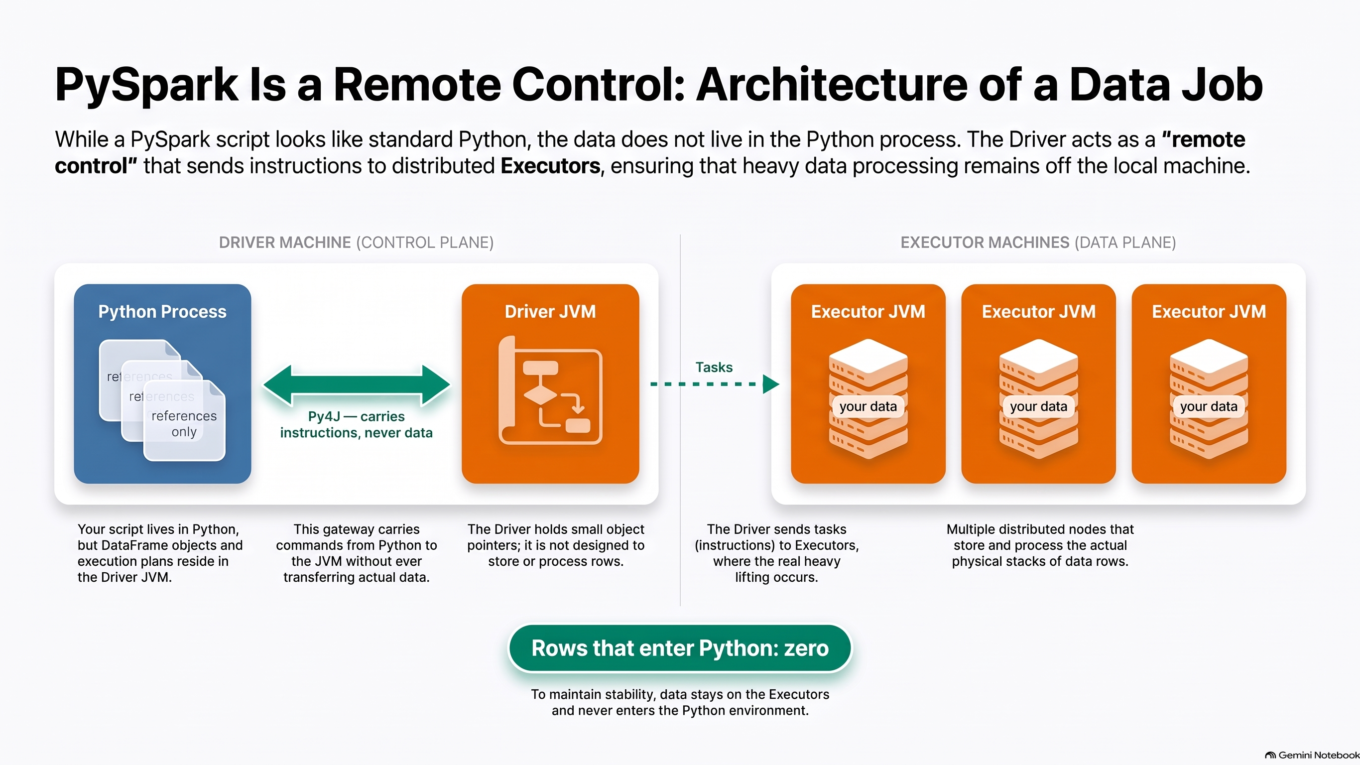
Spark is written in Scala and runs on the JVM (Java Virtual Machine).
When Spark reads data, it loads it into the JVM’s heap memory for processing.
PySpark is Spark’s Python API. It lets you write Spark code in Python.
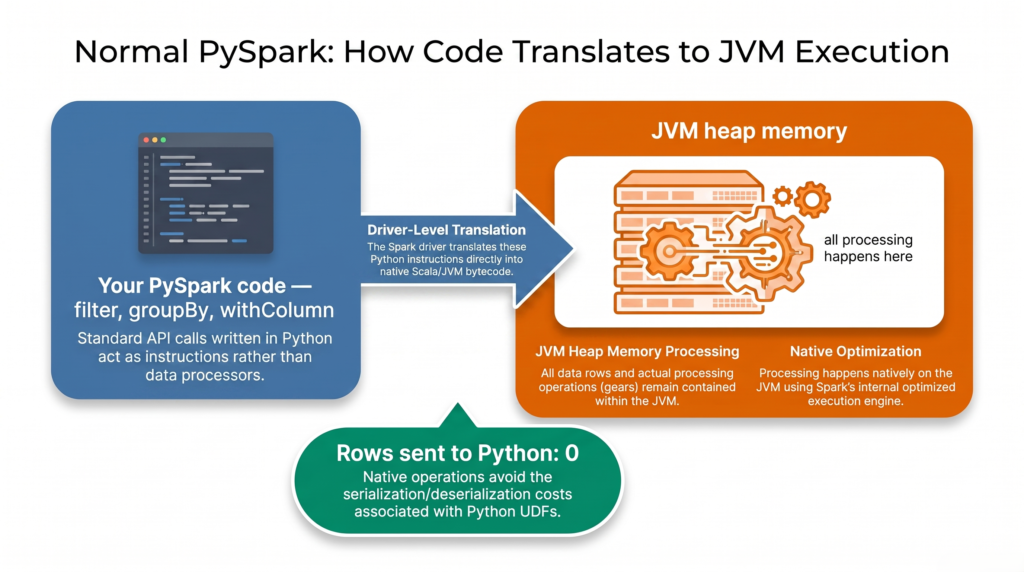
The Spark driver translates your PySpark calls — filter, groupBy, withColumn and everything in pyspark.sql.functions — into operations the JVM already knows how to run.
So for normal PySpark code, all the work happens in the JVM. No data ever reaches Python.
This is why PySpark is fast, and why PySpark and Scala Spark perform almost identically on normal DataFrame operations.
Normal PySpark: the driver translates your code into JVM operations. Data stays in the JVM.
This is plain Python code. The Spark driver cannot translate it into a JVM operation, because there isn’t one.
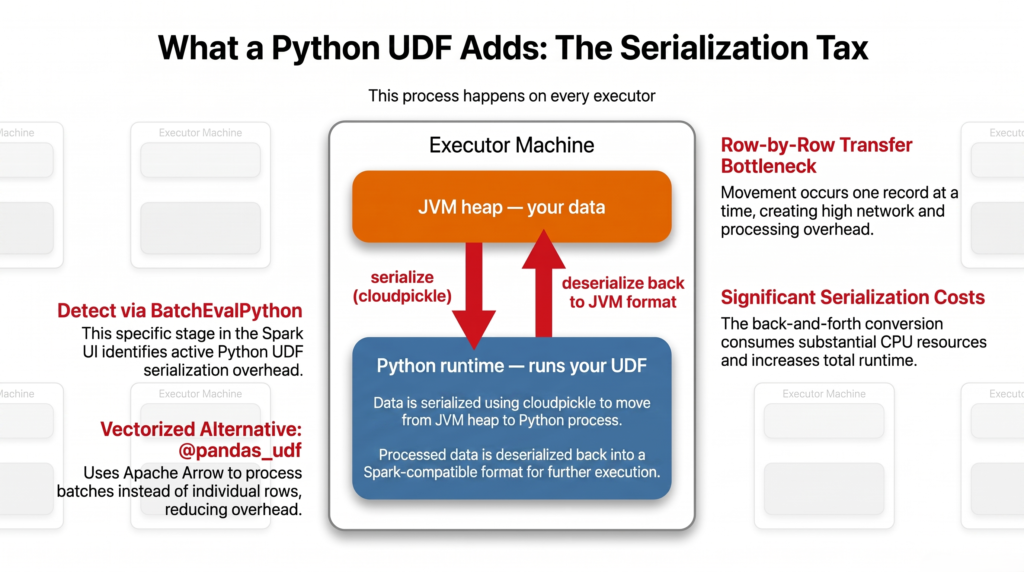
Instead, Spark creates a Python runtime (a Python worker process) on the executor to run it.
Your data is in the JVM heap. Your function is in the Python process. The data has to move between them.
That movement is the serialization:
Data is serialized when it moves from JVM heap memory into the Python process.
After the Python function runs, the result is serialized back into a JVM-readable format.
In PySpark, this JVM-to-Python serialization only happens when you use a Python UDF. Normal DataFrame operations never trigger it.
A Python UDF adds a Python runtime on the executor — and data must be serialized in both directions.
The three costs
This back-and-forth introduces overhead in three places:
Serialization cost — Spark must convert JVM data into a Python-friendly format, using Pickle or Arrow.
Deserialization cost — after the Python code runs, the result must be converted back into a JVM-compatible format.
Transfer overhead — moving serialized data between the JVM and the Python runtime is expensive, especially for large datasets.
Problems with Python UDFs
Serialization with cloudpickle — Python UDFs serialize using cloudpickle, which is slow and adds significant overhead on large datasets. Every record is serialized on the way out and deserialized on the way back.
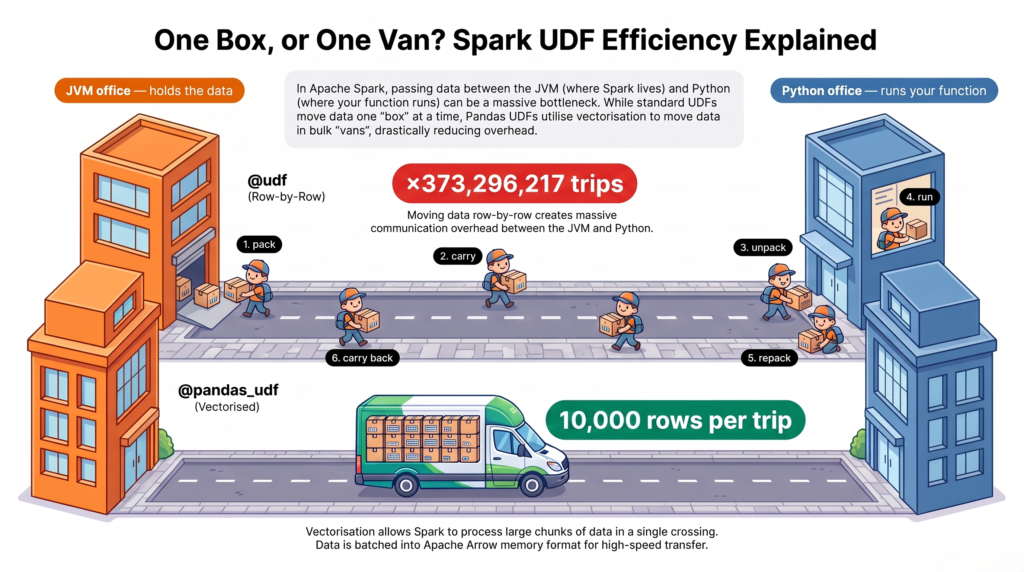
Record-by-record data transfer — data moves between the JVM and Python one record at a time. This fine-grained movement across processes creates high transfer and serialization overhead.
Record-by-record processing — the UDF also runs once per record, instead of using Spark’s vectorized operations. Lower throughput, longer runtime.
One record at a time, in both directions — and the function is called once per record too.
Detecting the problem in the Spark UI
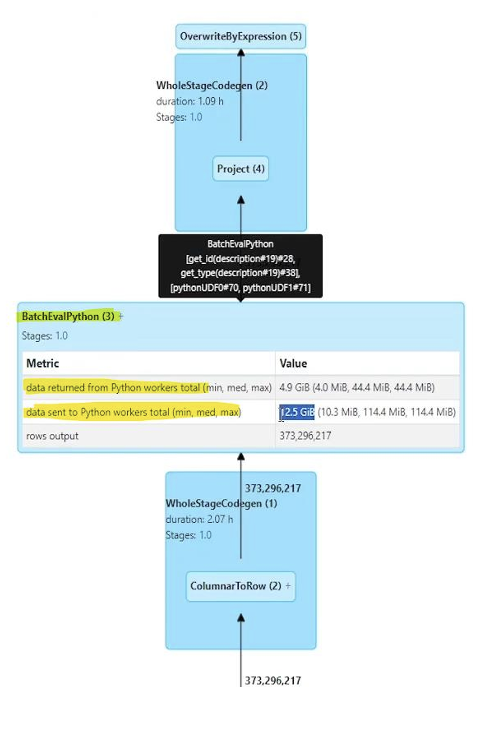
If you use any Python UDF, Spark adds a node named BatchEvalPython to the query plan.
To find it: open the Spark UI, go to the SQL / DataFrame tab, and click your query.
BatchEvalPython in the query plan: 12.5 GiB sent to Python workers for 373 million rows.
Note that the name is misleading. BatchEvalPython contains the word “batch” but processes one row at a time. There are three nodes to know:
Node in the plan
What it means
Speed
WholeStageCodegen only
No Python involved. All JVM.
✅ Fastest
ArrowEvalPython
Python UDF using Arrow, batched
🟡 Fine
BatchEvalPython
Python UDF, one record at a time
❌ Slowest
Ruling out other causes first
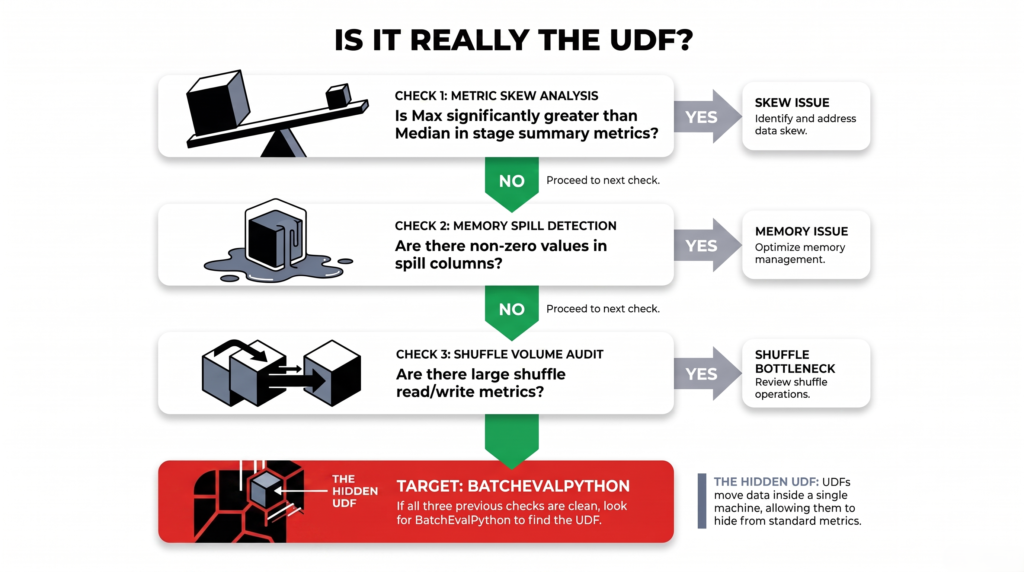
Before blaming a UDF, check the Stages tab. Serialization looks different from the other common problems.
This is what skew looks like:
Skew: median shuffle read of 0 B against a max of 1.7 GiB. A serialization problem does not look like this.
The Max column dwarfs the Median — that is skew, and it needs a different fix.
What you see in the Stages tab
What it means
Max much larger than Median
Skew — not serialization
Spill columns not zero
Memory problem — not serialization
Large shuffle read/write
Shuffle problem — not serialization
All three normal, stage still slow
Likely serialization. Check the SQL tab.
The reason serialization hides from all three checks: the data moves between two processes on the same machine, not between machines. Shuffle metrics do not count it, memory is never the limit so nothing spills, and every task pays equally so nothing looks skewed.
Check skew, spill and shuffle first. All normal but still slow points to serialization.
Solution 1: use @pandas_udf
Replace @udf with @pandas_udf. That is the whole change.
Arrow serialization — data is serialized in memory using Apache Arrow instead of row-by-row cloudpickle. Arrow is a shared memory format that both the JVM and Python understand, so transfer overhead drops sharply.
Vectorized operations — instead of one record at a time, the function receives data in batches as a pandas Series, and processes the whole batch at once.
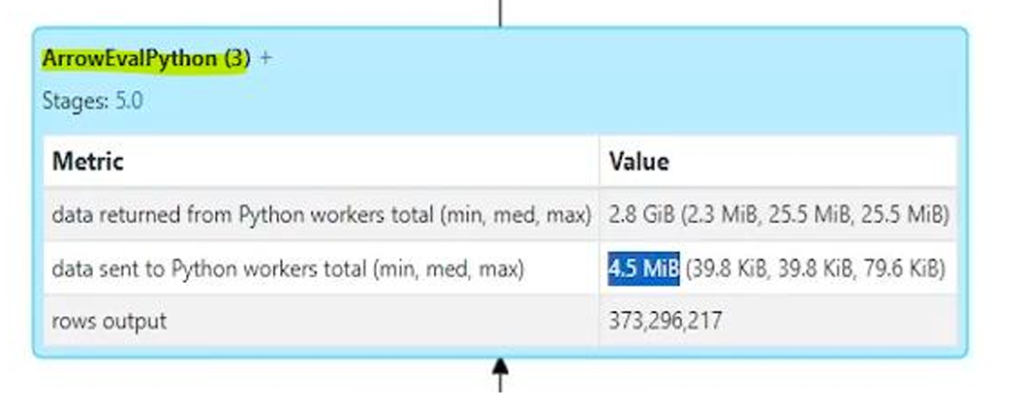
After the change, the Spark UI shows ArrowEvalPython instead of BatchEvalPython:
ArrowEvalPython: the same 373,296,217 rows, but 4.5 MiB sent instead of 12.5 GiB.
@udf
@pandas_udf
Node in the plan
BatchEvalPython
ArrowEvalPython
Serialization
cloudpickle, row by row
Arrow, batched
Data sent to Python
12.5 GiB
4.5 MiB
Data returned
4.9 GiB
2.8 GiB
Rows processed
373,296,217
373,296,217
Same rows in, same rows out, 12.5 GiB down to 4.5 MiB. Most of that 12.5 GiB was never your data — it was per-record serialization overhead repeated 373 million times.
Solution 2: avoid the UDF entirely
@pandas_udf reduces serialization. A built-in function removes it completely.
The example above just split a string and took the second element. Spark can already do that:
from pyspark.sql.functions import split, element_atdf = df.withColumn("type", element_at(split("description", ","), 2))
split and element_at are operations the JVM already knows, so no Python runtime is created and no serialization happens. The plan shows neither BatchEvalPython nor ArrowEvalPython.
There is a second benefit: Spark’s optimiser can see inside a built-in function and rearrange the query around it. It cannot see inside any UDF, including @pandas_udf.
Before writing a UDF, check pyspark.sql.functions. String handling, dates, JSON, regular expressions, conditional logic, arrays, maps, hashing and aggregation are all built in.
Solution 3: use Scala or Java UDFs
Scala and Java UDFs execute natively on the JVM, so no serialization or deserialization is needed at all.
They also benefit from Spark’s internal optimizations.
The trade-off is maintaining JVM code alongside your Python codebase.
If your team is comfortable with Scala or Java, this is the fastest option of all for custom logic.
The three options compared
Approach
Serialization
Optimiser can see it
Best
Built-in Spark functions
None
✅ Yes
Good
@pandas_udf
Arrow, batched
❌ No
Last resort
@udf
cloudpickle, row by row
❌ No
Tuning the batch size
When you do need @pandas_udf, you can control how many rows travel together:
# Rows per Arrow batch (default 10000)spark.conf.get("spark.sql.execution.arrow.maxRecordsPerBatch")spark.conf.set("spark.sql.execution.arrow.maxRecordsPerBatch", "20000")
Larger batches mean fewer transfers and less overhead.
Larger batches also need more memory in the Python worker.
That Python memory sits outside the JVM heap, so executor memory settings do not control it. If Python workers crash on wide tables, lower this value rather than resizing the cluster.
Quick reference
Question
Answer
What is data serialization?
Converting data so it can be stored, sent over a network, or moved between processes
When does it happen in PySpark?
Only when a Python UDF forces data out of the JVM into a Python runtime
How do I detect it?
BatchEvalPython in the SQL / DataFrame tab
How bad is it?
Click that node and read “data sent to Python workers”
Quick fix
Use @pandas_udf instead of @udf
Best fix
Use a built-in function — no serialization at all
Did it work?
The node becomes ArrowEvalPython, or disappears
Summary
Spark runs on the JVM and keeps your data in JVM heap memory.
Normal PySpark operations are translated into JVM operations, so no data reaches Python.
A Python UDF cannot be translated, so Spark creates a Python runtime on the executor and serializes data to it — one record at a time.
Spark marks this in the query plan as BatchEvalPython.
@pandas_udf switches to Arrow serialization and batch processing, shown as ArrowEvalPython. In the job above that reduced data sent from 12.5 GiB to 4.5 MiB.
A built-in Spark function removes the serialization entirely, and is always the first thing to check for.
Converting data into a format that can be saved to disk, sent over a network, or transferred between processes. In PySpark the costly case is the third one: moving data from the Scala JVM process into a Python process so a Python UDF can run on it, then converting the result back.
When does PySpark need to serialize data?
The JVM-to-Python serialization only happens when you use a Python UDF. Normal DataFrame operations like filter, groupBy and withColumn are translated into JVM operations, so the data never leaves the JVM heap and nothing is serialized.
What is BatchEvalPython in the Spark UI?
The node Spark adds to the query plan when a Python UDF runs. Despite the name, it processes one record at a time — each is serialized with cloudpickle, sent to a Python worker, processed, and sent back. Click it and read “data sent to Python workers” to see the cost.
What is the difference between udf and pandas_udf?
@udf serializes with cloudpickle one record at a time and calls your function once per record. @pandas_udf serializes with Apache Arrow in batches and hands your function a pandas Series to process all at once. In the example above, the same job sent 12.5 GiB with @udf and 4.5 MiB with @pandas_udf.
Why is my Spark stage slow with no shuffle and no spill?
Because the cost is inside the task, not in moving data between machines. Serialization moves data between two processes on the same machine, which shuffle metrics do not count; memory is never the limit so nothing spills; and every task pays equally so nothing looks skewed. Check the SQL / DataFrame tab for BatchEvalPython.
Are Scala UDFs faster than Python UDFs?
Yes. Scala and Java UDFs execute natively on the JVM, so no serialization or deserialization is required at all, and they benefit from Spark’s internal optimizations. The trade-off is maintaining JVM code alongside your Python codebase.
Do I need to install Apache Arrow to use pandas_udf?
PyArrow is required, and it comes preinstalled in Databricks, Microsoft Fabric and most managed Spark environments. On a self-managed cluster you may need to install pyarrow on every node, not just the driver.
My Python workers keep crashing. Should I add more executor memory?
Usually not. Python worker memory sits outside the JVM heap, so executor memory settings do not govern it. With @pandas_udf each worker holds a full batch at once, which adds up on wide tables. Lower spark.sql.execution.arrow.maxRecordsPerBatch from its default of 10000 first.